

Reply to a Comment
This feature lets you engage in collaborative discussions directly within your content entries. It addresses feedback, clarifies doubts, or continues conversations, ensuring smoother content reviews and updates.
To reply to a comment, log in to your Contentstack account, and perform the following steps:
- Go to your stack and click the “Entries” icon or use the shortcut key “E” (for both Windows and Mac users).
Open an entry with comments, click the “Comment” icon next to the relevant field, and enter your comments in the textbox.
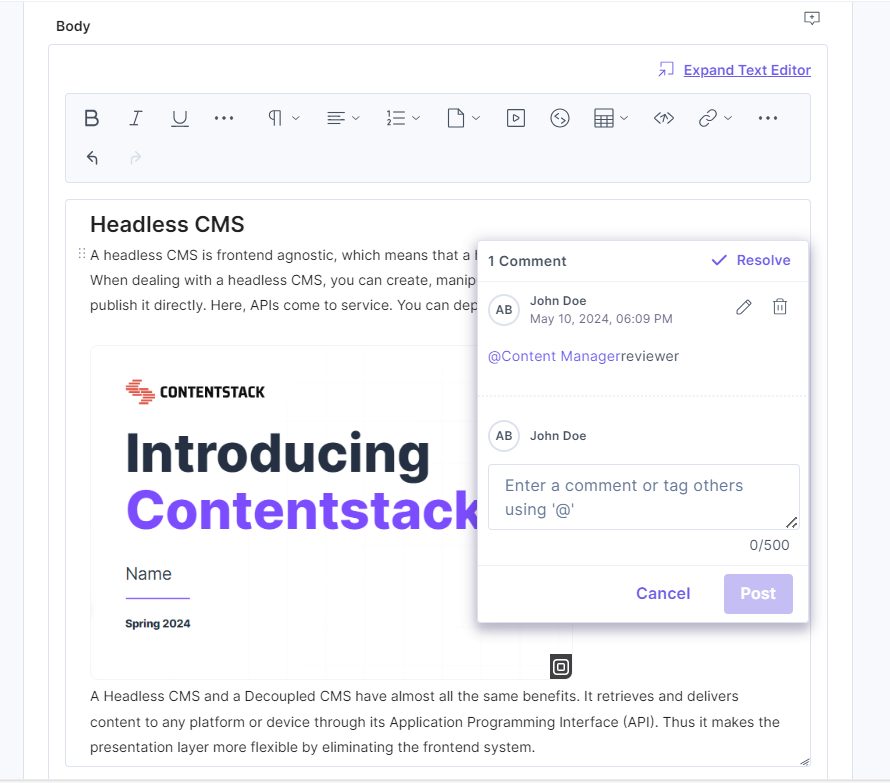
Note: The maximum length of a comment is 500 characters.
- Click Post to reply to a comment.
Additional Resource: Refer to our JSON RTE comments document to manage comments within the JSON Rich Text Editor.
Was this article helpful?
More articles in "Manage Entry Comments"
