

Add a Comment
Adding comments to your Contentstack entries improves team collaboration by enabling you to share feedback, ask questions, or provide instructions directly within the content. Whether it is a simple text field or a complex JSON Rich Text Editor (RTE), comments streamline communication and keep everyone aligned.
To add a comment, log in to your Contentstack account, and perform the following steps:
- Go to your stack and click the “Entries” icon or use the shortcut key “E” (for both Windows and Mac users).
- Open an entry and click the corresponding “Add comment” icon for the field where you want to add a comment.
Note: In Group, Global, and Modular Block fields, comments can only be added to subfields, not the parent field. Additionally, the “Add comment” icon appears only after you have entered some text and saved the entry.
- Add your comment in the textbox that appears.
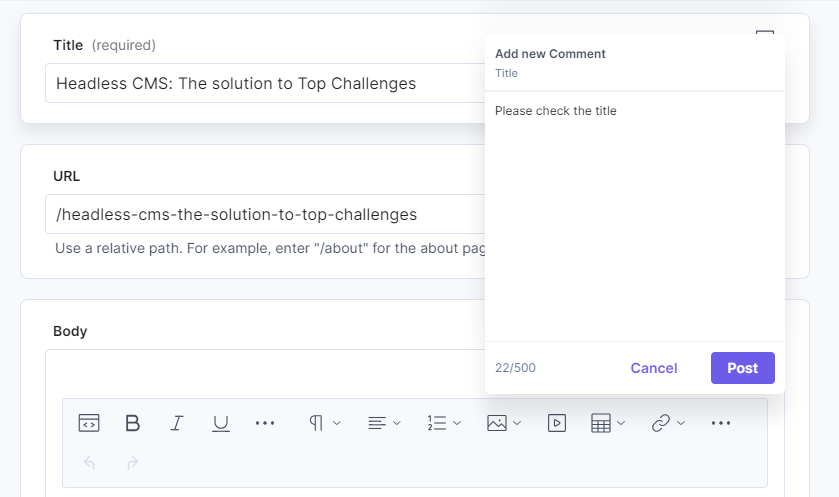
Note: The maximum length of a comment is 500 characters.
- Click Post to save your comment.
Adding your first comment to a field starts a discussion. You can continue the conversation by adding more comments, resolving them, or managing the discussion. Learn more about Discussions.
Additional Resource: Refer to our JSON RTE comments document for step-by-step instructions on adding comments in the JSON Rich Text Editor.
More articles in "Manage Entry Comments"
