

Server Side Rendering (SSR) Technical Implementation Architecture
The Server Side Rendering (SSR) approach is particularly recommended for businesses with an existing SSR setup and who may not be able to adopt the additional infrastructure required for SSR + Edge. While SSR + Edge remains the ideal choice for high-traffic environments and real-time personalization, SSR serves as the second-best option, delivering strong SEO, dynamic content capabilities, and efficient personalization without the need for edge infrastructure.
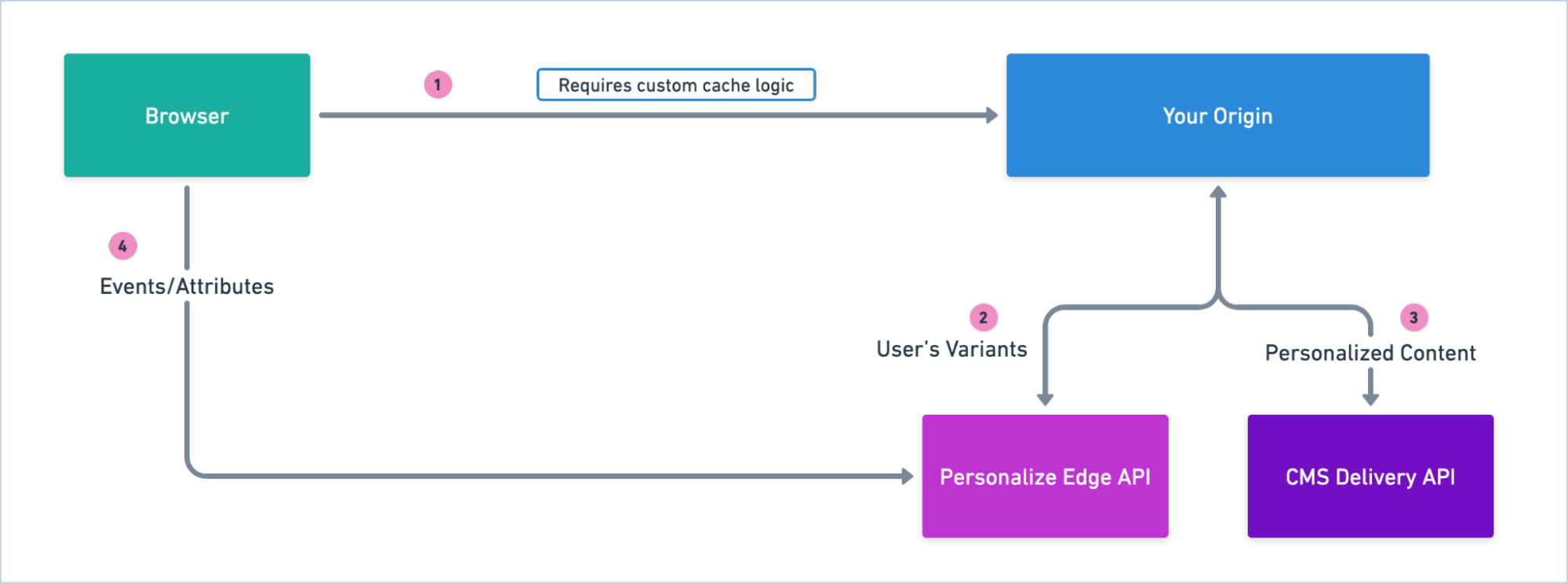
Introduction
Contentstack Personalize offers flexibility and freedom in implementation, by being API-first and tech-stack agnostic. As long as you can make API calls to Contentstack, you can use Personalize. This document outlines the SSR architecture, focusing on how it handles personalized content delivery using both Personalize Edge API and Contentstack Delivery API.
The SSR architecture is a balanced choice for businesses seeking dynamic personalization alongside strong SEO performance and efficient content delivery when adopting Edge infrastructure is not feasible. By managing all personalization from the origin server, this approach makes it particularly well-suited for businesses with moderate traffic, offering a simpler yet effective solution for delivering dynamic, personalized user experiences.
Note: While SSR is an effective solution for personalized content delivery, SSR + Edge offers additional benefits for all businesses. By retrieving visitor’s variants at the edge, it enables real-time personalization and allows easier caching of personalized content. Additionally, it reduces latency and eases the load on the origin server, ensuring faster response times and improved scalability. For more details on this approach, refer to the SSR + Edge documentation.
Note: This document provides a high-level overview. For details on how to use Personalize and other best practices, refer to Contentstack's official documentation and consult with our support team.
Benefits of the Architecture
This architecture offers multiple benefits. Below we have listed some of the important ones:
Dynamic Personalization
This architecture ensures that the Personalize Edge API is responsible for making personalization decisions about which variants are to be shown to a user. When using Personalize Edge SDK, personalizations will be updated on every new session or refresh using the reset(). This allows displaying the latest personalized content to the user based on updated personalization context. For instance, if a user attribute is updated just before visiting a page, it will affect the content displayed.
However, achieving true real-time personalization requires careful implementation. Since caching mechanisms like the custom cache layer or CDN cache may store personalized pages, it’s important to ensure the cache is revalidated after a set period of time. These rules define how long personalized content remains valid in the cache before it needs to be refreshed from the origin server. Without such measures, the content served may be stale and not reflect the latest active variants for the user.
This setup ensures that while content is personalized and cached for the user, there is a system in place to periodically refresh cached variants, balancing performance with dynamic personalization needs.
Flicker-free Personalization
Traditional personalization implementations work entirely in the browser by injecting a JavaScript script in the front-end code. The non-personalized webpage loads along with the script, which then gathers the context about the user, makes API calls, and then replaces or injects personalized content directly into the HTML. This means that until the script completes its process, the user is seeing either non-personalized content or a loading screen. Once the appropriate personalized content is determined, it is then suddenly injected into the page, causing flickers as non-personalized content is abruptly replaced with personalized content.
However, with the SSR approach, this problem is eliminated. The page that initially loads in the user’s browser is already personalized, based on the latest available context about the user and the experiences defined by you. This provides the smoothest possible experience for users.
SEO Friendliness
As the website (with and without personalization) is server-side rendered, it generates fully rendered HTML pages making it easier for search engines to crawl and index the pages of your website.
Ease of Integration
This SSR architecture requires minimal code changes on the front-end, with most of the personalization logic managed server-side. For each request, the server retrieves user-specific variants and delivers them as part of the CMS content, allowing you to maintain a single content-rendering approach for both personalized and base content. Event tracking may require minor client-side adjustments but can also be managed through Google Tag Manager or similar tools.
Trade-Offs
Scalability
With SSR, personalization decisions are requested from the origin server. This means every time you wish to display updated personalized content to your user, the requests have to be served from the origin server. This may lead to increased traffic to your origin. To scale effectively, this architecture can use CDN caching for static or less frequently used personalized content. However, without edge distribution, heavy loads on the origin server should be carefully managed to avoid potential performance impacts and ensure fast content delivery.
Adding your Own Cache Layer
In an SSR architecture with basic CDN caching, the CDN stores rendered pages to reduce the load on the origin server, ensuring fast response times for repeated requests.
When adding personalization, the request will include user-specific variants, ensuring each user receives content tailored to them. However, with basic CDN caching, the same page is stored for all users, meaning personalized content is not considered.
To address this, you need to implement a custom cache layer that can manage personalized content. This layer should differentiate between user-specific variants by including variant data in the cache key.
This change impacts your current caching logic because different users will need to see different content. The cache layer must store pages based on unique variants, and you’ll need to update the cache configuration to support these dynamic, variant-specific pages. This ensures personalized content is correctly stored and served.
To update the caching logic, adjust how the cache key is generated. Instead of caching a single version of the page, the cache key should incorporate user-specific attributes, such as user ID or session data. This creates distinct cache entries for different user variants, ensuring that each user sees their personalized content. Additionally, you’ll need to configure time-to-live (TTL) values for personalized content to keep it fresh, while also optimizing cache hit rates.
When implementing the new caching logic, several important considerations should be kept in mind:
- Cache Granularity: Ensure that cache keys are unique enough to distinguish between user variants but avoid excessive cache fragmentation.
- Cache Expiration (TTL): Set appropriate TTL values for personalized content. A TTL that's too long may serve outdated content, while one that's too short may decrease cache efficiency. Striking the right balance is crucial.
- Cache Invalidation: Implement cache invalidation logic so that when personalization rules or user data change, outdated variants are removed from the cache and don't get served.
- Cache Size: Be mindful of cache storage limits, especially with many unique variants, to avoid storage issues or degraded performance.
By carefully managing these aspects, your caching logic will effectively support personalized content while maintaining optimal performance.
Diving Deeper into the Architecture
The following are the key components of this implementation architecture:
- Your user’s browser: A user accesses your website using a browser on their device. The browser is responsible for making requests to your domain to ask for your website, and then rendering the received page.
- Your SSR Origin: The application server dynamically generates HTML pages with personalized or non-personalized content created in the CMS. The server is responsible for extracting user information from the incoming request and using it to interact with the Personalize Edge API. By passing relevant user context to the Edge API, it retrieves the appropriate variant information, which is then used to fetch corresponding entries from the CDA. This component is entirely responsible for communicating with both Contentstack Personalize and CDA to deliver personalized web pages tailored to individual users.
- Contentstack Personalize Edge API and SDK: The Personalize Edge API is the decision engine that powers real-time personalization. Given the user UID and other context such as the page URL, referrer, etc., it responds with the UIDs of each experience’s variant that the visitor should see. Read more about the Edge API here.
We recommend using the JavaScript Edge SDK, which handles communicating with the Edge API and providing it with the required context on your behalf.
- Contentstack CMS Content Delivery API (CDA): Contentstack's CDA delivers the content (articles, products, etc.) — both base and personalized variants. Your SSR process combines this content with your page layout or components to generate the final personalized page that will be shown to the user.
- Your cache layer: This layer ensures that personalized content is efficiently delivered to the user. It helps reduce the load on the origin server, providing faster content delivery.
Request Flows
Let’s discuss how the components in the architecture work—in sequence—to deliver a personalized experience to your visitors when they visit your website.
When requesting a personalized variant without custom cache logic
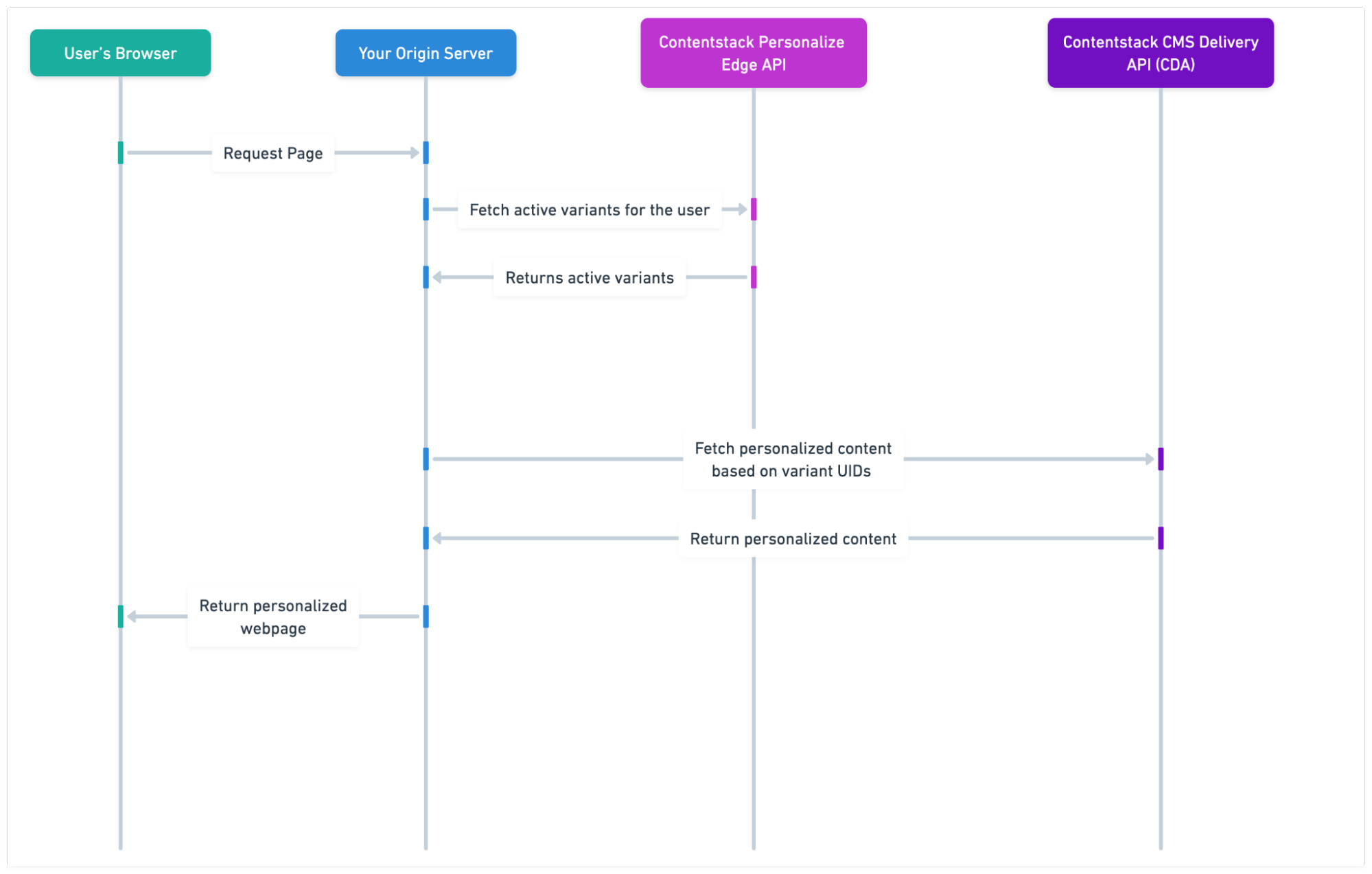
The diagram visually represents this flow:
- The user's request is first received by your origin server, which asks the Personalize Edge API for the user’s variants.
- Upon receiving the variants, your origin reads the variants and retrieves personalized content based on the same. It then generates the personalized page and returns it.
- The response is returned to the user.
- Finally, a personalized page is then displayed to the user.
- The next time any user requests the same page, the request still goes to the origin server. For caching capabilities, custom cache logic must be implemented to serve the previously generated page without needing to generate a new one at the origin. This custom cache logic can reduce server load and improve response times by returning a cached version of the personalized page whenever possible.
When requesting a personalized variant with custom cache logic
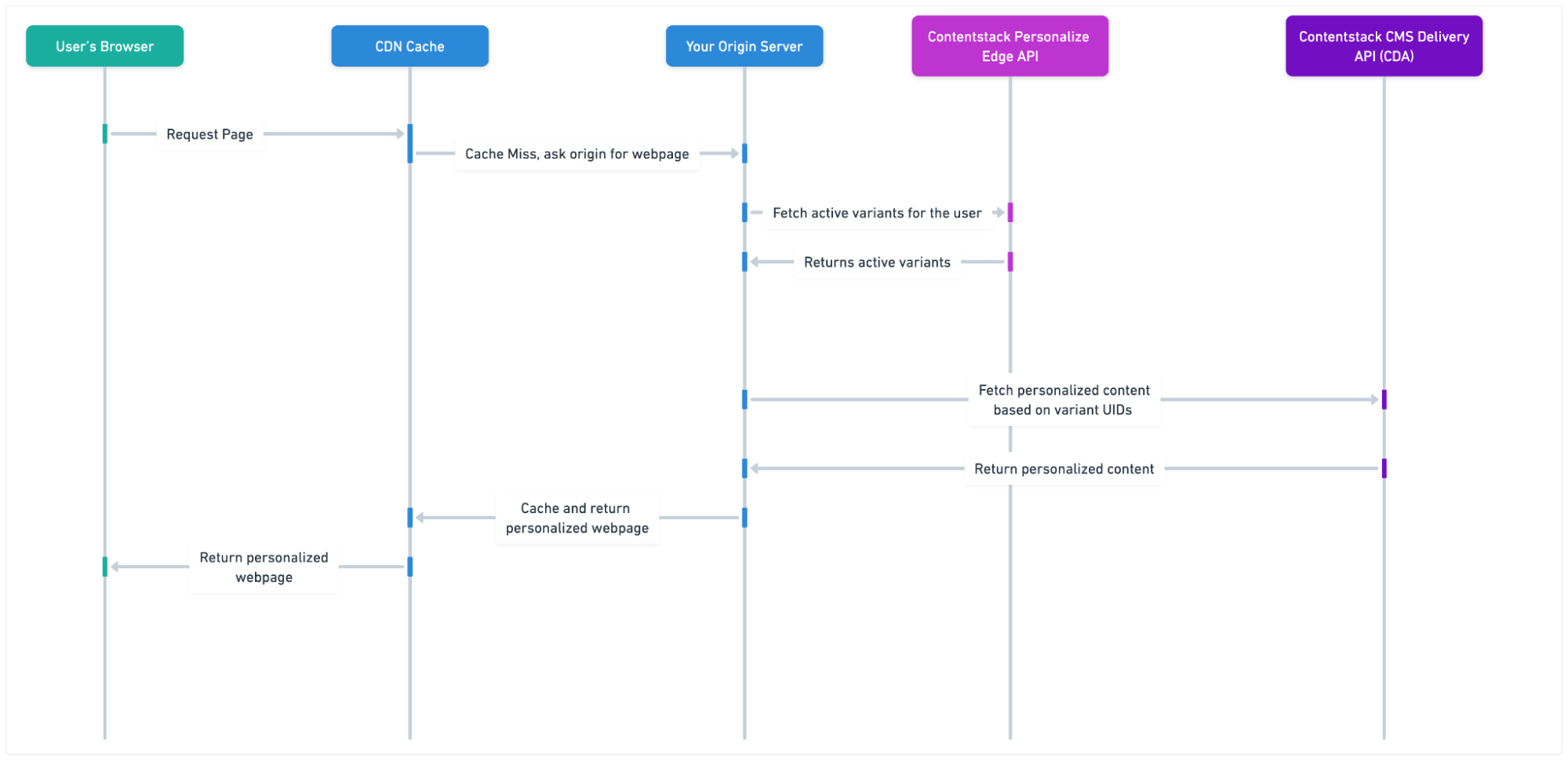
The diagram visually represents this flow:
- The user's request is first received by your CDN cache layer. If the requested webpage is not present on the cache layer, it forwards the request to your origin.
- The origin then asks the Personalize Edge API for the user’s variants.
- Upon receiving the variants, your origin reads the variants and retrieves personalized content based on the same. It then generates the personalized page and returns it.
- The CDN now caches the personalized web page against the request URL and the applied variants for future use.
- The response is returned to the user.
- Finally, a personalized page is then displayed to the user.
- The next time any user requests the same page and is supposed to be shown the same variants, the previously cached web page is immediately served to the user without needing to generate it anew at your origin.
Note: The cached web pages might contain older or out-of-date variant content, as the Personalize Edge API was called only once, from your origin. To ensure visitors see the most up-to-date personalized content, it is essential to implement some cache revalidation logic.
Things to Consider
- Tracking Analytics: Now that the rendering of personalized content is taken care of, you need to track how your variants are performing. For this, we need to trigger impression and conversion events from the browser, when the user sees personalized content, and when they perform an action that is a conversion event. This can be done by calling the Edge SDK’s triggerImpressions and triggerEvent methods wherever applicable in your frontend code, but this can get cumbersome over time. Alternatively, these could be controlled via Google Tag Manager.
- User Data Management: Ensure secure and compliant handling of user data for personalization. Avoid storing any personally identifiable information with Contentstack Personalize to aid in making personalization decisions.
- Fallbacks and Error Handling: Design robust fallback mechanisms, with error handling in all the appropriate places to ensure a seamless user experience. Should any piece of the system not work as expected, it’s important to be able to fall back to showing the users the default content, instead of an imprecise or incomplete personalized experience.
- Real-time Personalization & Scalability with Edge: While the current SSR architecture effectively handles personalization, transitioning to an SSR + Edge architecture offers significant benefits, such as real-time personalization, reduced load on the origin server, faster delivery through globally distributed edge functions, and better utilization of CDN caching for personalized content. For more details, refer to the SSR + Edge Routing Technical Implementation Architecture.
More articles in "Technical Implementation Architecture for Personalize"
