

Edit a Custom Attribute
In Contentstack, custom attributes within a Personalize project can be edited to maintain accurate audience segmentation. This is important to ensure that your targeting remains precise.
This guide provides a step-by-step walkthrough for editing custom attributes in Contentstack Personalize.
Prerequisites
- Contentstack account
- Access to the Contentstack Organization that has Personalize enabled
- Access to a project in Personalize
Note: Users with Owner and Member access to a Personalize project can edit existing custom attributes.
Steps for Execution
Note: For this guide, we have assumed that you have already created a Personalize project. If not, please follow this guide and create a project in Personalize.
To edit an existing custom attribute, log in to your Contentstack account and perform the following steps:
- In the top navigation bar, click the App Switcher icon and then click Personalize.
- You will be redirected to the Personalize Projects landing page. Click the project for which you want to edit a custom attribute.
- Click the Attributes tab.
- You can edit an existing custom attribute by clicking your attribute to open it or by clicking the corresponding vertical ellipses under the Actions section and selecting Edit.

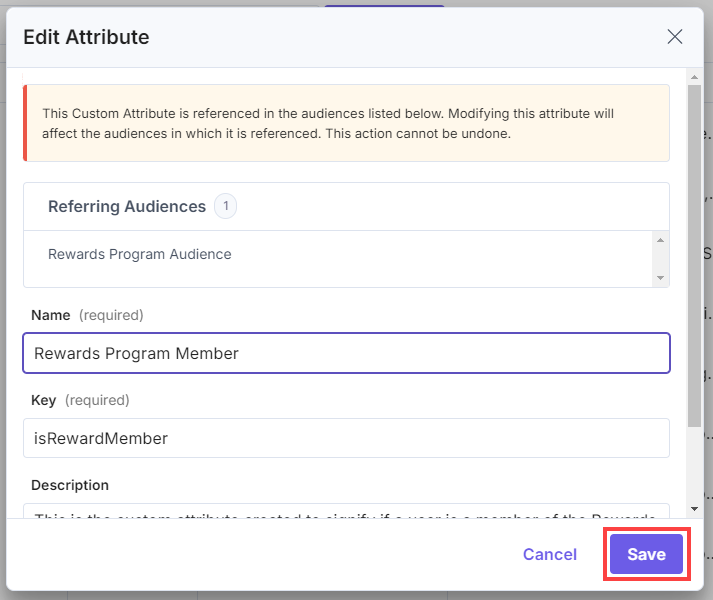
- In the Edit Attribute modal, make the necessary changes to the Name, Key, or Description fields.
- Once you have done that, click the Save button to apply the changes.
Warning: Editing a custom attribute (especially the key) that is referenced in an Audience or Experience might affect your audience segmentation and personalized experiences. Ensure you update any references to the modified attribute accordingly. You must reset the Attribute Key used in the Set and Update User Attributes request via the Personalize Edge API and the set method via the Personalize Edge SDK.
You will get a success message after the Custom Attribute has been successfully edited.
Additional Resource: You can use the Personalize Management API to create, edit, delete, and retrieve all existing attributes.
More articles in "Working with Attributes"
