

Create a Personalize Project
Creating a project in Contentstack Personalize allows you to manage and execute content personalization for your audience. Once the project is set up, you can link it to an existing stack, allowing you to deliver personalized content across multiple channels.
This guide provides step-by-step instructions on creating a Personalize project and linking it to a stack.
Prerequisites
- Contentstack account
- Personalize-enabled Organization with Owner or Admin permissions
- An existing stack to link to the Personalize project
What You Will Learn
How to create a new project in Personalize.
How to link an existing stack to the project.
Steps for Execution
To create a new project in Personalize, log in to your Contentstack account and perform the following steps:
- In the top navigation bar, click the App Switcher icon and then click Personalize.
- You will be redirected to the Personalize Projects landing page. Click the + New Personalize Project button.
- In the New Personalize Project modal, provide the following details:
- Name (required): Enter a name for your project.
- Description (optional): Add a brief description of the project.
- From the Select Stack drop-down, select an existing stack to connect it to your Personalize project to link the stack in which you have the personalized content, entry variants, etc.
Note: You can choose to connect to an existing stack later via the Personalize Project Settings > General > Stack Connection section.
- After filling out the information, click the Create Project button.
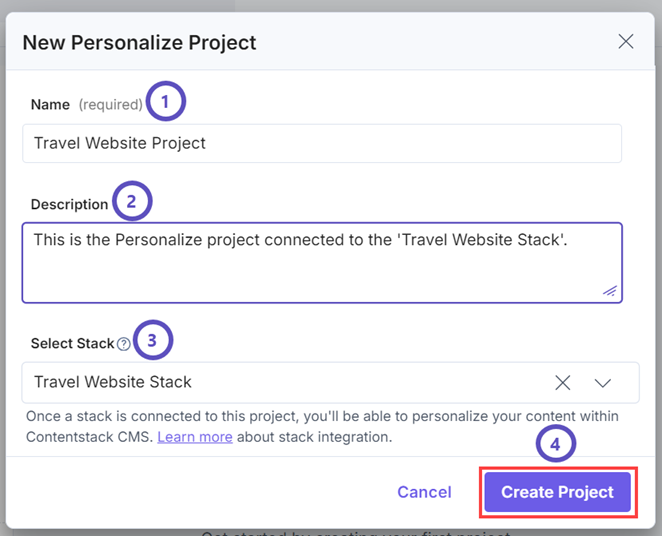
This creates your new Personalize project. Your new project will now appear on the Personalize Projects landing page.
Next Steps
You can now create personalized experiences within your project and link the content types of the existing stack via the CMS with your Personalize project to create and manage Entry Variants.
More articles in "Working with Projects"
