

Edit an Audience
Contentstack Personalize empowers you to create tailored content for specific audiences. But as your user base evolves, so should your targeting. Regularly editing your audiences ensures that your content reaches the right people at the right time, maximizing the impact of your personalization efforts.
This guide provides a step-by-step walkthrough for editing audiences in Contentstack Personalize. Whether you're refining existing segments or adapting to new user behaviors, you'll learn how to keep your targeting strategies effective.
Prerequisites
- Contentstack account
- Personalize-enabled Organization with permissions
Note: Users with Owner and Member access to a Personalize project can edit existing audiences.
- Access to Personalize project
Note: We assumed that you have already created a Personalize project. If not, follow this guide to create a project in Personalize.
- Audience created in your Personalize project
What You Will Learn
How to open an existing audience for editing in a Personalize project.
How to change an audience's Name, Description, Rules, and Groups.
What to check before editing an audience that is referenced in an experience.
Steps for Execution
To edit an existing audience, log in to your Contentstack account and perform the following steps:
- In the top navigation bar, click the App Switcher icon and then click Personalize.
- You will be redirected to the Personalize Projects landing page. Click the project for which you want to edit an audience.
- Click the Audiences tab.
- You can edit an existing audience by clicking your audience to open it or by clicking the corresponding vertical ellipses under Actions and selecting Edit.
- On the Audience page, make the necessary changes to the Name, Description, Rules or Groups.
- Once you have done that, click the Save button to apply the changes.


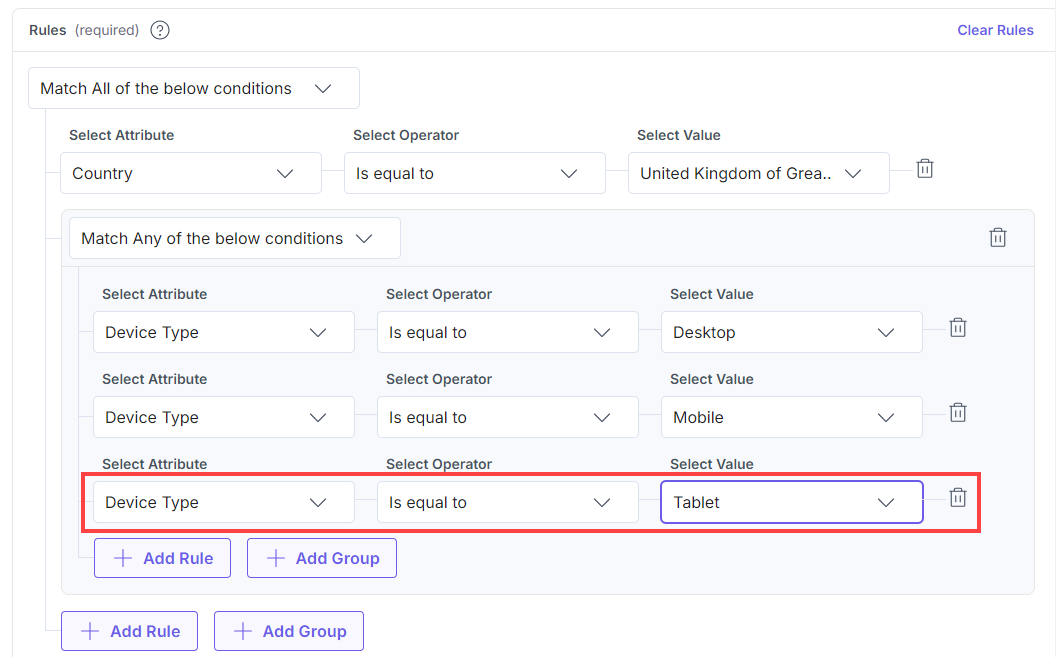
You will get a success message after the audience has been successfully updated.
Warning: Editing an audience that is referenced in an experience might affect your active segmentation, A/B tests, and analytics. Ensure you update any references to the modified audience accordingly.
Related Resource
More articles in "Working with Audiences"
