

Create a Custom Attribute
Custom attributes in Contentstack Personalize empower you to fine-tune your audience targeting. This guide provides a clear, step-by-step walkthrough for creating these attributes, enhancing your ability to deliver personalized content experiences.
Prerequisites
- Contentstack account
- Personalize-enabled Organization with permissions
- Access to Personalize project
Note: We assumed that you have already created a Personalize project. If not, follow this guide to create a project in Personalize.
What You Will Learn
-
How to create a custom attribute in a Personalize project.
-
How to set a name, key, and optional description for the attribute.
-
Who can create, edit, and delete custom attributes.
Steps for Execution
Suppose you want to create a custom attribute for users who are a member of a Loyalty Program on your website. To create the custom attribute, log in to your Contentstack account and perform the following steps:
- In the top navigation bar, click the App Switcher icon and then click Personalize.
- You will be redirected to the Personalize Projects landing page. Click the project for which you want to create a custom attribute.
- Click the Attributes tab and then click the + New Attribute button.
- In the New Attribute modal, provide a suitable Name and Key for the attribute along with an optional Description.
- Once you have done that, click the Create button.
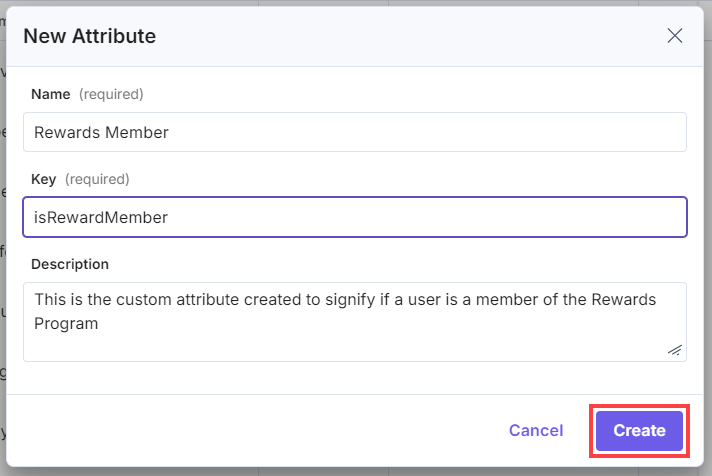
This creates a new custom attribute in your Personalize project. You can now add the custom attribute to an audience.
Note:
- Users with Owner and Member access to a Personalize project can create new custom attributes, and edit/delete existing custom attributes.
- The default number of Custom Attributes allowed per project is 100.
Next Steps
After creating a custom attribute in your project, the data needs to be collected for the attribute. This can be done using the Personalize Edge SDK or the Personalize Edge API. You can also use tools like Google Tag Manager and Customer Data Platform integrations for collecting the data.
Related Resource
More articles in "Working with Attributes"
