

Cache Priming
Cache Priming is a performance optimization feature in Contentstack Launch that improves website speed by preloading critical content into the CDN cache before user access. This proactive caching reduces latency, minimizes server load, and ensures seamless content delivery.
Ideal for high-traffic websites, e-commerce platforms, and content-heavy applications, Cache Priming enhances the user experience by accelerating page load times and optimizing resource efficiency.
How Cache Priming Works
Cache Priming preloads pages and content onto the CDN cache during deployment, ensuring the latest versions are immediately available without requiring an initial request. By eliminating delays caused by backend processing or stale cache states, it consistently delivers fresh, optimized experiences.
Important: Cache Priming only works for routes whose responses are cacheable at the CDN layer. If a route's Cache-Control header includes no-store, no-cache, or must-revalidate, these directives instruct the CDN to skip storing the response and fetch directly from origin on every request. As a result, priming requests still run and appear in your logs, but no content is cached, and every request continues to be served directly from origin.
Ensure your routes return cacheable headers such as s-maxage=60 before relying on cache priming. See the Caching Guide for Contentstack Launch for details.
Overcoming Performance Challenges with Cache Priming
Modern front-end architectures rely on Server-Side Rendering (SSR), Incremental Static Regeneration (ISR), and Dynamic Static Generation (DSG) to serve dynamic content efficiently. However, these techniques can introduce longer build times and delays for first-time visitors. Cache Priming mitigates these issues by preloading critical content during deployment. By decoupling the build process from the user experience, it ensures fast access to pre-cached content, reducing wait times and improving efficiency, especially during peak traffic periods.
Key Benefits of Cache Priming
- Optimized Performance for High-Traffic Websites: Ensures fast loading of critical pages, preventing server overload and downtime during traffic surges.
- Seamless E-Commerce Experiences: Preloads promotional and product pages, enabling smooth navigation during major sales events.
- Enhanced Performance for Content-Heavy Sites: Reduces latency and improves access for media, news, and entertainment platforms.
- Global Content Delivery: Minimizes geographic latency, providing a consistent experience for users worldwide.
- Improved User Experience: Pre-caches high-priority content, ensuring instant access for both new and returning visitors.
- Increased Cache Efficiency: Enhances cache hit ratios, optimizing performance and reducing unnecessary origin requests.
- Advanced Cache Management: Provides better visibility and control over the caching layer, enabling technical teams to monitor and optimize performance effectively.
Identifying Cache Priming Traffic
You can identify cache priming requests by their unique User-Agent header, allowing you to distinguish them from regular user traffic in your logs and monitoring systems.
User-Agent Header
All cache priming requests include the following User-Agent:
User-Agent: Contentstack-Launch/CachePrimingAgent/1.0
Use this value to filter cache priming traffic in your server logs or observability platform.
Steps for Execution
Follow the steps below to configure and implement Cache Priming in Contentstack Launch:
Add URLs to launch.json
- Open your source code folder.
- Edit the launch.json file inside the folder by adding the URLs you want to prime. For optimal performance, ensure these URLs are unique and frequently accessed.
Example for launch.json Configuration:
{
  "cache": {
    "cachePriming": {
      "urls": [
        "/delay",
        "/blog.html",
        "/new-page.html"
      ]
    }
  }
}
Note: Ensure the URLs you add return cacheable Cache-Control headers. Adding a non-cacheable route produces no performance benefit.
Deploy your Project in Launch
Choose one of the following methods to deploy your project in Launch:
Enable Cache Priming in your Project
Once the project is deployed, follow the steps below:
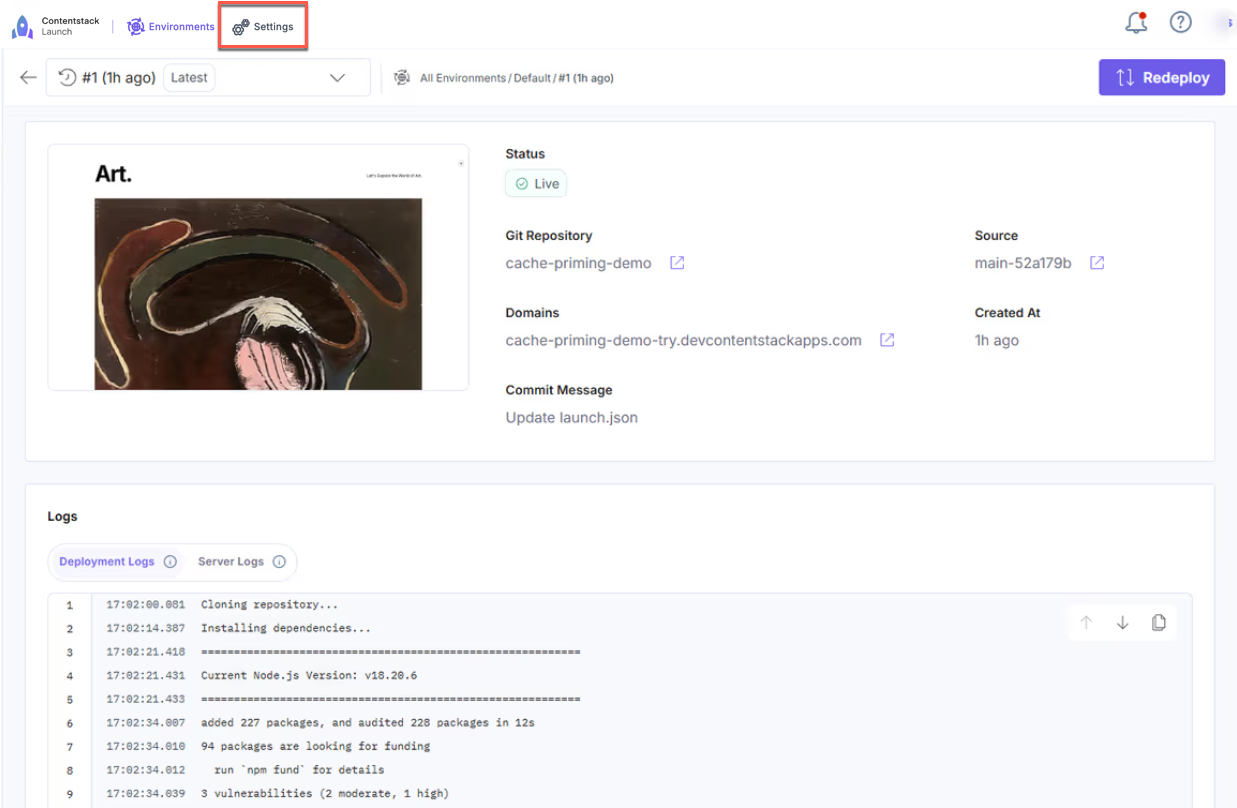
- Click the Settings icon in the top panel.
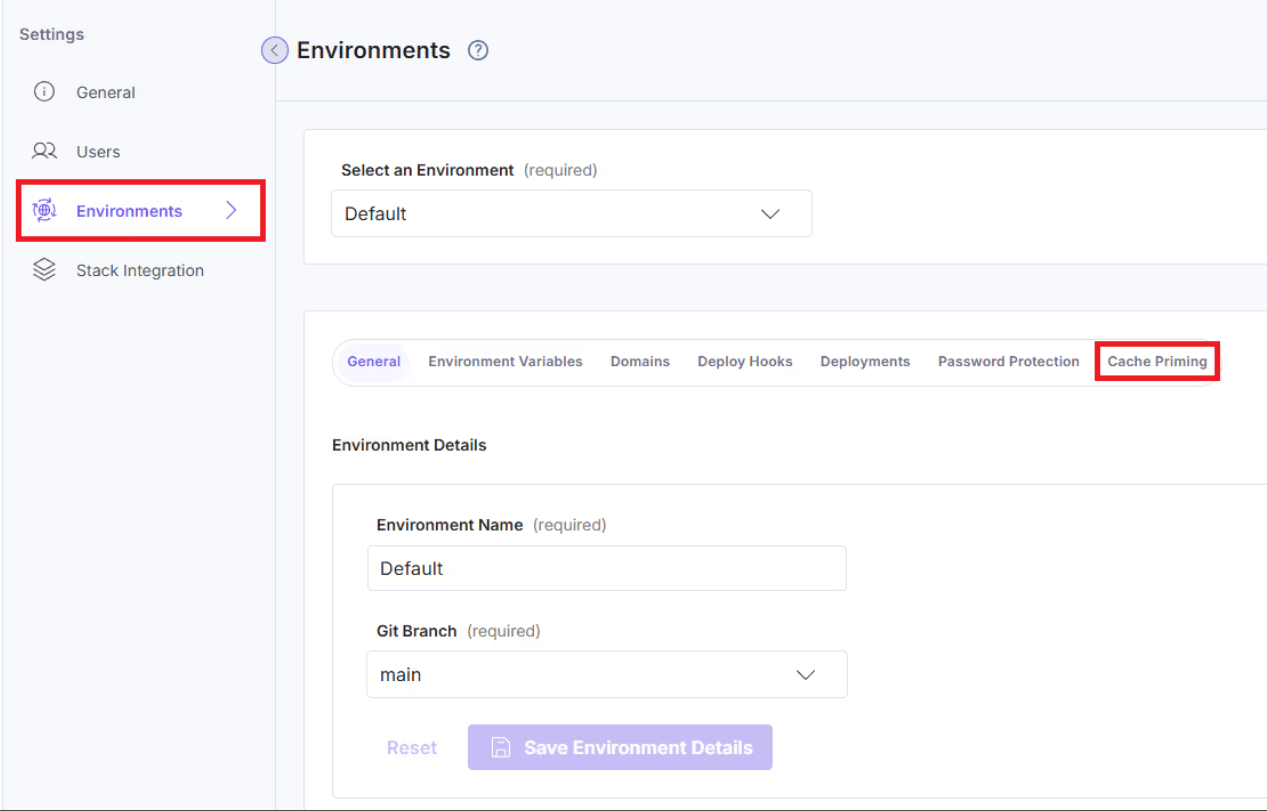
- Navigate to Environments > Cache Priming.
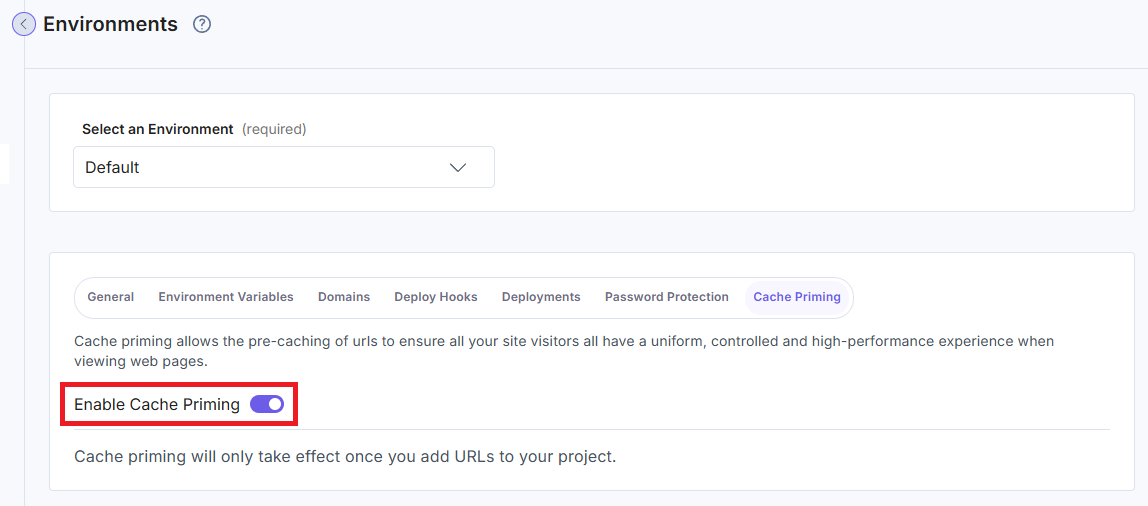
- Click the Enable Cache Priming toggle to enable priming.
- Click the Settings icon in the top panel.
Note: Cache Priming takes effect from the next deployment of your project.
By leveraging Cache Priming, websites can achieve superior speed, reliability, and scalability, ensuring a seamless experience for users across all regions.
Limitations
While Cache Priming helps reduce cold-start latency by preloading key routes into the cache, there are a few important limitations to consider:
- Only Relative Paths Are Supported:
The launch.json configuration must use relative paths. Fully qualified URLs are not supported.
For example, use /home instead of https://example.com/home. - No Regex or Wildcards:
The configuration does not support regular expressions, wildcard characters (*), or glob patterns. You must list each path explicitly. - Incompatible with IP-restricted Sites:
Cache priming requests originate from platform-managed IP addresses and include the User-Agent Contentstack-Launch/CachePrimingAgent/1.0. If your site enforces IP whitelisting, VPN access, or firewall restrictions, your firewall or WAF may block these requests unless you allow the necessary IPs.
If your WAF or proxy filters requests based on headers, ensure it does not block requests containing this User-Agent. - Traffic Identification:
You can identify cache priming requests by the User-Agent header Contentstack-Launch/CachePrimingAgent/1.0. Use this to filter cache priming traffic in your logs or monitoring tools. Do not use this identifier for authentication or security decisions.
More articles in "Launch Features"
