

Copy a Global Field
Contentstack allows you to duplicate an existing Global field, enabling you to reuse its structure with minimal modifications instead of creating a new one from scratch.
To copy a Global field, log in to your Contentstack account and perform the following steps:
- Go to your stack where you want to copy a Global field.
- Click the Content Models icon in the left navigation panel and select Global Fields in the left panel.
- Locate the Global field you want to copy. Click the vertical ellipsis in the Actions column next to it and select Copy Global Field.
- The Copy Global Field modal appears with the name "Copy of {your_global_field_name}". Enter a suitable name and description. The UID is auto-generated, but you can update it as required.
Tip: Refer to the Restricted Keywords for UIDs to avoid using reserved keywords.
- Click Copy.
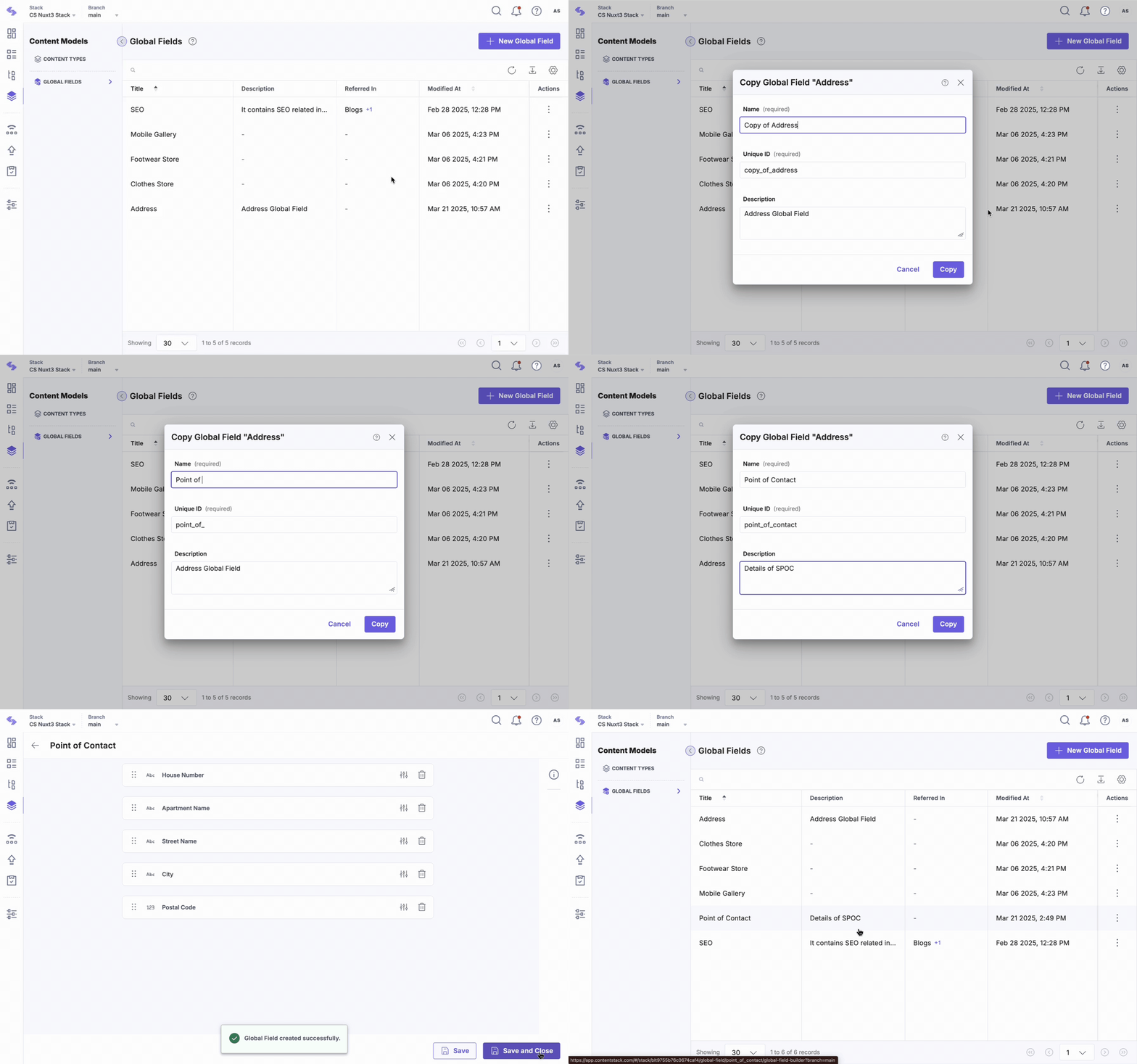
Once copied, the new Global field retains the original structure, allowing modifications without affecting the source field.
For Nested Global fields, the copied field will maintain its existing structure, including all nested components. You can modify these fields as needed without altering the original Global field.
By following these steps, you can efficiently manage and reuse Global fields in Contentstack, streamlining content modeling workflows.
More articles in "Work with Global Field"
