

Create a Node.js app using Contentstack DataSync
This step-by-step guide will help you to create a Node.js-based app that fetches data from your infrastructure. We will create a web page “about” in this tutorial from the data synced through Contentstack DataSync.
So, download the boilerplate code, configure it as required, and get started with the app.
Note: The boilerplate uses Filesystem as a database. You can change the storage if required.
Prerequisites
- Node.js version 20 or above
- Contentstack DataSync should be up and running
- Mongodb version 3.6 or above
Set up the Server
- Clone the boilerplate
Clone the boilerplate using the git clone command as follows:Once you download the boilerplate, you will see the following folder structure:git clone https://github.com/contentstack/datasync-nodejs-website-boilerplate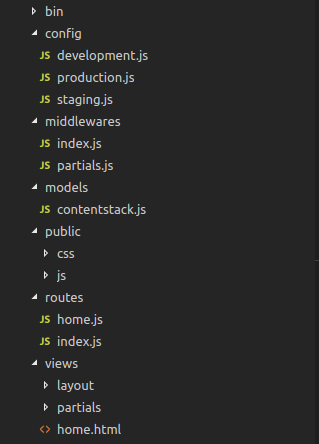
config: Holds configurations for different environments. When the app starts with environment variable NODE_ENV=development , the boilerplate picks the specified configuration i.e. development.js in our case.
middlewares: Contains middleware. We have added a middleware to load partials such as header, footer, etc. to make them available in every page.
models: Holds the Contentstack DataSync SDK initialization and exports Contentstack objects to query data.
public: Put all your static files inside this folder.
routes: All your routes in the application go here.
view: Contains templates for your pages — we have used the Nunjucks template engine. It also contains layouts for your pages and partials, such as header and footer. - Install dependencies
Open the command prompt, navigate to the project directory, and install npm dependencies by using the following command:npm install
- Edit the “development.js” file
By default, the app runs in the development environment. So go to the config folder, edit the development.js file, and specify details of your stack. Here is the sample configuration code for datasync-filesystem-sdk:You need to specify the path inside the baseDir parameter. This is the location from where your synced data will be fetched.const config = { sdk: 'datasync-filesystem-sdk', contentstack: { apikey: '', deliveryToken: '', }, locales: [ { code: 'en-us', relative_url_prefix: '/' }, { code: 'es-es', relative_url_prefix: '/es/' } ], contentStore: { baseDir: './_contents' }, assetStore: { baseDir: './_contents', }, port: 4000 } module.exports = config - Create an example web page “about”
Let's consider you are creating an 'about' web page. Import the 'about' content type and its entry from the schemaNentries folder to your stack. Also, import the content type and entries of header and footer to your stack.Additional Resource: To import data into Contentstack, refer to the Import an Entry and Import a Content type section.
- Create an “about” page
Inside the routes folder, create an about.js file, and copy-paste the following code in the file:Verify that route of the “about” page and the UID of the “about” content type is correct in the following line.const express = require('express'); const router = express.Router(); const Stack = require('../models/contentstack'); router.get('/about', (req, res, next) => { const contentTypeUID = 'about'; //Render the 'about.html' page as follows: Stack.contentType(contentTypeUID).entries() .find() .then(function success (result) { res.render('about.html', { about: result }) }).catch(next) }) module.exports = routerrouter.get('/about', (req, res, next) => { const contentTypeUID = 'about'; - Create an “about.html” template in the “views” folder
Go to the views folder, create an about.html file, and paste the following code in the file:{%extends "layout/parent.html" %} {%block main_body %} {% set entry= about.entries[0] %} <div> {# Your contact_us title will be rendered #} <h1>{{entry.title }}</h1> {#add your body here using {{ entry.field_name }} #} </div> {% endblock %} - Add your routes
Inside the routes folder, open the index.js file, and verify that the route for the “about” page is added correctly in the following code:module.exports = (app) => { app.use('/', require('../middlewares')) app.use('/', require('./about')) app.use('/', require('./home')) }
- Create an “about” page
- Clone the boilerplate
Start the server
Start the server with the following command:
npm start
Open the browser and check if the web page (about) you created is loading correctly by using the following address: localhost:4000/about
Boilerplate Config for MongoDB Datastore
If you want to use MongoDB as the database for storing data instead of Filesystem, you need to configure the MongoDB server and have it running.
- Edit the “development.js” file
Open the development.js file and replace the following line: - Restart your application
Once you restart the app, Contentstack will start using MongoDB as the app’s database.
sdk: 'datasync-filesystem-sdk',With this:
sdk: 'datasync-mongodb-sdk',Provide the URL and name of the mongoDB database by replacing:
contentStore: {
    baseDir: './_contents'
  },
With the following:
 contentStore: {
    url: 'mongodb://localhost:27017',
    dbName: 'contentstack-db'
  }
More articles
