

Client Side Rendering (CSR) with Static Site Generation (SSG) Technical Implementation Architecture
The Client Side Rendering with Static Site Generation (SSG) architecture combines elements from two worlds: the performance benefits of static sites and the dynamic capabilities of client-side rendering.
In this approach, static HTML pages are pre-generated at build time, offering fast initial loads as content is already available. Once the static page is delivered, Client-Side Rendering (CSR) kicks in, allowing the site to dynamically fetch and display personalized content without reloading the entire page.
Introduction
This architecture is particularly useful for applications requiring both static and dynamic content, where initial load times are critical, but personalization or dynamic updates are also necessary for a rich user experience.
For organizations aiming to deliver personalized content efficiently, this architecture leverages a combination of custom caching, client-side execution, and robust APIs. This guide provides a detailed overview of the architecture and explains how each component interacts to ensure a seamless user experience.
Key Components
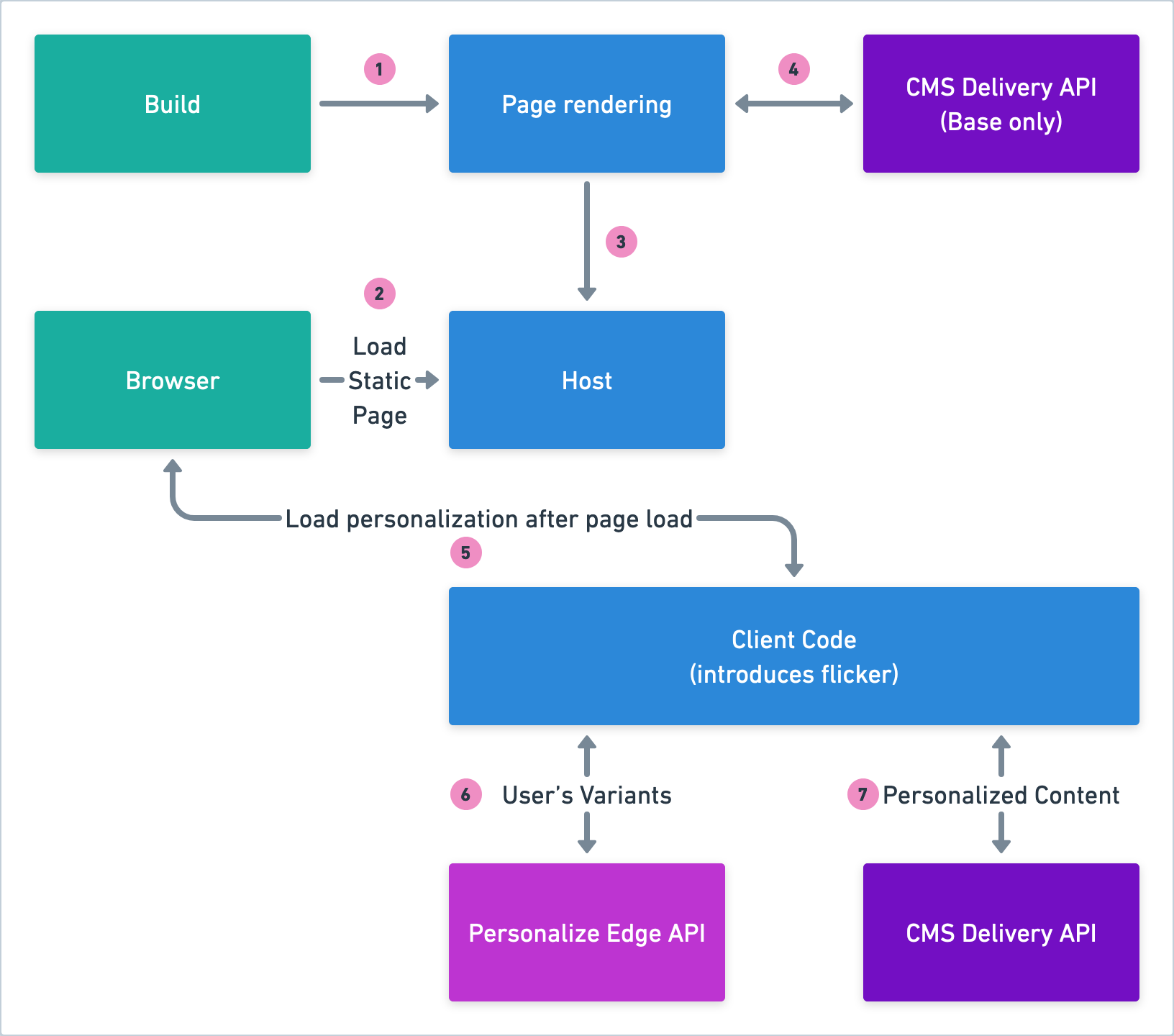
The diagram below illustrates the main components and flow of the architecture:
- Build: The initial step where the static page is built and prepared for rendering. During the build process, the content and structure of the pages are determined.
These pages are then stored and ready to be served to users when they visit the website. This approach ensures that the page load times are minimized as the static content is quickly accessible.
- Browser: The user's web browser, responsible for loading and displaying web pages. The browser loads the static pages, executes the necessary scripts, and renders the content for the user. It's responsible for sending requests and receiving responses from various components, including fetching initial and personalized content.
- Page Rendering: The process where the static page built is rendered for the user. This step involves transforming the static content into a styled, interactive web page. Rendering ensures that the content is displayed correctly according to the design and layout specifications defined during the build process.
- Host: The server where your web application is deployed. The host component is responsible for delivering the static pages initially.
- Client Code: Introduces client-side logic to customize the user experience based on the visitor's data. This code runs within the user's browser and executes after the initial page load. It fetches user-specific data and content, contributing to a personalized user experience. However, it introduces a minor flicker as it fetches additional data needed for personalization.
- CMS Delivery API (Base only): Provides the base content for the pages. This API is called during the build and initial rendering phases to deliver essential content. It ensures that the static content necessary for the basic functionality and layout of the page is available quickly.
- Visitor Manifest: A collection of data points about the user, used for personalizing the content. The Visitor Manifest collects various data points about the user, such as their preferences, interactions, and attributes. This data is crucial for generating personalized content and experiences.
- Personalize Edge API: Processes visitor data to prepare personalized content (decide which variant to show to the visitor) at the edge, ensuring faster load times. The Personalize Edge API processes the data about the visitor provided by you and minimizes latency by executing logic at the edge of the network.
- CMS Delivery API: Delivers the final personalized content based on the processed visitor data. After processing by the Personalize Edge API, the CMS Delivery API fetches and provides the specific content tailored to the user’s profile and preferences. It ensures that the content is updated dynamically to reflect real-time personalization requirements.
Benefits of this Architecture
Implementing this architecture offers several benefits that can significantly enhance both performance and user experience.
By leveraging custom caching, edge processing, and client-side execution, this architecture addresses common challenges in content delivery and personalization. Here are the key benefits:
- High Performance: Utilizes custom caching and edge processing to deliver content swiftly.
- Scalable Architecture: Can handle increased traffic and load efficiently.
- Enhanced Personalization: Provides tailored content based on user data, enriching the user experience.
- Component Flexibility: Modular components such as Client Code can be independently optimized.
Flow of the Diagram
The following explains the step-by-step communication flow depicted in the architectural diagram:
- Build and Page Rendering:
- The process begins with the Build phase, where static pages are created and stored. When a user accesses the website, their Browser requests these static pages.
- The Host then simply returns these static pages in a visible format that the user can interact with.
- Initial Content Load:
- The Host loads the static page and fetches base content from the CMS Delivery API (Base only).
- This ensures that the user sees a structured and functional page almost instantly upon loading.
- Client Code Execution Post-Load:
- After the initial page is displayed, the Client Code begins to run within the browser.
- This client-side script is responsible for personalization, retrieving user-specific data elements, known as the Visitor Manifest from the Personalize Edge API.
- Data Processing and Personalization:
- The Client Code sends the visitor data to the Personalize Edge API. The Personalize Edge API processes this data, leveraging edge computing to reduce latency and provide faster responses.
- Based on the Manifest returned by the Personalize Edge API, the Client Code requests personalized content from the CMS Delivery API.
- Final Content Delivery:
- The personalized content is then sent back to the Client Code in the user's browser. This content is displayed to the user, completing the personalization process.
- The initial flicker effect introduced during this stage is minimized by efficient fetching and rendering mechanisms.
Challenges
Despite the many advantages, implementing the Customer Origin architecture comes with its own set of challenges:
- Complex Implementation: Integrating multiple components such as Client Code (front-end code), Edge APIs, and custom caching mechanisms can be complex and require careful planning.
- Client-Side Dependencies: Relying on client-side code for personalization introduces challenges such as browser compatibility issues and the need for efficient execution to minimize flicker.
- Latency Issues: Although edge processing reduces latency, network issues or geographic variability can still affect performance.
- Initial Load Time: The reliance on client code can lead to an initial period of flicker if the personalization content is not fetched and integrated quickly enough.
- Error Handling: Ensuring graceful degradation of the system in case of API failures or data fetch issues is critical to maintaining a good user experience.
While this architecture is ideal for delivering fast, pre-built static content, it struggles to meet the real-time dynamic needs of personalization.
Real-time personalization requires server-side processing, dynamic content delivery, and low-latency performance, which are not easily achievable in this architecture.
An alternative architecture like Server-Side Rendering (SSR) with Edge Routing would be more suited for personalized experiences, as they allow for real-time content adjustments based on user behavior.
Technical Considerations
To fully leverage the benefits of this architecture, consider the following best practices:
- Effective Caching Strategies: Implement caching for non personalized content to reduce latency and enhance load times.
- Content Security: Ensure that personalized data is transmitted and stored securely, adhering to data protection regulations.
- Resilient Design: Architect the system to gracefully handle failures, maintaining user experience even if some components fail.
This architecture with its combination of custom caching and client-side personalization provides a high-performance, scalable solution for delivering personalized content. By optimizing the content delivery process through edge APIs and client-side logic, businesses can ensure a superior user experience.
More articles in "Technical Implementation Architecture for Personalize"
