

Understanding Your Lytics Project Setup
This guide covers the setup and access components of a Lytics project, the pieces you configure to get data flowing.
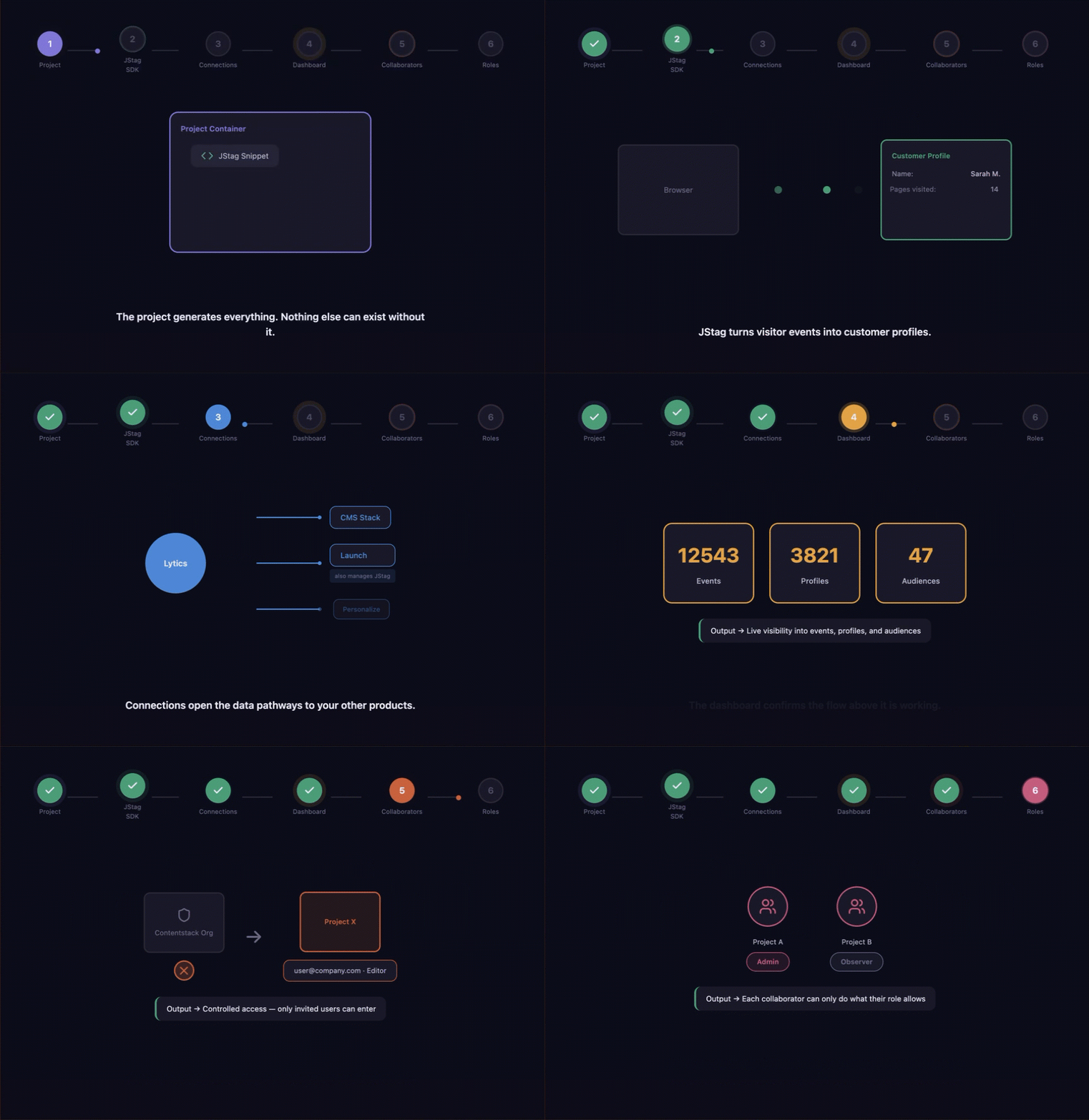
Lytics is not a single feature, it is a chain of components working in a fixed sequence. Each one unlocks the next. A project generates the JStag snippet. JStag fills the project with data. Connections route that data to your other Contentstack products. Collaborators and roles control who can manage any of it. Remove one component from the chain and the flow stops at that point. This guide explains each dependency so you know what to set up, in what order, and why it matters.
For definitions of each term, see Key Concepts.
Project
A project is the entry point for Lytics. When a project is created, three things happen automatically, a corresponding Lytics account is created on app.lytics.com, a unique JStag snippet is generated for the project, and a default data stream is created ready to receive events.
Nothing else in Lytics can be configured or generated without a project in place. Until a project exists, there is no snippet to install, no stream to receive events, and no data to monitor.
JStag
A JStag is the data input layer for the project. It sends visitor events from your website into the project's default stream. The Lytics platform processes those events and builds customer profiles from the accumulated behavioral data. Those profiles are the raw material that connections and audiences depend on downstream.
Without JStag, the project exists but contains no data, no events, no profiles, and no audiences.
Note:
- If your front end runs on Contentstack Launch, the Launch connection replaces the manual JStag installation step entirely.
- Launch manages JStag automatically once connected.
Connections
A Connection define the data pathways between the Lytics project and other Contentstack products. Without a connection, data collected by JStag remains inside the Lytics platform and does not reach any other product.
The Launch connection has a direct relationship with JStag, when a Launch project is connected, Launch manages JStag automatically and the manual installation step is not required. The Personalize connection is the bridge between data collection and content targeting, without it, audiences built on app.lytics.com exist in Lytics but are not available for variant targeting or experiments in Personalize.
If no connections are configured, JStag continues collecting data into the Lytics platform but that data does not flow into any other Contentstack product.
Additional Resource:
- If you are using Launch, you do not need to install JStag manually. The Launch connection replaces the manual installation step entirely.
- Refer to the Manage a Lytics Project documentation for instructions.
Collaborators and Roles
Collaborators and roles govern access to the project and run parallel to the entire component chain. Collaborators are the users who manage the project. Roles define what each collaborator is permitted to do.
Both collaborators and roles are scoped to the project. A user's access to one project does not extend to any other project in the organization. A collaborator without a role has no meaningful access regardless of their Contentstack organization membership.
End-to-End Flow
The five components follow a fixed sequence of dependencies:
- The project must exist before any other component can be created or configured.
- JStag must be installed or a Launch connection must be in place before any data enters the project.
- Connections must be configured before data can reach other Contentstack products.
- Collaborators must be invited and roles assigned before anyone other than the project owner can interact with any of the above.
As each component is configured, the Lytics project overview screen reflects the current state event counts climb once JStag is running, and audience counts appear once audiences are built on app.lytics.com.
Additional Resource:
- For audience authoring, profile inspection, and stream configuration, refer to the Lytics platform documentation.
More articles
