

Delete a Release
Deleting release in Contentstack allows you to remove that specific release if no longer required.
Warning: Once deleted a release cannot be restored.
To delete a release, log in to your Contentstack account and follow these steps:
- Go to your stack and click the “Releases” icon in the left navigation panel.
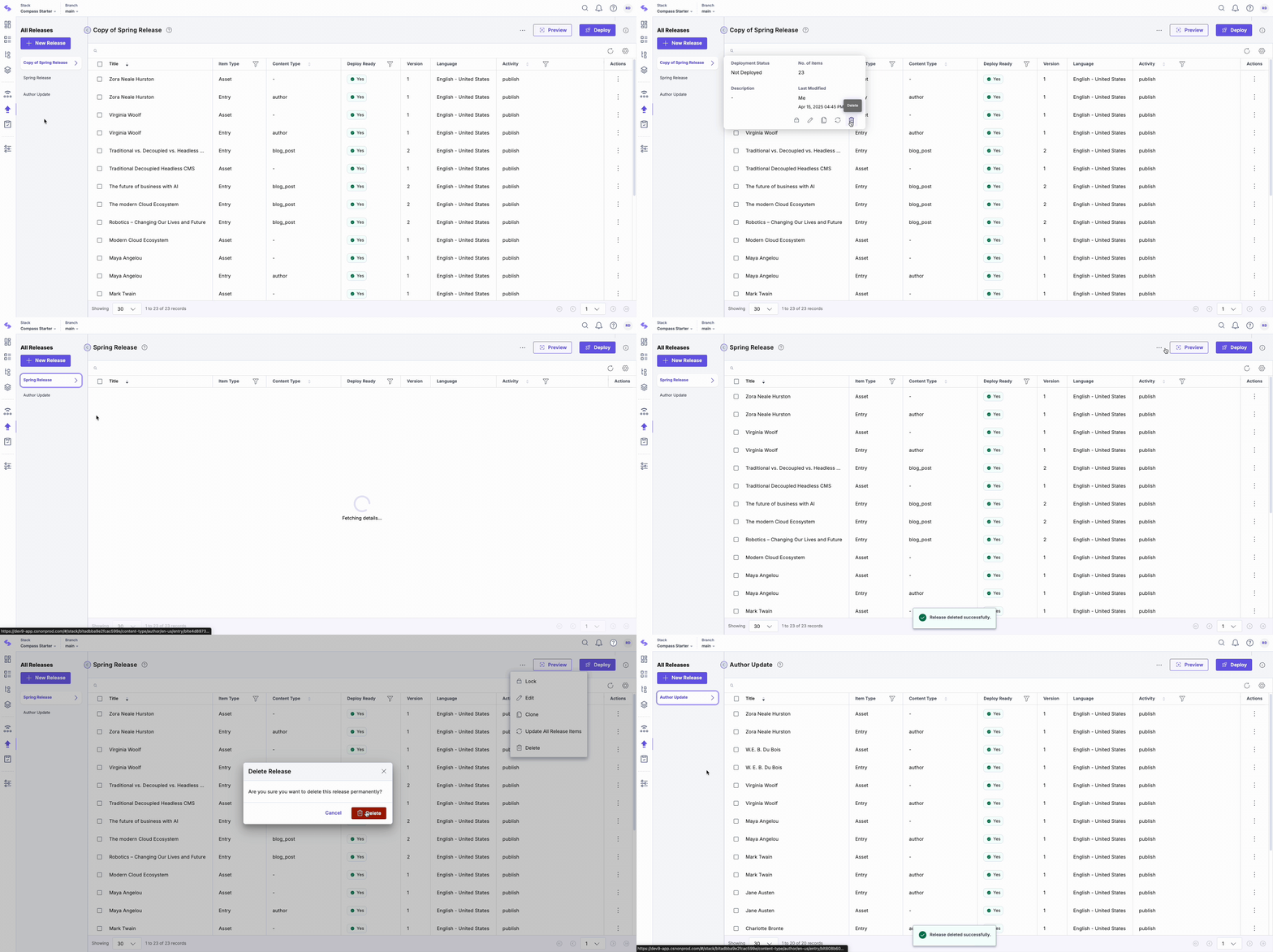
- Hover over the release you want to delete in the left panel.
- Click the “Delete” icon in the popup modal. Alternatively, click the horizontal ellipsis in the top right corner and click Delete.
- In the resulting Delete Release modal, click the Delete button to delete your release.
Delete a Rollback Release
Deleting a rollback release removes the system-generated duplicate used to revert a deployment. The original deployed release is not affected. However, rollback for that deployment is no longer available until the release is redeployed.
Warning: If you delete a rollback release, you cannot create another rollback release for the original deployed release unless you redeploy that release. Redeploying the original release re-enables rollback creation.
API Reference
To perform this delete action via API, refer to the Delete a release API request.
More articles in "Work with Releases"
