

Create a New Stack
A stack is a centralized repository that stores and manages all entries and assets for a project. It provides a structured workspace where teams can collaborate to create, manage, and publish content efficiently.
Prerequisites
- Contentstack account
- Organization Owner or Admin permissions
Note: Only the Organization Owner or Admin can create stacks and invite users to collaborate.
What You Will Learn
-
How to create a new stack in an organization.
-
How to set a stack's name, description, master language, and color.
Create a Stack
To create a stack, log in to your Contentstack account and perform the following steps:
- Navigate to the organization where you want to create a stack.
- Click the + New Stack button in the top right corner, and select Create New.
- In the Create New Stack modal, enter the following details:
- Name (required): Name of your stack.
- Description (optional): Provide a relevant description for the stack.
- Set Master Language (required): Select the primary language for your stack.
-
Stack Color (optional): Choose a predefined color to visually identify your stack across the interface. If you do not select a color, a default color is applied.
- Click Create.
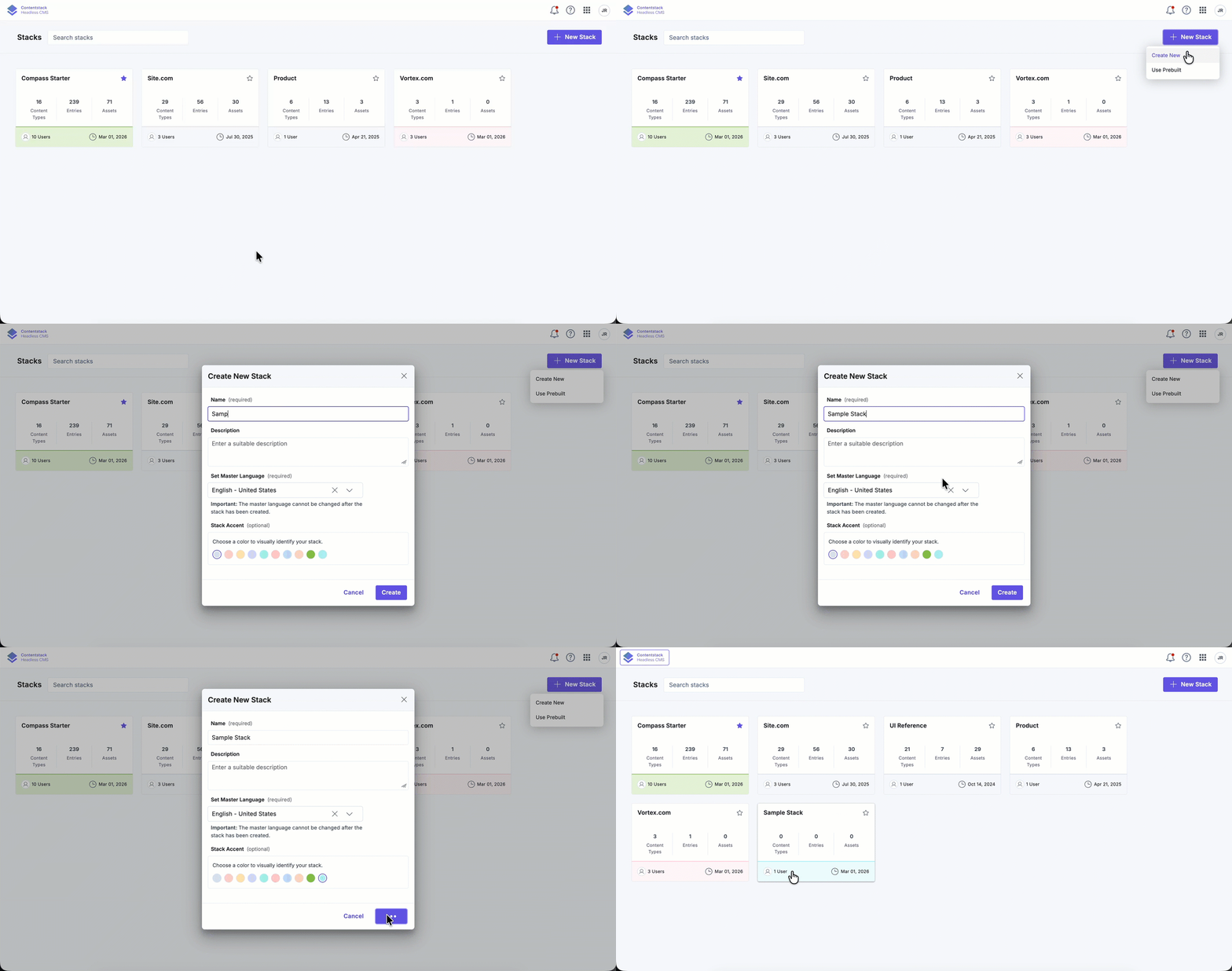
After creating the stack, you are automatically redirected to it. You can now create content types and upload assets.
Note: An organization user can create only one stack per minute. For more information, visit our Service Description document.
Related Resource
