

Create and Manage Variant Groups in the CMS
Note: The Entry Variants feature is available as part of the Personalize license and may not be accessible to all users. For more information, contact the support team.
Variant groups help organize independent variations of content, such as platform-specific or channel-specific versions. Using the Contentstack interface, you can create and manage variant groups directly in the CMS.
Note: Developers can create, edit, and delete variant groups and variants. Administrators have full permissions to manage variant configurations across the stack.
This guide explains how to access variant groups, create a new variant group, add variants, and assign content types.
To create and manage variant groups, log in to your Contentstack account and perform the steps given below:
- Navigate to the desired stack and click Settings.
- Select Variants to open the Variant Groups list page.
- On the Variant Groups page, click New Variant Group.
Note: By default, the create variant groups button is visible only in the main branch.
- In the modal, enter the Variant Group Name, and click Create.
- Within the variant group, add a Description if required.
- Under Linked Variants, enter the variants associated with this group. To add multiple variants, click the + icon.
- In the Linked Content Types section, select one or more content types that this variant group will support for the main branch.
- Click Save to apply the configuration.
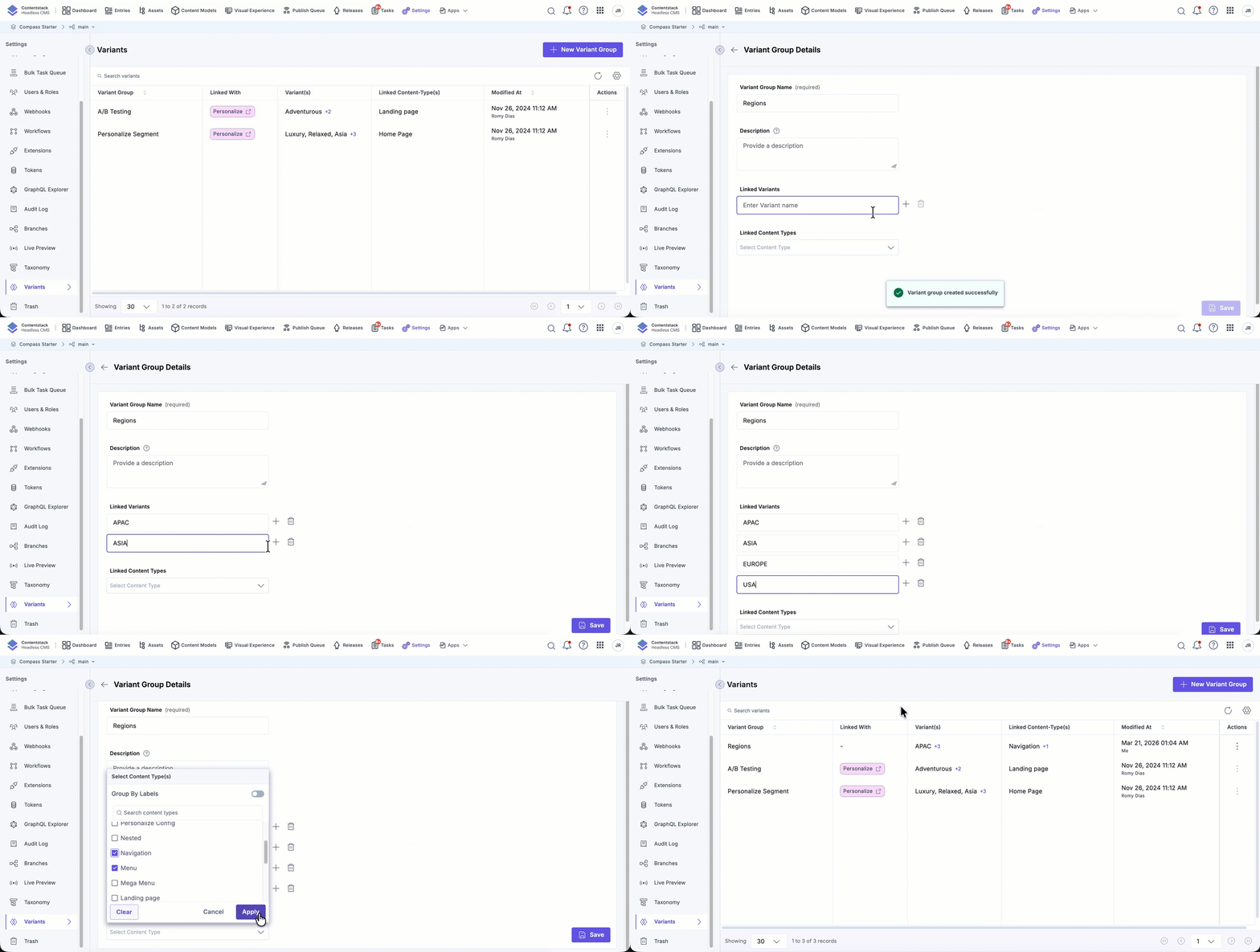
Once configured, these groups can be used when creating or managing entries, helping teams maintain structured and consistent content variations across the stack.
More articles in "Work with Variants"
