

Open Live Preview in a New Tab
The Open in New Tab feature enhances Contentstack Live Preview by allowing websites to open outside the iFrame, in a standalone browser tab. This improves compatibility with tools such as Single Sign-On (SSO) and OAuth, and provides a smoother editing and review workflow.
If the Always Open in New Tab toggle is enabled in Live Preview settings, clicking the Live Preview icon opens the website directly in a new browser tab. If the toggle is disabled, you must first open the Live Preview panel and then select Open in New Tab.
Behavior Depending on SDK Version
The behavior of the Open in New Tab feature varies based on the version of the Live Preview SDK. You can also configure this behavior programmatically using the enableLivePreviewOutsideIframe key during SDK initialization. When set to true, this key forces the preview to open in a new tab outside the iframe. This setting only applies to SDK version 4.0.0 or later.
| SDK Version | Toggle Status | SDK Property | Behavior |
| v4.3.0 or later | Enabled or Disabled | true | Live Preview opens in a new browser tab, outside the iframe. |
| v4.3.0 or later | Enabled | true | Clicking the Live Preview icon opens the site in a new browser tab. |
| v4.3.0 or later | Disabled | true | The Live Preview panel opens. From there, click Open in New Tab to open the Live Preview in a new browser tab, outside the iframe. |
| v4.3.0 or later | Disabled | false | The Live Preview panel opens. From there, click Open in New Tab to open the Live Preview in a new browser tab, inside the iframe. |
| v4.0.0 or later | Enabled or Disabled | NA | Live Preview opens in a new browser tab, outside the iframe if toggle status is Enabled, and inside the iframe if toggle status is Disabled. |
| Earlier than v4.0.0 | Any | NA | The site opens inside the iframe. The toggle and SDK key have no effect. |
Steps to Enable Always Open in New Tab
To simplify the preview workflow, you can enable the Always Open in New Tab option in your stack settings. This setting removes the extra click needed to open your site in a new tab.
To enable the feature:
- Ensure your Contentstack App is up to date (this is auto-managed).
- Update your Live Preview SDK to the latest version (v4.0.0 or later) using the following command:
npm install @contentstack/live-preview-utils
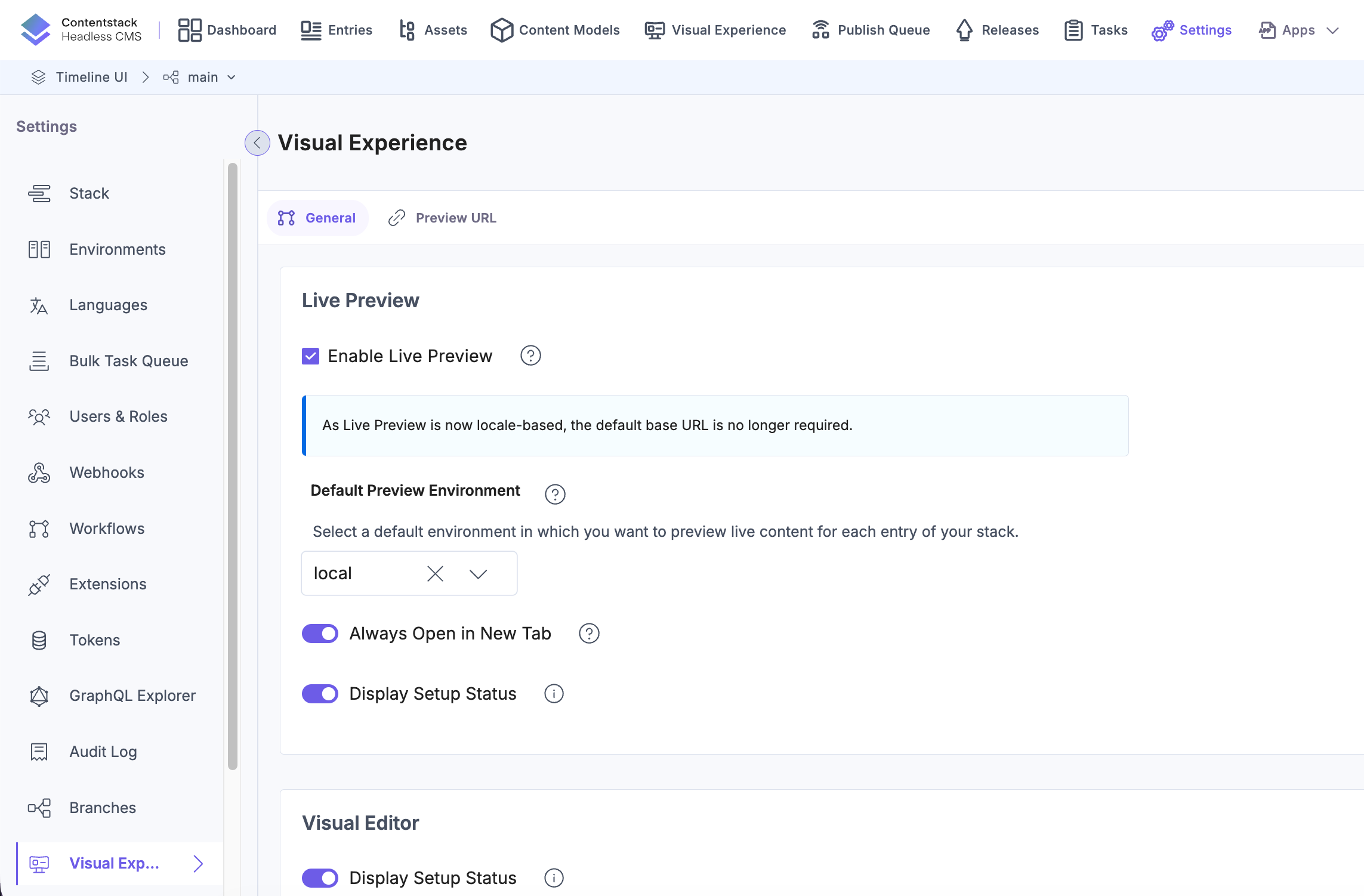
- In your stack, go to Settings and select Visual Experience.
- In the General tab, enable the Always Open in New Tab toggle.
- Click Save.
- Clicking the Live Preview icon in an entry opens the site in a new browser tab.
If the SDK is outdated, the site opens in a new browser tab but remains inside an iframe, skipping the additional click.
The Open in New Tab feature provides more flexibility in how editors and developers use Live Preview. By keeping the preview experience outside the iFrame and reducing extra clicks, it streamlines content review and supports advanced integrations.
More articles in "Work with Live Preview"
