

Custom Preview URLs
Note: Custom Preview URLs is a plan-based feature and may not be available to all users. Contact Contentstack support for more information.
Custom Preview URLs allow you to define dynamic, pattern-based paths for Live Preview. These paths align preview behavior with your website’s routing logic, including nested routes, taxonomies, multiple domains, and non-native URL fields.
By enabling Custom Preview URLs, you can generate preview URLs dynamically using custom patterns and contextual data.
Note: Custom Preview URLs are currently supported only for Live Preview.
Previously, Live Preview used a fixed pattern:
<environment base URL> + <entry's native URL field>This approach works for simple scenarios but does not support advanced routing setups.
When to Use Custom Preview URLs
Use Custom Preview URLs when:
- Your application uses nested or hierarchical routing
- URLs depend on taxonomy or reference fields
- You manage multiple domains or regional sites
- URL structures vary by locale, environment, or branch
- You need to transform or normalize field values before generating URLs
How Custom Preview URLs Work
Custom Preview URLs resolve the final preview URL through the following phases:
- Pattern selection: Selects the matching configuration based on branch and content type.
- Pattern resolution: Replaces placeholders in the pattern using entry data, environment context, locale, and taxonomy values.
- Preview rendering: Loads the resolved URL in the Live Preview iframe.
- Fallback behavior: Reverts to the default preview URL if resolution fails.
Configure Custom Preview URLs
To configure Custom Preview URLs, log in to your Contentstack Account and perform the following steps:
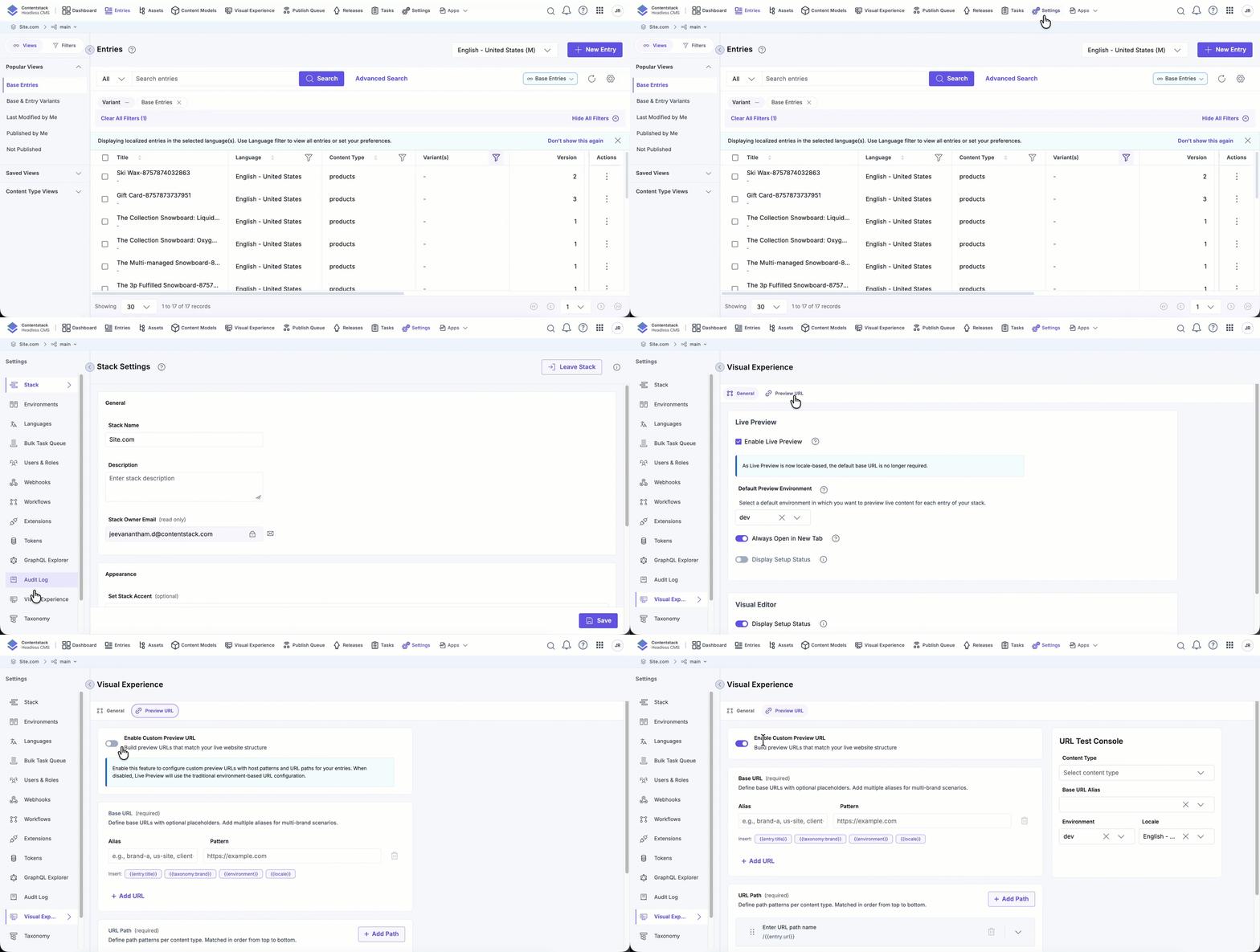
- Go to your stack and click “Settings”.
- Navigate to Visual Experience and select the Preview URL tab.
- Enable the Custom Preview URL toggle.
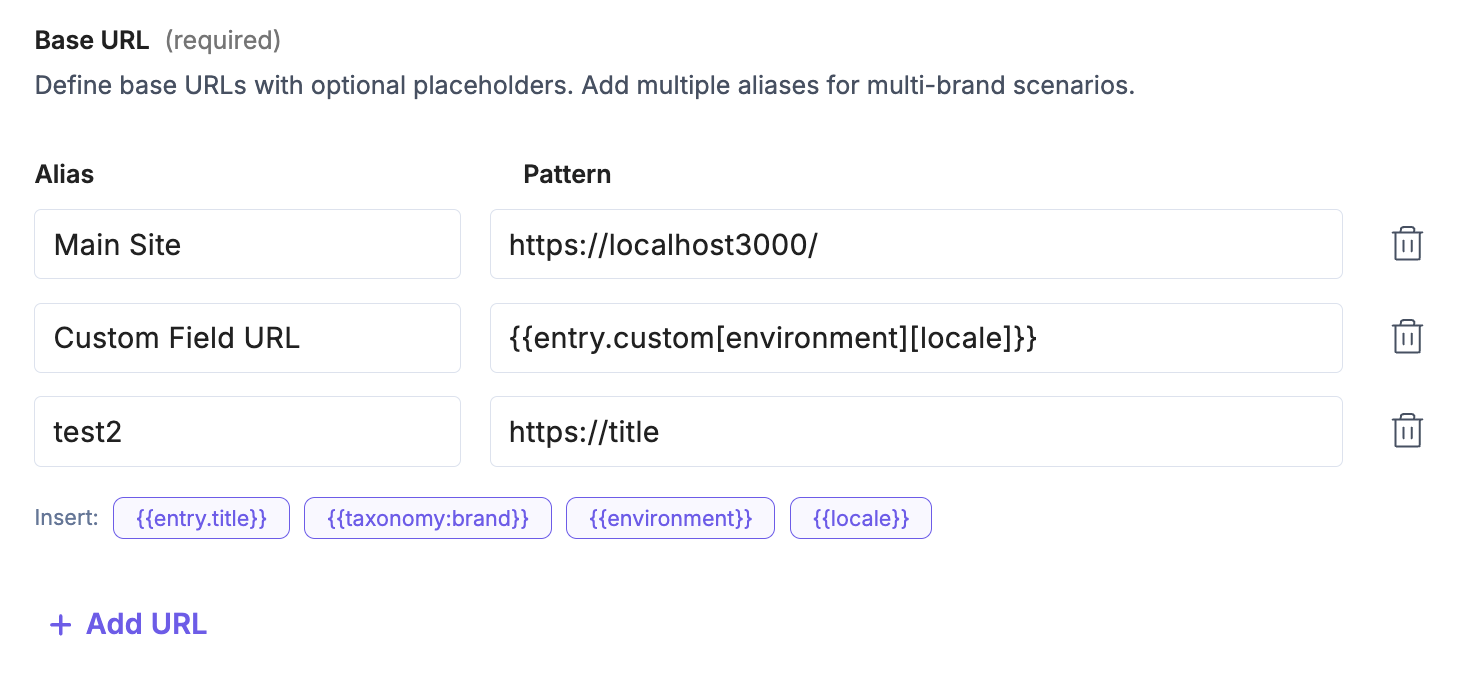
- Under Base URL, define one or more aliases. Aliases allow you to define multiple hostnames for the same content. Each alias contains a name (identifier) and a base URL pattern.
Tip: Use aliases to preview the same content across multiple domains or brand-specific hostnames.
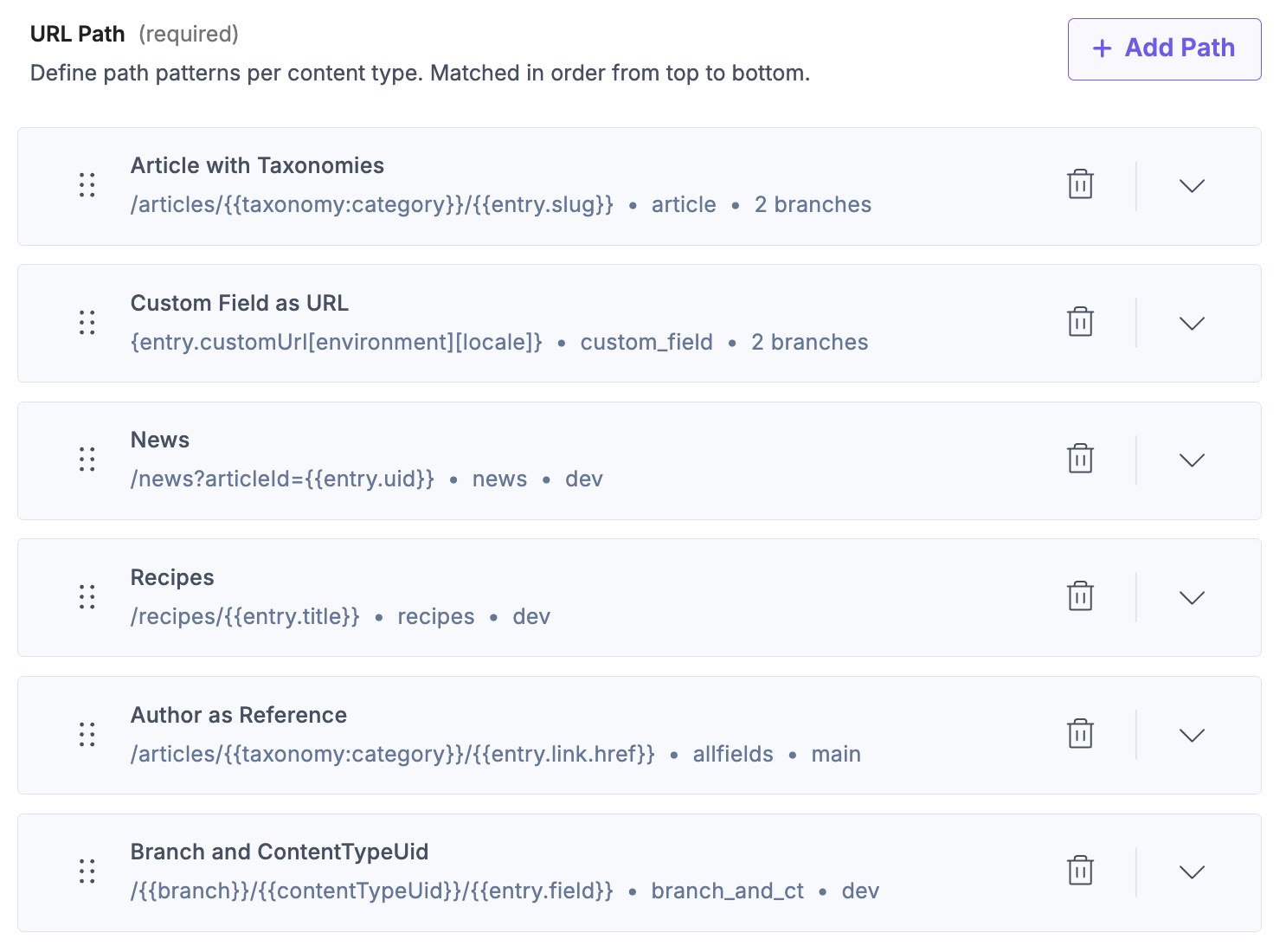
- Define the URL Path:
- Enter a path name for the preview route.
- Select the Branch where the configuration applies.
- Choose whether the pattern applies to All content types or only to Specific content types.
- Build preview URLs using dynamic placeholders in the pattern. Placeholders use the {{...}} syntax and can reference:
- Entry fields: {{entry.slug}}, {{entry.title}}, {{entry.uid}}
- Custom fields: {{entry.custom_field_id}}
- Context variables: {{environment}}, {{locale}}, {{branch}}, {{contentTypeUid}}
- Reference fields: {{entry.author.name}}, {{entry.parent.url}}
- Taxonomy values: {{taxonomy:brand}}
Tip: Use {{entry.<field_uid>}} to access any field dynamically, including nested reference fields.
- Click Save after testing your URLs and applying any advanced configurations described in the following sections.
Note: If multiple configurations exist, Live Preview evaluates them in order and applies the first matching configuration.
Test Your Configuration
Use the URL Test Console to validate your configuration:
- Select a content type, environment, and locale.
- Choose a base URL alias.
- Preview the resolved URL.
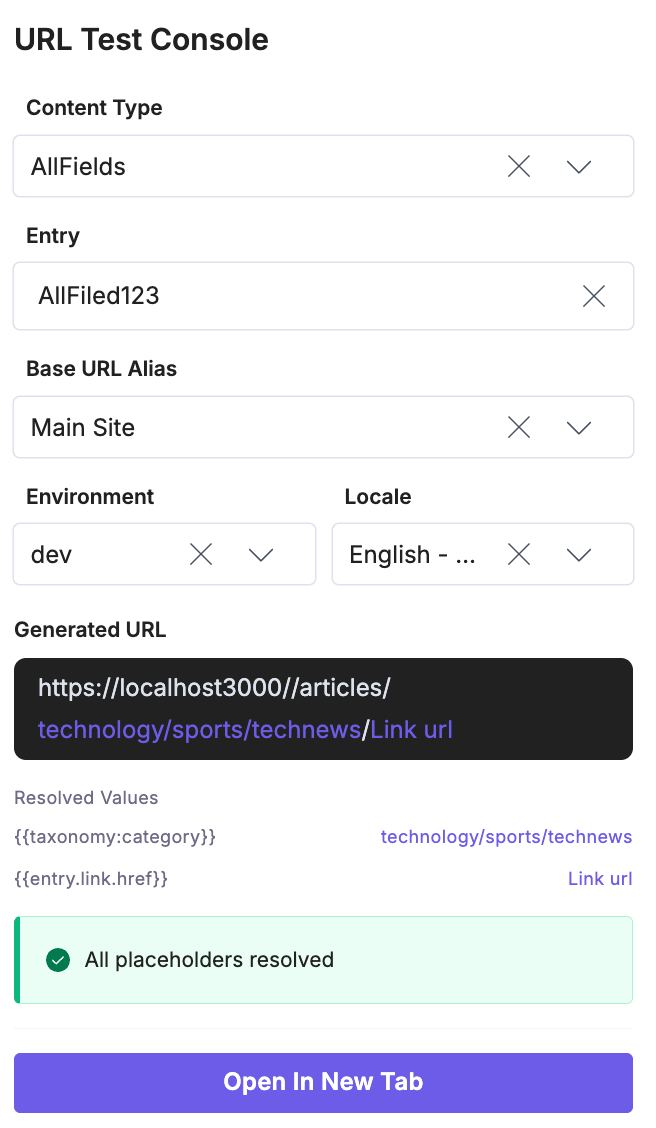
This helps identify issues early and ensures that patterns resolve as expected.
Advanced Configuration
Use the Advanced Config section to define transformations and fallback logic through a guided UI.
You can:
- Transform values (for example, lowercase or regex replacements)
- Define default values for missing fields
- Apply custom logic beyond basic pattern matching
The UI generates the configuration automatically, reducing the need for manual JSON editing.
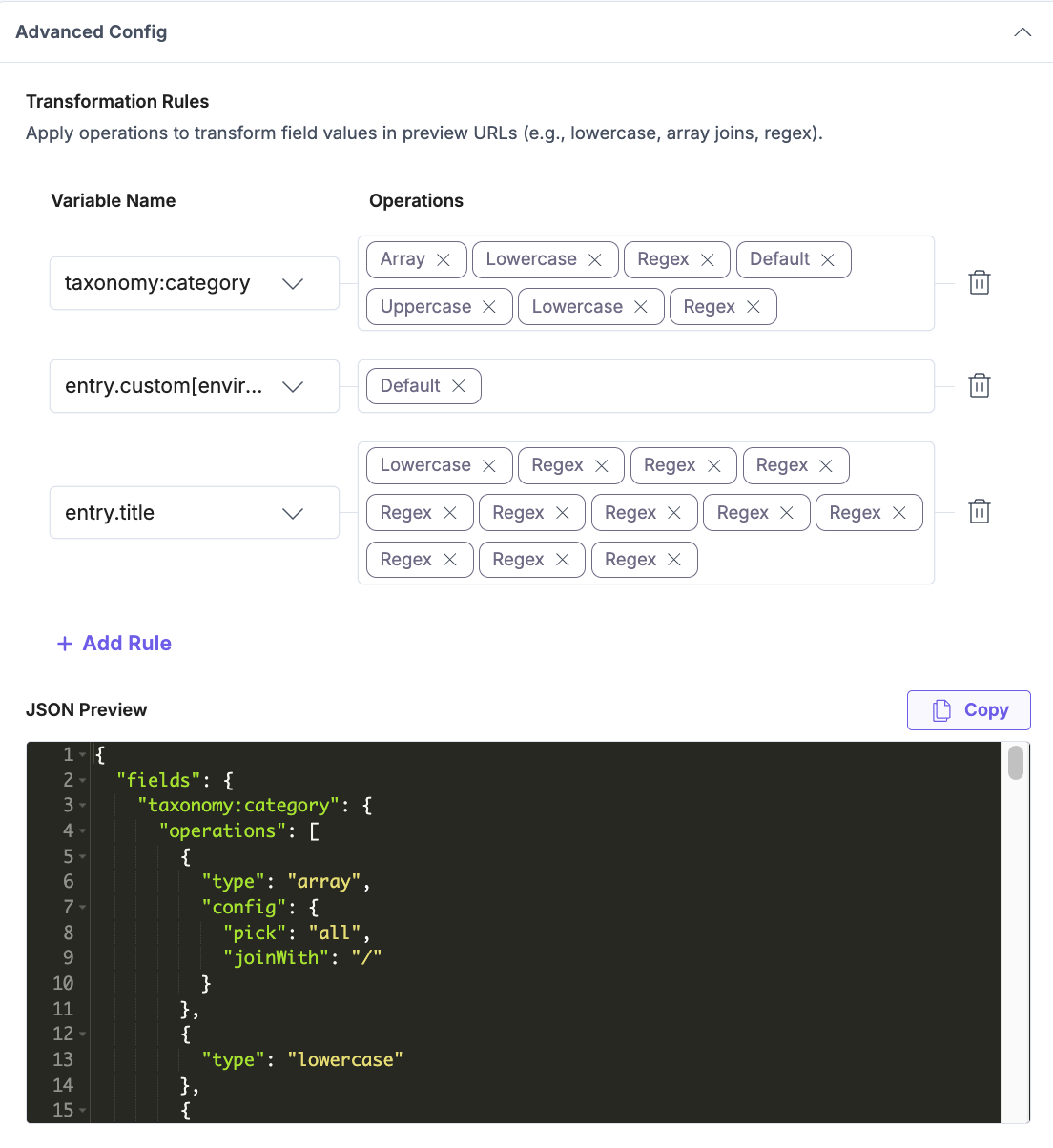
Use advanced configuration when preview URLs depend on transforming or normalizing field values before constructing the final URL.
Supported operations include:
- Text case transformation: Convert values to a consistent format.
- lowercase: Technology → technology
- uppercase: blog → BLOG
- Array handling: Process multi-value fields such as taxonomies or references.
- join values → ["Technology", "Cloud Computing"] → technology/cloud-computing
- Value mapping: Map values to custom outputs (useful for locales, environments, or categories).
- "en-us" → "en"
- "Artificial Intelligence" → "ai"
- Regex transformations: Modify values using pattern-based replacements.
- Replace spaces with hyphens: "hello world" → "hello-world"
- Remove special characters: "AI & ML!" → "ai-ml"
- Normalize accented characters: "Crème Brûlée" → "creme-brulee"
- Default values: Provide fallback values when fields are missing or empty.
- null → "uncategorized"
- Chained transformations: Apply multiple operations sequentially to achieve the desired output.
- "Blog Article" → "blog article" → "blog-article"
Supported Use Cases
Custom Preview URLs support a wide range of routing scenarios, from simple paths to complex, data-driven URL structures.
Routing Patterns
Use routing patterns to define URL structures based on entry fields and static path segments. This approach is useful when your website follows predictable URL hierarchies, such as blogs, product pages, or category-based navigation.
Nested Routing
Define nested paths using multiple entry fields.
Pattern Example:
/blog/{{entry.category}}/{{entry.slug}}Example Entry:
{
 "category": "food",
 "slug": "ramen-recipe"
}Result:
/blog/food/ramen-recipe
This approach helps create clean, hierarchical URLs that reflect your content structure.
Prefix or Suffix-Based URLs
Add static segments to enforce consistent URL structures.
Examples:
/shop/product/{{entry.slug}}
/blog/{{entry.slug}}-{{locale}}
Taxonomy and Data-Driven URLs
Use taxonomy and data-driven URLs when your routing depends on classification systems such as categories, regions, or tags. This approach helps you generate consistent URLs dynamically without duplicating content across multiple structures.
Taxonomy-Driven URLs
Use taxonomy values to dynamically construct both domain and path-based URL structures. This is useful for scenarios such as region- or market-specific routing without duplicating content.
Pattern Example (Path-based):
/articles/{{taxonomy:category}}/{{entry.slug}}Pattern Example (Domain + Path):
https://{{taxonomy:region}}.example.com/articles/{{taxonomy:category}}/{{entry.slug}}Result:
/articles/technology/cloud-computing/ai-revolution
https://us.example.com/articles/technology/cloud-computing/ai-revolution
This approach enables:
- Hierarchical URLs using taxonomy values (e.g., category, subcategory)
- Region-specific domains using taxonomy (e.g., us, eu, apac)
- Reuse of the same content across multiple markets
Fallback values can be applied when taxonomy data is missing, ensuring URLs remain valid and consistent.
Dynamic Parameter-Based URLs
Use dynamic parameter-based URLs when your routing relies on system-generated or custom identifiers, such as entry IDs or external reference values. This is useful for applications that require stable, ID-driven URL structures.
Examples:
/news/{{entry.uid}}
/articles/{{entry.article_id}}/{{entry.slug}}
Localization and Environment-Based URLs
Use localization and environment-based URLs when your content needs to adapt across locales or environments. This approach helps you dynamically construct URLs for multilingual sites or environment-specific previews without hardcoding values.
Locale-Based URLs
Position locale codes anywhere in the URL.
Examples:
/{{locale}}/blog/{{entry.slug}}
/blog/{{locale}}/{{entry.slug}}
/blog/{{entry.slug}}-{{locale}}
Environment- and Locale-Based URLs
Dynamically resolve URLs without hardcoding environments.
Example:
https://{{environment}}.example.com/{{locale}}/{{entry.slug}}Multi-Domain and Host-Based URLs
Use multi-domain and host-based URLs when you need to preview the same content across different domains or brand-specific hostnames. This is especially useful for multi-brand, regional, or localized deployments.
Preview the same content across multiple domains using aliases.
Examples:
example.com
example.co.in
This is useful for multi-brand, regional, or localized websites.
Transformations and Clean URLs
Use transformations to standardize and sanitize URL values generated from entry data. This ensures that URLs remain consistent, readable, and optimized for SEO, even when source data contains special characters or inconsistent formatting.
Sanitized and SEO-Friendly URLs
Use transformations to clean and standardize values.
Example:
/recipes/{{entry.title}}Transforms:
"Crème Brûlée" → /recipes/creme-brulee
Advanced Config JSON:
{
  "fields": {
    "entry.title": {
      "operations": [
        { "type": "lowercase" },
        {
          "type": "regex",
          "config": {
            "pattern": "[àáâãäåæ]",
            "replace": "a"
          }
        },
        {
          "type": "regex",
          "config": {
            "pattern": "[èéêë]",
            "replace": "e"
          }
        },
        {
          "type": "regex",
          "config": {
            "pattern": "[ìíîï]",
            "replace": "i"
          }
        },
        {
          "type": "regex",
          "config": {
            "pattern": "[òóôõö]",
            "replace": "o"
          }
        },
        {
          "type": "regex",
          "config": {
            "pattern": "[ùúûü]",
            "replace": "u"
          }
        },
        {
          "type": "regex",
          "config": {
            "pattern": "[ñ]",
            "replace": "n"
          }
        },
        {
          "type": "regex",
          "config": {
            "pattern": "[ç]",
            "replace": "c"
          }
        },
        {
          "type": "regex",
          "config": {
            "pattern": "\\s+",
            "replace": "-"
          }
        },
        {
          "type": "regex",
          "config": {
            "pattern": "[^a-z0-9-]",
            "replace": ""
          }
        },
        {
          "type": "regex",
          "config": {
            "pattern": "-+",
            "replace": "-"
          }
        },
        {
          "type": "regex",
          "config": {
            "pattern": "^-|-$",
            "replace": ""
          }
        }
      ]
    }
  }
}
Mapped or Shortened Values
Convert values into predefined formats.
Example:
{{entry.topic}} → ai (from "Artificial Intelligence")
Advanced Config JSON:
{
  "fields": {
    "entry.topic": {
      "operations": [
        {
          "type": "map",
          "config": {
            "Artificial Intelligence": "ai",
            "Machine Learning": "ml",
            "Cloud Computing": "cloud",
            "Data Science": "data-science"
          }
        }
      ]
    }
  }
}
Custom Field-Driven URLs
Use custom field-driven URLs when you need full control over URL generation. This approach allows you to define complete URLs within structured fields, making it suitable for highly customized routing logic.
Fully Custom URL Definitions
Use structured fields to define complete URLs dynamically.
Example:
{{entry.customUrl[environment][locale]}}This enables full control over URLs across environments and locales.
Advanced Dynamic URLs
Use advanced dynamic URLs when your routing requires combining multiple fields and transformations. This approach helps generate complex, multi-level URL structures that reflect detailed content relationships.
Complex Multi-Field URLs
Combine multiple fields with transformations to generate rich URL structures.
Example:
/{{entry.content_type}}/{{entry.category}}/{{entry.topic}}/Result:
/blog-article/technology/agent-os/ai/
Fallback and Error Handling
Fallback and error handling ensure that preview URLs continue to work even when data is missing or patterns fail to resolve. This helps maintain a consistent preview experience while clearly surfacing configuration issues.
Live Preview handles URL resolution failures through a combination of defaults, error feedback, and fallback behavior.
Resolution Flow:
- Pattern Resolution: The system attempts to resolve all placeholders using entry data, locale, environment, and taxonomy values.
- Default Value Handling: If a required value is missing, the system checks for a default value defined in Advanced Config and uses it if available.
- Error Handling: If a required value is still missing after applying defaults, Live Preview displays an error screen indicating which value could not be resolved. This helps identify gaps in the configuration.
- System Fallback: In cases where URL resolution fails due to processing errors (such as invalid transformations), Live Preview falls back to the traditional behavior:
<base URL> + <entry URL field> - Base URL Fallback: If the entry does not contain a URL field value, only the base URL is loaded.
This layered approach ensures that:
- Missing values are handled gracefully using defaults
- Configuration issues are surfaced clearly through error messages
- Preview functionality remains available through fallback mechanisms when resolution fails
Best Practices
To ensure scalable, accurate, and maintainable custom preview configurations, follow these best practices:
- Start with simple patterns, then add advanced configuration only when needed.
- Use base URL aliases for multi-domain setups instead of duplicating patterns.
- Always define defaults for optional fields.
- Test preview behavior across environments and locales.
- Use custom fields for highly complex URL logic.
Custom Preview URLs provide control over how preview URLs are generated in Live Preview. This is especially useful for complex routing, multi-domain setups, and dynamic URL structures.
Combine pattern-based configuration with optional transformations to create scalable and consistent preview experiences across content types, locales, and environments.
More articles in "Work with Live Preview"
