

Restore a Deleted Taxonomy
Deleted taxonomies are retained in the Trash for up to 14 days after deletion. Within this timeframe, you can choose to restore them to their original state before they are permanently removed.
When restoring a deleted taxonomy, you can also opt to restore it along with its associated content type.
Note: While viewing details of a deleted taxonomy from the Trash, you can't modify its schema; it's in a read-only mode.
To restore a deleted taxonomy from the Trash, log in to your Contentstack account, and perform the following steps:
- Go to your stack where you want to restore a deleted taxonomy, navigate to the “Settings” icon (or press “S”), and select Trash (or press “alt + T” for Windows OS, and “option + T” for Mac OS).
- Click on the Taxonomies tab, locate the taxonomy you want to restore, and click on the vertical ellipsis in the Actions column.
- You can also view a taxonomy’s details by clicking View Details.
- Click Restore. In the modal that appears, choose between Restore with Content Type Association or Restore without Content Type Association based on your requirements.
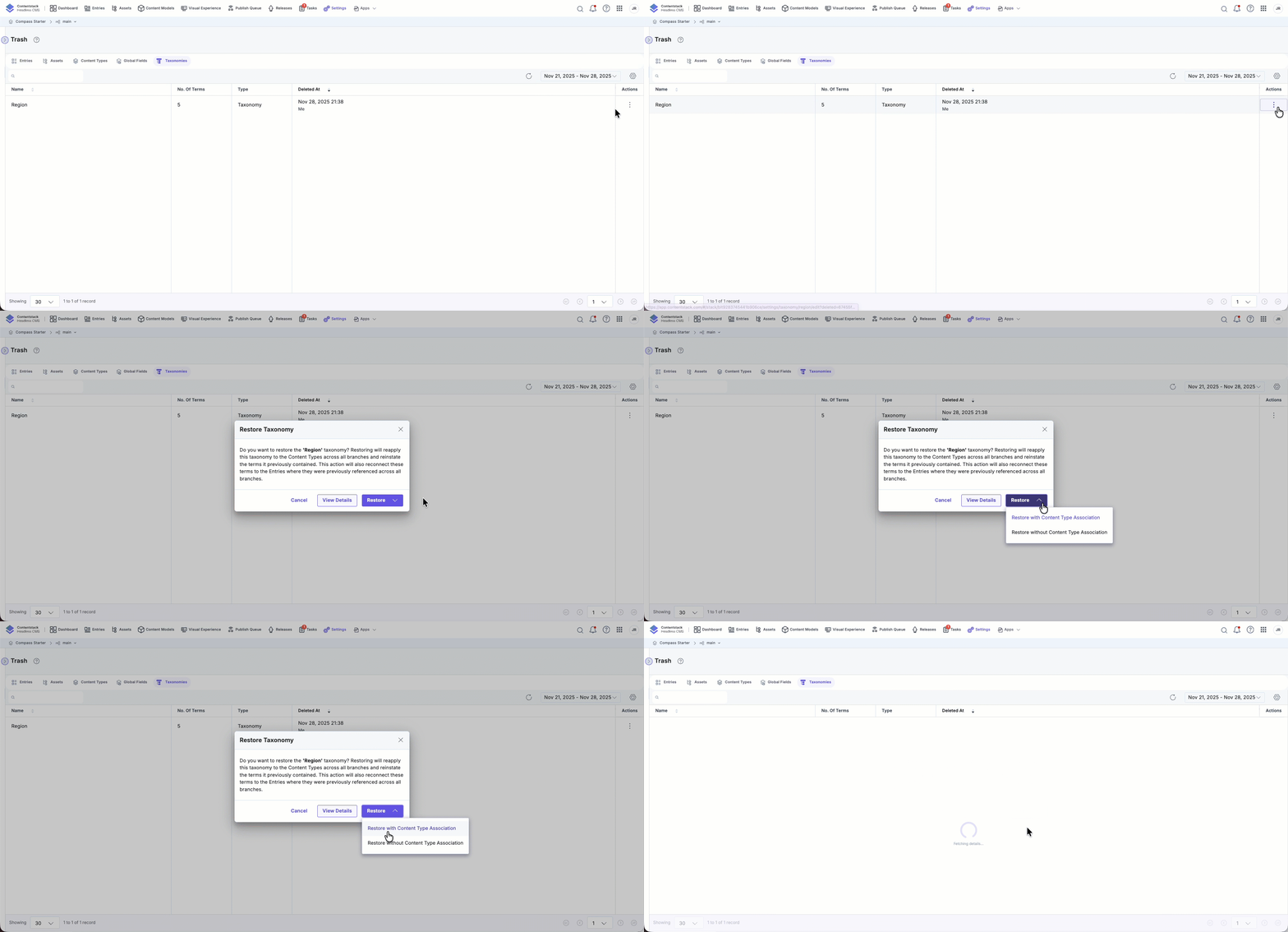
Note: Restoring with Content Type Association will reintegrate the taxonomy with the content types it was linked to before deletion, reconnecting its terms to the entries where they were previously referenced. This action will increase the entry version since the terms are added back to the entry.
Filter Deleted Taxonomies
By default, the Trash displays previously deleted taxonomies in reverse chronological order under the Taxonomies tab i.e., recently deleted Taxonomies will appear at the top. You can apply filters to refine the results and display only the required taxonomies.
The Filters section, located on the right, displays the list of available filters, which includes the following:
- Deleted By: Enables filtering of deleted taxonomies based on the users who moved them to the trash.
- Type: Allows filtering of deleted taxonomies by their type, either by taxonomy or terms.
Check the filter options that you want to apply. Click Reset Filters to clear all the applied filters.
Note: While restoring a taxonomy or term, or when creating or deleting a branch, avoid performing additional delete or restore operations until the ongoing process is complete. This restriction is implemented to prevent conflicts, as multiple entries are modified simultaneously during these processes.
More articles in "Manage Items in the Trash"
