

Add API Endpoints to a Website in Launch
Launch allows you to write Cloud Functions to create API endpoints.
This step-by-step guide lets you add API endpoints to a website in Launch.
Prerequisites
- Contentstack account
- Access to Launch for your organization
Steps for Execution
Follow the steps given below to write a Cloud Function that can be used to add API endpoints to a website in Launch.
- Create a folder named /functions under a source folder in your project’s root folder.
- Create a JavaScript file to code your functions and then save the file to the /functions folder.
Example:
// functions/users.js export default function handler(request, response) { const users = [ {name: "Jack", age: "25"}, {name: "Rick", age: "28"}, {name: "Jane", age: "34"}, ]; response.status(200).send(users); } - Zip the source folder that contains the /functions folder.
- Deploy your project in Launch using one of the following methods:After successful deployment, you will see the Cloud Functions displayed in the log:
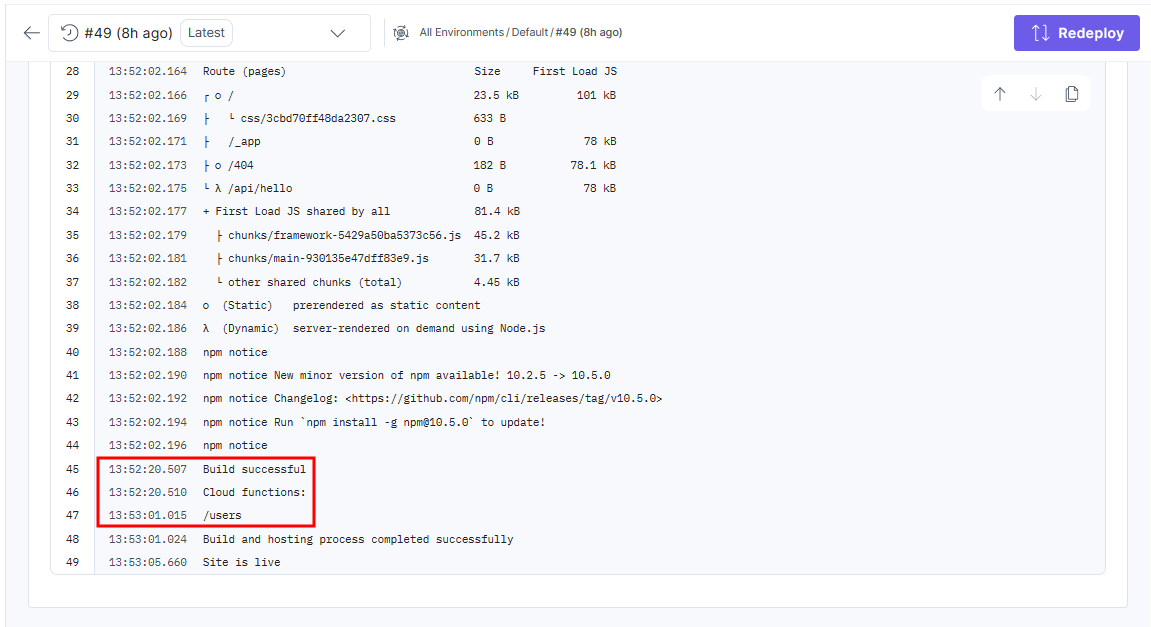 The function endpoint is determined by its file path relative to /functions. The function runs when you visit the path: /users.
 - Click the icon next to the URL in the Domains section to open the deployed website.
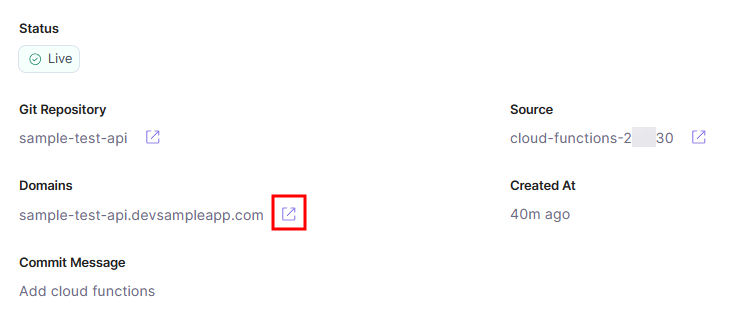 In this example, the URL of the API endpoint will be https://sample-test-api.devsampleapp.com/users.
 - On sending a request to the API Endpoint, you will see the following response:
 [
    {
      "name": "Jack",
      "age": "25"
    },
    {
      "name": "Rick",
      "age": "28"
    },
    {
      "name": "Jane",
      "age": "34"
    }
 ]
Was this article helpful?
More articles in "Launch How to Guides"
