

Manage Single Page Web App with Contentstack
Note: This page is no longer maintained, and the underlying code may be outdated or unsupported. It may be removed in a future release. To learn how to build websites and web apps with Contentstack, refer to the Kickstarts and Starters documentation.
A Single Page Web Application (SPWA) is an app that works within the browser and does not require page reloading during usage. Therefore, it is more convenient to use and manage than multi-page web apps. Gmail and Google Maps are the most common examples of SPWA that we use almost daily.
In this document, we will discuss how you can create a single-page app and manage its content through Contentstack. We will then use Content Delivery API requests to fetch content from Contentstack and display it on the app.
Prerequisites
- Contentstack account
- Working knowledge of React, Node, and APIs
Managing SPWA with Contentstack
Managing a single page web app with Contentstack is a simple task.
- Create entries in Contentstack
- Create a single page app
- Use APIs to fetch content from Contentstack on the app
Create Entries in Contentstack
Log in to your Contentstack account and follow the below steps:
- Create a content type in Contentstack named Single Page App.
- Create entries inside this content type.
- Publish the content in your desired environment.
Create a Single Page App
- Open your terminal and create a React project with modern build setup without any configuration by using one of the following command:
npx create-react-app my-app
npm init react-app my-app (for Windows) If you get an error after running either of the above commands, try the following command:
npm install -g create-react-app- Create a component that will define all routing using the react-router-dom npm package. If you haven’t installed this package yet, then install it using the following command:
npm install react-router-dom
This will install BrowserRouter, Link, and Route components. If you want hash links, you can use HashRouter instead of BrowserRouter.
For a single-page app, we don't want the browser to reload the page. We simply want it to display the required content without loading the page. So for that, we will use the NavLink component. For example, <BrowserRouter> <div> <h1>Single Page Web Application</h1> <ul className="header"> <li><NavLink exact activeclassName="active" to="/">Home</NavLink></li> <li><NavLink activeclassName="active" to="/product">product</NavLink></li> <li><NavLink activeclassName="active" to="/ContactUs">ContactUs</NavLink></li> </ul> </div> </BrowserRouter>- Now using the Route component, define which component to render when requested. For example:
<BrowserRouter>
   <div>
     <h1>Simple SPA</h1>
     <ul classname="header">
       <li><Navlink to="/">Home</Navlink></li>
       <li><Navlink to="/product">product</Navlink></li>
       <li><Navlink to="/AboutUs">AboutUs</Navlink></li>
     </ul>
     <Route exact="" path="/" component={Home}/>
     <Route path="/product" component={product}/>
     <Route path="/AboutUs" component={AboutUs}/>
   </div>
</BrowserRouter>
Note: Ensure you define NavLink and Route components inside the BrowserRouter component.
- Define the components you specified for each route. For example, for the Home component, you can fetch the content from Contentstack inside the ComponentWillMount lifecycle method of the component as follows:Similarly, define all the required components, for example, Contact Us, and Product.
export default class Home { constructor(props){ super(props); this.state ={ data:’ ’ } } componentWillMount(){ let fetchedData =//fetch content from contentstack //change state this.setState({ data:fetchedData }) } render(){ return(<div className="content">{this.state.data}</div>) } } - Lastly, import the created component in step 2 inside the main App.js component.
- Now go back to your terminal and run the following commands to see if this setup is working.
npm install
npm start
By default, the app should start on port 3000. For every request, the component defined inside the Route component gets rendered.
- Open your terminal and create a React project with modern build setup without any configuration by using one of the following command:
Fetch Content from Contentstack
Now use the API request to fetch content from the Contentstack server and display it on the single-page app. For example, for the “Contact Us” component, we have defined the API request as follows:
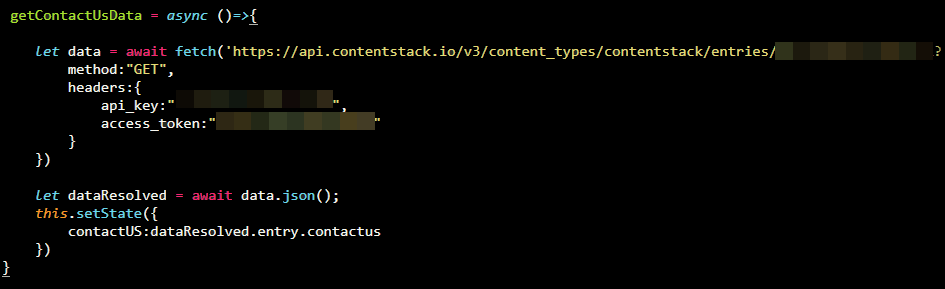
Similarly, you can define the API requests for other components.
Note: SSO-enabled organizations can use the management token to make API requests.
Once you have set up everything, go to Contentstack and make changes in the entries. You should see the relevant changes in the single-page app.
Starter App
We have created a starter website using React JS and Contentstack. The React starter app is built using React JS combined with Contentstack’s Node.js SDK to store and deliver the content from Contentstack.
Note: We highly recommend you to use the React Starter App. Follow our documentation and GitHub code to build a starter website using React JS and Contentstack.
More articles
