

Delivering Content within China
This document is a technical guide that explores in detail the methods for delivering content from Contentstack to users in the China region, covering the challenges faced, solutions, and patterns.
GFW Affecting Contentstack's API Reliability in China
For any internet traffic passing through the Great Firewall of China (GFW), a series of legislative measures and technologies are enforced by the Chinese government to regulate the internet domestically. This might cause the unreliability of data delivered by Contentstack’s API within China.
Methods of GFW Enforcement (Evolving and Changing)
The GFW employs a variety of methods for internet censorship, which continues to evolve and change over time. These methods include:
- IP Blocking: The simplest method, blocking the IP addresses of servers with restricted content, making them inaccessible to users in China.
- DNS Filtering and Redirection: The GFW may return incorrect IP addresses for restricted domain names, sending users to the wrong server.
- URL Filtering: URLs containing restricted keywords might have their connections reset, preventing the page from loading.
- Packet Filtering: The GFW uses packet filtering techniques, such as Deep Packet Inspection (DPI), to inspect and block specific types of traffic based on criteria like keywords, URLs, or IP addresses.
- Connection Reset: Connections to restricted sites may be forcibly reset by the GFW.
- SSL Man-in-the-Middle Attacks: The GFW might intercept and decrypt SSL connections, inspect the content, re-encrypt it, and then forward it.
- VPN Blocking: The GFW increasingly detects and blocks VPN traffic used to bypass censorship.
These methods contribute to a highly sophisticated and adaptive system of internet censorship that companies and individuals must navigate when attempting to deliver content in China.
Possible Contentstack API Problems Crossing GFW
Using Contentstack APIs to serve content in China can face challenges due to the GFW. Here's an overview of possible issues:
- Slow content delivery
- Timeouts
- Partial response
- Complete block of data
- Build failures on the client side when building inside China
- Failure in webhook calls
Solutions and Strategies
To effectively deliver content to users in China while navigating the complexities of internet regulations, the following solutions and strategies offer a reliable approach.
Note: Customers must have a valid ICP license before they can run and deliver their website in China.
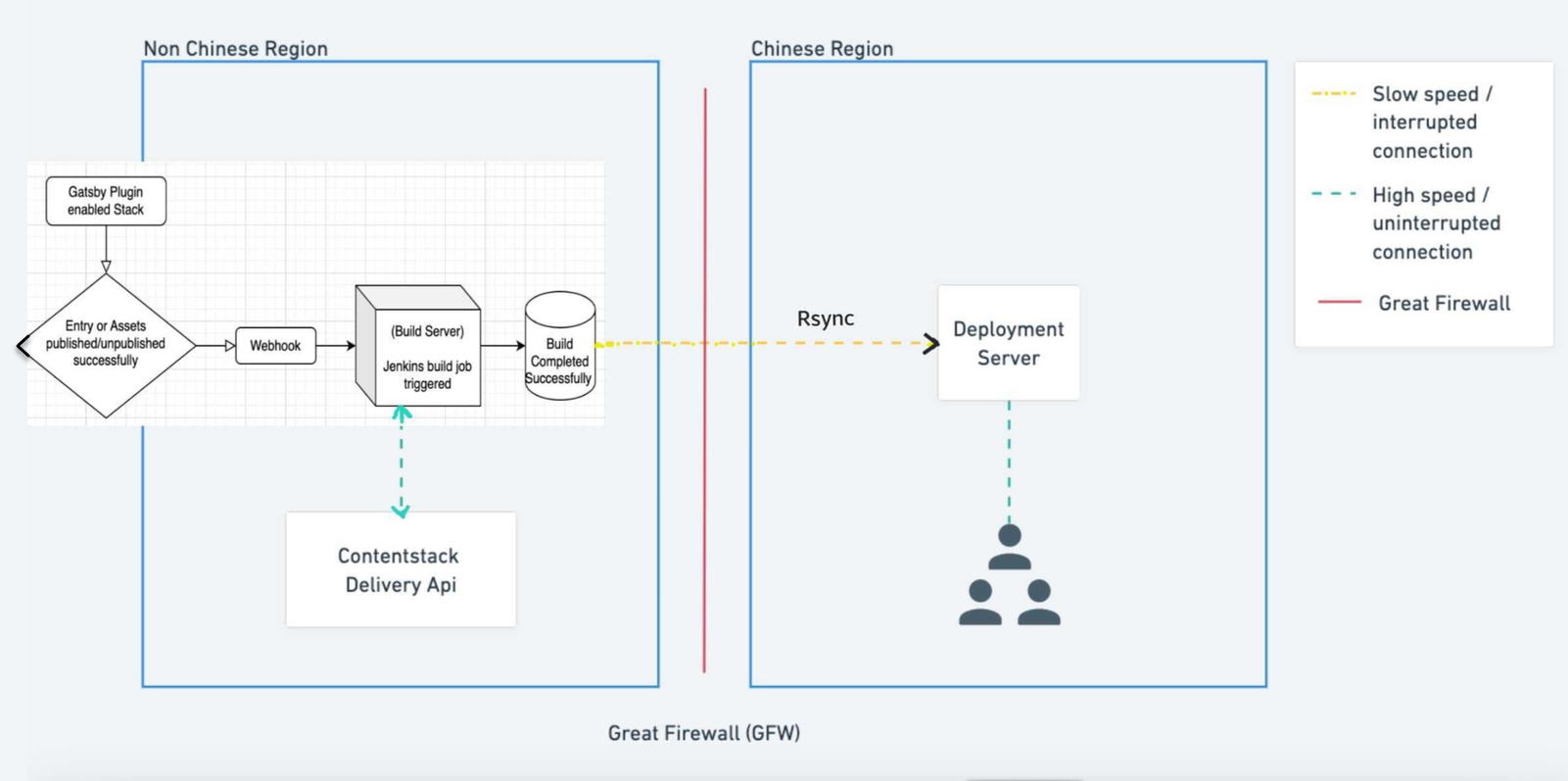
- Build your website on a server outside of China using the required static site framework. Either in the incremental (data sync) or full build.
- This ensures no timeouts or blocks during content delivery from Contentstack to build servers.
- No reachability issues for webhook calls to trigger builds.
- Building directly in China may result in failures due to timeouts or data corruption.
- Synchronize the created build to the servers deployed in the China region using synchronization mechanisms. The synchronization itself can be slow, but once deployed in the Chinese region it would ensure high connectivity to users in the China region.
- Deploy the build synchronized to the China region so that data is delivered from China server to Chinese users with low latency. Additionally, users can use CDN providers based in China to cache the content for better performance.
An architecture diagram is shown below representing the strategy to deploy content within China region:
Example: Gatsby Starter App Integration
To demonstrate the above steps, we utilize a Gatsby Starter app.
About the Gatsby Starter App: Gatsby is a widely used Static Site Generator (SSG) built on React, enabling developers to create fast and optimized websites by generating static HTML at build time.
Integration with Gatsby: Gatsby, being a static site generator, fetches content from Contentstack at build time to create static HTML pages. The stack created in Contentstack contains the content and assets required by Gatsby to generate the static pages.
Creating a Stack
A stack in Contentstack is a container that holds all the content, assets, and configurations needed for your project. For our example use case, we will use the Gatsby Starter app to add content to our stack.
- Import a stack using the Contentstack app:
- Open Marketplace and navigate to Discover | Starters.
- Hover over the desired Gatsby Starter app and click the Import button.
- Authorize the app and provide a name for the stack to identify it, then import the starter.
- Import a stack using CLI: Follow steps 1 to 3 in the documentation: Build a Starter Website with Gatsby and Contentstack to import the starter content using the CLI.
By completing these steps, you will have a stack containing all the content, assets, and configurations needed for further development and customization.
Build Server Configuration
In this step, we need to create a Jenkins server on an instance (Ubuntu22.04) in any cloud service provider or self-hosted datacenter and install NVM, Node, and Gatsby using the jenkins user.
Note: For simplicity, we have used Jenkins and AWS Cloud in this example. However, AWS Lambda or CodeBuild could also be used instead of Jenkins.
- Launch an EC2 instance outside China:
- Ensure the server OS is Ubuntu20 or higher.
- Launch in a public subnet and assign a public IP.
- Create a Jenkins server:
- Switch to Jenkins user and install NVM, Node, and Gatsby.
- Reference for Installing NVM and Node: How To Install NVM on Ubuntu 22.04
- Reference for installing Gatsby: How to Install Gatsby on Ubuntu 22.04
- We rely on the power and efficiency of rsync for synchronizing our project files. Rsync is a versatile and robust file synchronization tool, serving as the cornerstone of our strategy, ensuring seamless synchronization.
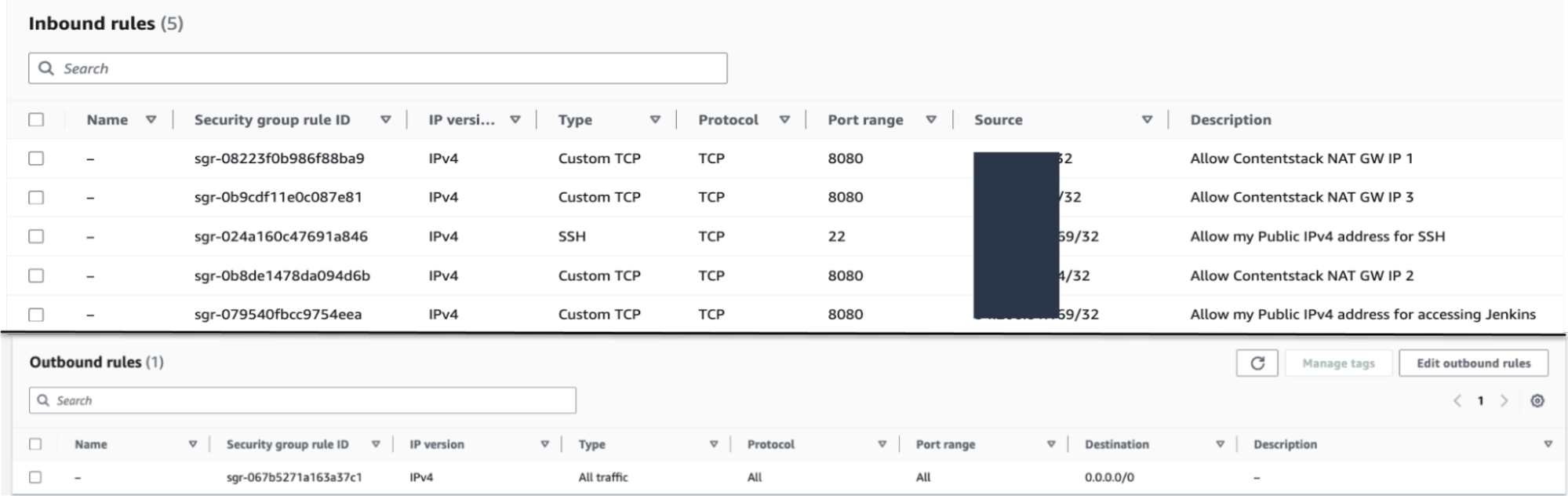
- Security group inbound rules:
Create a Jenkins job build pipeline using the shell script:
pwd

whoami


# ----- Setting up Node.js path: -----


# path of node installation to be appended here. can be found with the command - 'whereis node'


PATH=$PATH:/var/lib/jenkins/.nvm/versions/node/v20.11.0/bin

echo $PATH


# ----- Creating .env.production file: -----


cat << EOF > .env.production

CONTENTSTACK_API_KEY=xxxxxx

CONTENTSTACK_DELIVERY_TOKEN=xxxxxx

CONTENTSTACK_ENVIRONMENT=development


# For live preview


CONTENTSTACK_MANAGEMENT_TOKEN=xxxxxx

CONTENTSTACK_API_HOST=api.contentstack.io

CONTENTSTACK_APP_HOST=app.contentstack.com


CONTENTSTACK_LIVE_PREVIEW=true

CONTENTSTACK_LIVE_EDIT_TAGS=false


#sitemap generation


# For enabling live editing tags for this project set CONTENTSTACK LIVE PREVIEW=true by default it is set to false

# For EU region add CONTENTSTACK_APP_HOST=eu-app.contentstack.com

# For EU region add CONTENTSTACK_API_HOST=eu-api.contentstack.com


# By default branch=main, if a branch is not provided


CONTENTSTACK_BRANCH=main


# By default region=us, if a region is not provided


CONTENTSTACK_REGION=us

EOF


# ----- Updating Gatsby serve command: -----


# By default "gatsby serve" command serves only on localhost. This step will ensure it is served on a private, public IP interface.


sed -i 's/"serve": "gatsby serve"/"serve": "gatsby serve -H 0.0.0.0"/g' package.json


# ----- Installing dependencies and building the project: -----


npm install

npm run build

echo -e "\n\n ####### BUILD COMPLETED SUCCESSFULLY ####### \n\n"


# ----- Rsync to remote server: -----


echo -e "RSYNC TO CHINA STARTED... \n\n"

cd .. && rsync -avzhe ssh contentstack-gatsby-starter-app-build root@<EIP-of-the-China-server-created-in-next-step>:/root/

echo -e "SYNC COMPLETED SUCCESSFULLY... \n\n"
Other configurations of this pipeline:
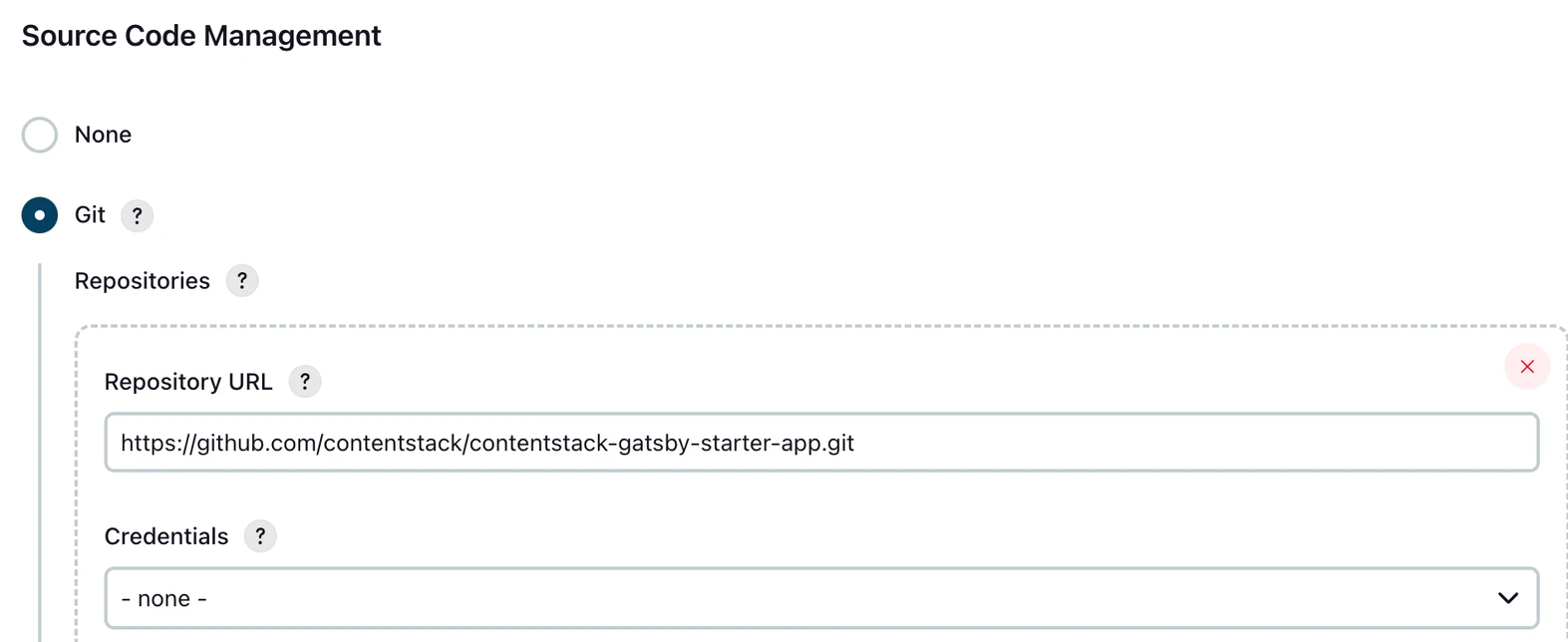
- In the Source Code Management modal select Git and add the Repository URL of your app and specify the branch to build.
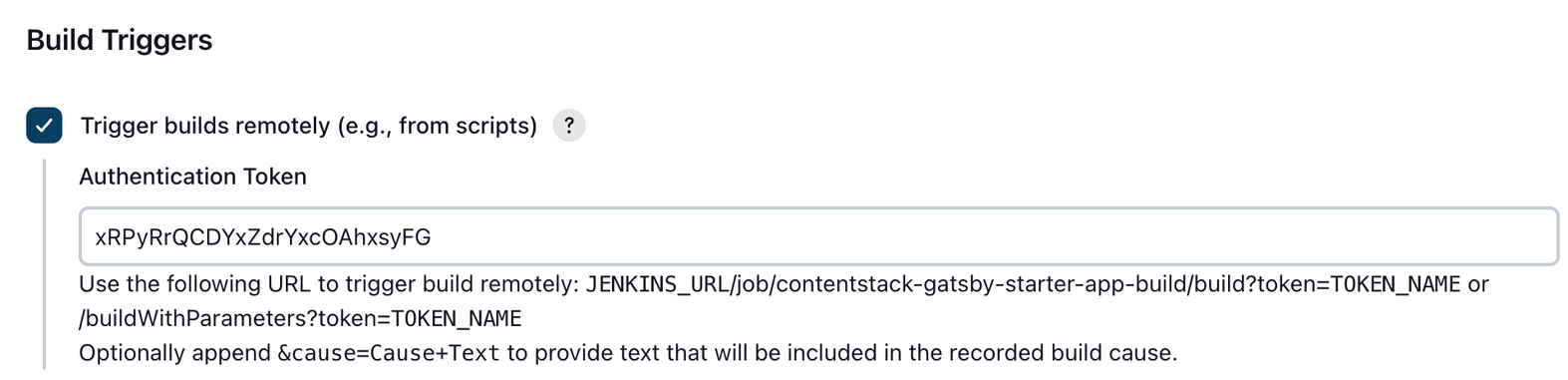
- To trigger the build remotely using webhook add a randomly generated authentication token.
- Create a user in Jenkins, for example csgatsbyremoteuser, and generate a token for this user. This user and token are used as the basic-auth credentials in the stack’s webhook configuration.
Webhook configuration in the stack:
- Navigate to Webhooks under Settings within your stack. And create a webhook as per below configurations.
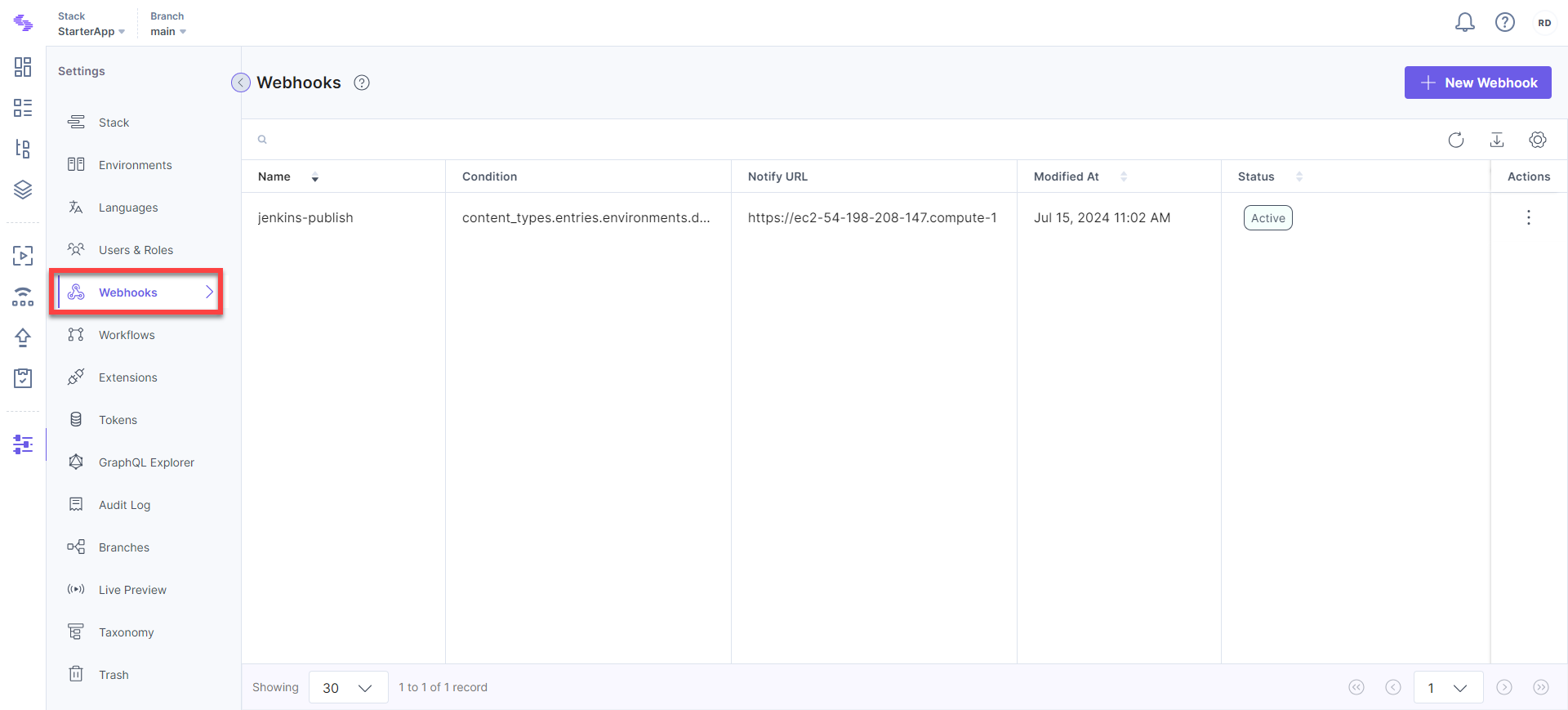
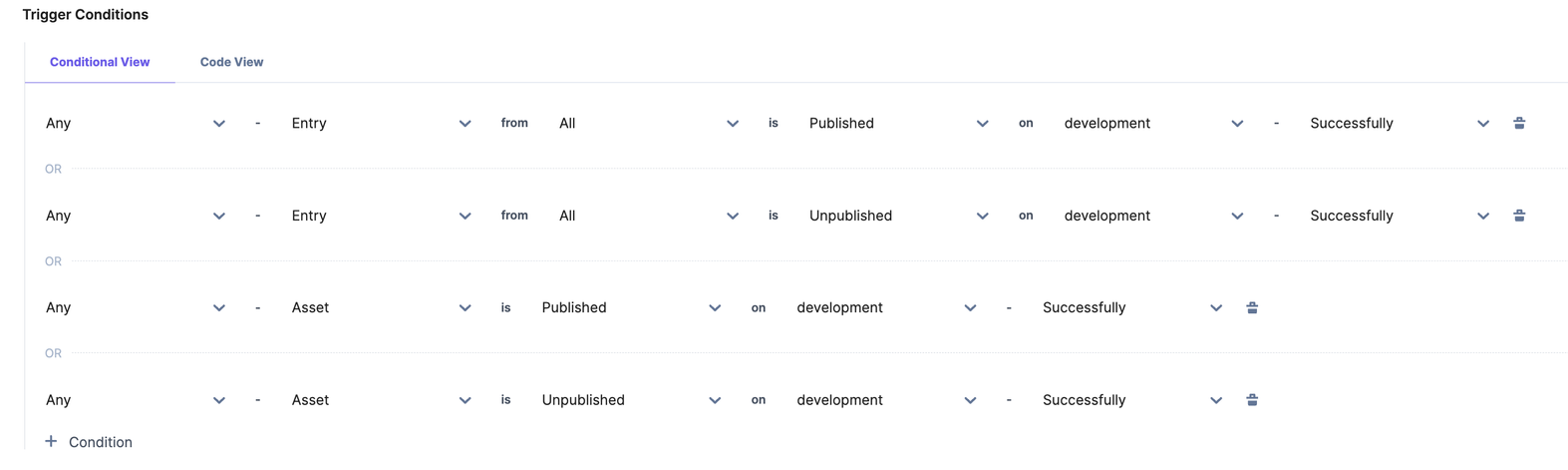
- Our purpose is to send an HTTP POST request to the webhook URL (the Jenkins endpoint in this case) for any entry or asset being published/unpublished on the selected environment.
- Create a webhook with the following configurations:
- Name: jenkins-publish
- URL to Notify: http://ec2-54-198-208-147.compute-1.amazonaws.com:8080/job/contentstack-gatsby-starter-app-build/build?token=xRPyRrQCDYxZdrYxcOAhxsyFG
HTTP Basic Auth Username: <csgatsbyremoteuser>
- HTTP Basic Auth Password: <token-generated-for-csgatsbyremoteuser-in-previous-step>
Email Addresses to Notify: <YOUR_EMAIL_ADDRESSES>
- Stack-level Scope: We don't need any stack-level scope.
- Branch-level Scope: Select the branch for which this webhook should be applicable.
- Trigger Conditions: Configure the trigger conditions as shown below.
- Tick the Enable Webhook checkbox.
Now we should be able to trigger the build whenever anything is published in the main branch of the stack in the development environment.
Preparing the Server in China
- Set up a server (Ubuntu22 OS) in the China region after obtaining an ICP license and compliance.
- Next, attach an EIP to this server. The security group should be configured in a way to expose minimum surface area for attack. Only the 9000 port has to be kept open to the world (from all IPs). And SSH port 22 should be allowed from only your public IPv4 and the Jenkins’ public IP (for rsync).
- China GFW doesn’t allow connecting to GitHub. We did not install NVM here. Directly installed node, NPM, and Gatsby in this server.
- Update the Jenkins job script created earlier with the actual EIP address of this server.
- Next, run the Jenkins job manually once to build the code and let it sync in the China server. We have synced the build in the /root/contentstack-gatsby-starter-app-build directory of the China server.
- Create a service file (/etc/systemd/system/gatsby-serve.service) with the following content:
[Unit] Description=gatsby-serve service After=network.target [Service] User=root # Here's where the build is synced from Jenkins WorkingDirectory=/root/contentstack-gatsby-starter-app-build ExecStart=/usr/bin/npm run serve Restart=always RestartSec=3 [Install] WantedBy=multi-user.target - Run the service:
systemctl start gatsby-serve
systemctl enable gatsby-serve - You should see the app running on http://EIP-of-the-server:9000/.
Make any changes in the stack by publishing an entry or asset and it should reflect in the webpage within some minutes automatically without any downtime.
Other Synchronization Mechanisms
- AWS S3: Transferring Amazon S3 data from AWS Regions to AWS Regions in China
- Azure: Azure in China cross-border connectivity and interoperability
- SFTP, Rsync, and SCP protocol
Possible Third-Party Solutions
Here are some options that can help legally accelerate and optimize your site for the Chinese audience:
- Accelerate Your Site in China Legitimately: Build a static site from GitHub and deploy it in China.
- Accelerate and secure your web properties at scale: Convert a live website into a Chinese version and deploy it in China.
More articles in "General Guides"
