

URL
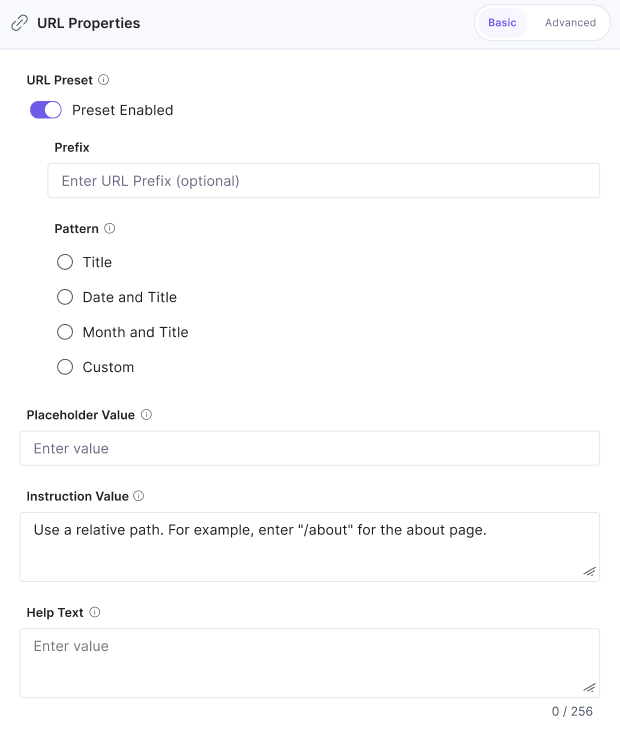
Use the URL field to define the relative path of your webpage (for example, /home or /projects/new-project) where your content is published.
You can configure field properties and set a default URL pattern for entries of a specific content type.
You can:
- Edit or overwrite the help text shown to content creators.
- Add a placeholder value to indicate the expected input format.
- Set an instructional value to guide users with examples or context.
- Mark the field as mandatory or optional depending on your content validation needs.
Tip: Use the Instruction Value to provide examples such as /about or /blog/title to guide contributors when filling out the field.
Note: You can’t set URL field properties for content types set to Single.
After you configure this field in a content type, it appears as shown below:
Note: You can only add the URL field at the parent level. It cannot be added inside modular blocks or group fields.
Enforce Unique Entry URLs Using the Content Management API
Use the Content Management API to prevent duplicate entry URLs across your stack.
To enforce unique URLs using the API, perform the following steps:
- Authenticate to Contentstack using your Authtoken and the stack’s Management Token.
- Make a request to the Add Stack Settings API. Use a REST API client (e.g., Postman) to run your API call.
- In the Body section of your request, include the "enforce_unique_urls": true parameter to maintain unique URLs across your stack.
If a duplicate URL is detected, the URL field displays an error and prevents publishing until a unique URL is entered.
Additional Resources:
- For details on configuring default patterns, refer to our Use Default URL Pattern documentation.
- You can also redirect URLs. To know more, read our documentation on Redirecting URLs.
- Learn more about Field Visibility Rules and how to configure them.
API Reference
To enforce unique entry URLs via API, refer to the Add Stack Settings API request.
More articles in "Fields"
