

Maximum Number of Terms
The Maximum Number of Terms property allows you to specify a limit of maximum terms a user can add to an entry. Once you set this limit, users will be restricted from adding terms beyond the specified maximum.
Note: The maximum number of terms allowed per entry is 25.
To set the maximum number of terms for a taxonomy, log in to your Contentstack account and go to the stack. Perform the following steps in the stack:
- Once the Content Type is created, add the required fields along with the Taxonomy field.
- Within the Taxonomy field properties, add the necessary details for the Display Name, Help Text, and Instruction Value field properties.
Note: By default, the UID for the taxonomy field is set to taxonomies and cannot be updated.
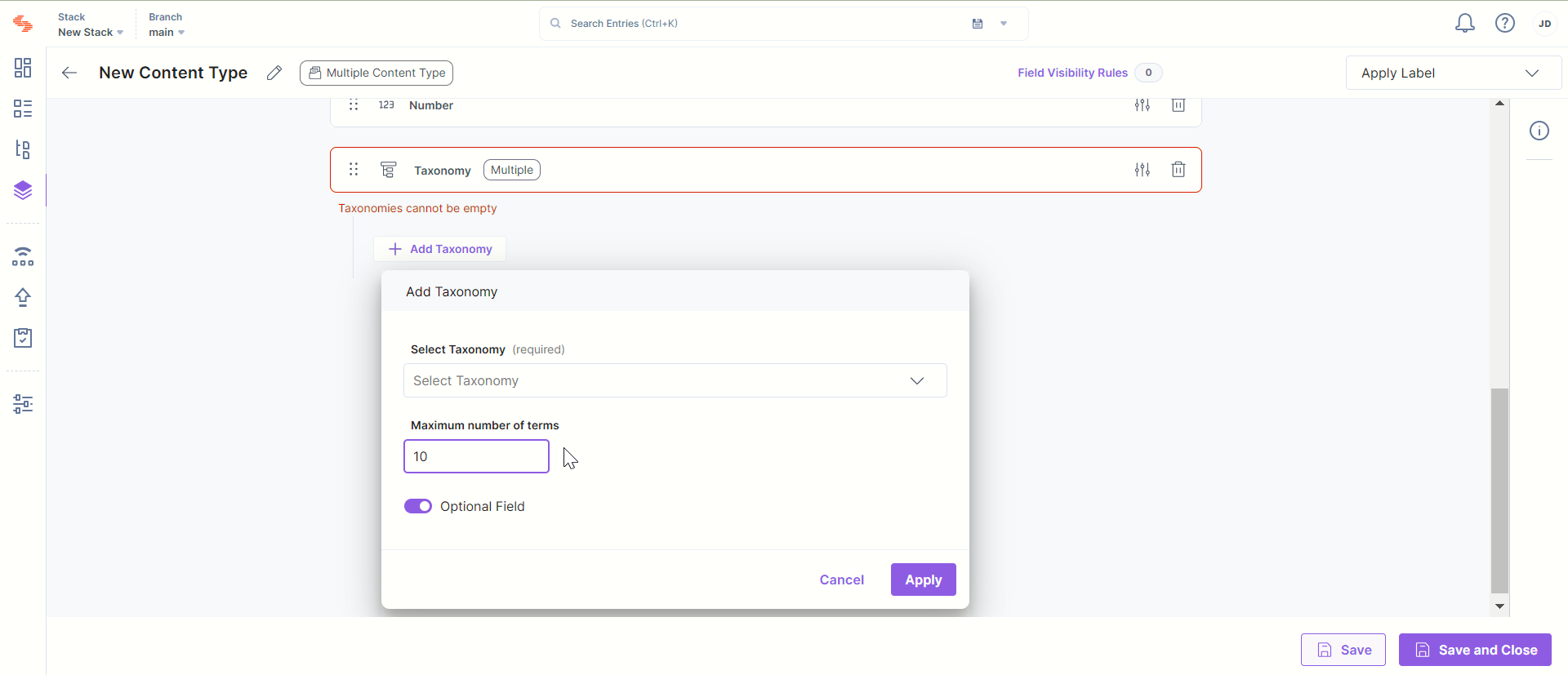
- Click on + Add Taxonomy, and in the pop-up window, select a taxonomy from the drop down menu.
- Within the Maximum Number of Terms field, enter the limit.
- Once all the details are filled, click Apply to save the changes.
Additional Resource: Refer to our Add Taxonomy to a Content Type document for more information.
Was this article helpful?
More articles in "Field Properties"
