

Compare and Merge Branches Using the CLI
Contentstack provides Branches to create multiple copies of your stack content. By default, stacks have a main branch. You can fork a branch from the main branch (parent branch) to create a new branch (child branch).
Contentstack lets you list, create, delete, compare, and merge Branches using the CLI. You can compare two branches and merge the two with the desired changes into a single branch.
This step-by-step guides you on how to create, update, delete, compare, and merge Branches using the CLI. In the CLI, the base branch refers to the target branch, while the compare branch is the source branch.
Prerequisites
- Contentstack account
- CLI installed and configured (version 1.7.0 and above)
- CLI authenticated
- Branches enabled for your organization.
Note: Contact your organization administrator for more details.
Steps to List, Create, and Delete Branches
You can list the branches in a stack, create a new branch in a stack from a base branch, and delete an existing branch from a stack.
List Branches
- Open a terminal.
- Run the following command to list the available branches:
csdx cm:branches - The CLI prompts you to enter a Stack API key. To list the branches of a specific stack, enter its Stack API key.
You can see the branches for the specific stack displayed.
Alternatively, you can pass the Stack API key in the command as given below:
csdx cm:branches --stack-api-key <value>You can also view the list in a detailed view using the verbose flag:
csdx cm:branches --verbose
Usage
csdx cm:branchesor
csdx cm:branches -k <value>or
csdx cm:branches --stack-api-key <value>Options
- -k, --stack-api-key=stack-api-key: Stack API key.
- --verbose: Display information in detailed format.
Create a Branch
- Open a terminal.
- Run the following command to create a new branch:
csdx cm:branches:create - Enter the Stack API key of the stack for which you want to create a branch.
- Enter a source branch for the branch you want to create.
- Enter a unique ID (name) for branch UID.
You have successfully created a new branch.
Alternatively, you can pass the Stack API key, source, and UID in the command as given below:
csdx cm:branches:create --stack-api-key <value> --source <value> --uid <value>Limitations
- The branch UID must be in lowercase. Only ‘_’ can be used to separate two words.
- The UID must not exceed 15 characters.
- The maximum number of branches allowed per stack depends on the product tier.
- Once you create a branch, you cannot edit its name or the source branch.
Usage
csdx cm:branches:createor
csdx cm:branches:create --stack-api-key <value> --source <value> --uid <value>Options
- -k, --stack-api-key=stack-api-key: Stack API key.
- --source=source: Source branch to use for creating the new branch.
- --uid=uid: Branch UID (unique name) to be created.
Delete a Branch
- Open a terminal.
- Run the following command to delete a branch:
csdx cm:branches:delete - Enter the Stack API key of the stack from which you want to delete a branch.
- Enter the UID of the branch you want to delete.
- To confirm the deletion, you are prompted to type the name of the branch you want to delete.
You have successfully deleted a branch.
Alternatively, you can pass the Stack API key and UID in the command as given below, and then in the following step, when prompted, enter the name of the branch to confirm the deletion.
csdx cm:branches:delete --stack-api-key <value> --uid <value>To skip confirmation and delete the branch forcefully:
csdx cm:branches:delete --stack-api-key <value> --uid <value> --yesUsage
csdx cm:branches:deleteor
csdx cm:branches:delete --stack-api-key <value> --uid <value>or
csdx cm:branches:delete --stack-api-key <value> --uid <value> --yesOptions
- -k, --stack-api-key=stack-api-key: Stack API key.
- --uid=uid: Branch UID to be deleted.
- -y, --yes: Force the deletion of the branch by skipping the confirmation.
Examples
- To list out the branches in a stack:
csdx cm:branches --stack-api-key bltxxxxxxxx7 - To create a new branch in a stack:
csdx cm:branches:create --stack-api-key bltxxxxxxxx7 --source test1 --uid test2 - To delete a branch from a stack:
csdx cm:branches:delete --stack-api-key bltxxxxxxxx7 --uid test2
Steps to Configure Base Branches
You can set, get, or remove the default base branch for a stack. This will be used as the default base branch when performing a compare or merge command and will act as the target branch where the final changes will be merged during the merge operation.
Set
- Run the following command to set a base branch:
csdx config:set:base-branch - Enter the Stack API key of the stack where you want to set the base branch.
- Enter the name of the branch you want to set as the base branch.
Alternatively, you can pass the Stack API key and base branch name in the command as given below:
csdx config:set:base-branch --stack-api-key <value> --base-branch <value>
Usage
csdx config:set:base-branchor
csdx config:set:base-branch --stack-api-key <value> --base-branch <value>Options
- -k, --stack-api-key=stack-api-key: Stack API key.
- --base-branch=base-branch: Base branch (Target branch).
Get
- Run the following command to get the base branch:
csdx config:get:base-branchThe base branch will be displayed along with the Stack API key.
Usage
csdx config:get:base-branchRemove
- Run the following command to remove a base branch:
csdx config:remove:base-branch - Enter the Stack API key of the stack for which you want to remove the base branch.
- When prompted, enter Y to remove the base branch.
Alternatively, you can pass the Stack API key in the command as given below, and then when prompted, enter Y to remove the base branch.
csdx config:remove:base-branch --stack-api-key <value>To forcefully remove the base branch by bypassing the confirmation step, pass the command as given below:
csdx config:remove:base-branch --stack-api-key <value> --yes
Usage
csdx config:remove:base-branchor
csdx config:remove:base-branch --stack-api-key <value>or
csdx config:remove:base-branch --stack-api-key <value> --yesOptions
- -k, --stack-api-key=stack-api-key: Stack API key.
- -y, --yes: Force remove.
Examples
- To set a base branch in a stack:
csdx config:set:base-branch --stack-api-key bltxxxxxxxx7 --base-branch test2 - To remove the base branch from a stack:
csdx config:remove:base-branch --stack-api-key bltxxxxxxxx7 --yes
Steps to Compare Branches
Follow the steps below to compare two branches:
- Run the following command to compare two branches:
csdx cm:branches:diff - Enter the Stack API key of the stack where you want to compare branches.
- Enter the name of the base branch.
- Enter the name of the compare branch.
- When prompted, select a specific module or all modules of the branch to compare.
Alternatively, you can pass the Stack API key, base branch (target branch), and compare branch (source branch) in the command as given below:
csdx cm:branches:diff --stack-api-key <value> --base-branch <value> --compare-branch <value> --module <value>Note: To choose a base branch other than the default, specify the --base-branch flag as given in the command above.
You get the comparison results as displayed below:
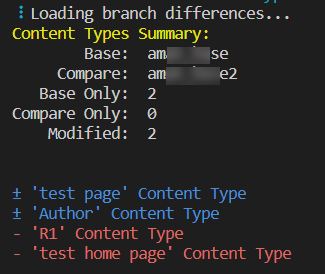
The CLI displays the branch comparison summary along with the modules affected.
- Pass the format flag as given below to get detailed branch comparison results.
csdx cm:branches:diff --stack-api-key <value> --base-branch <value> --compare-branch <value> --format detailed-textYou get the detailed comparison results as displayed below:
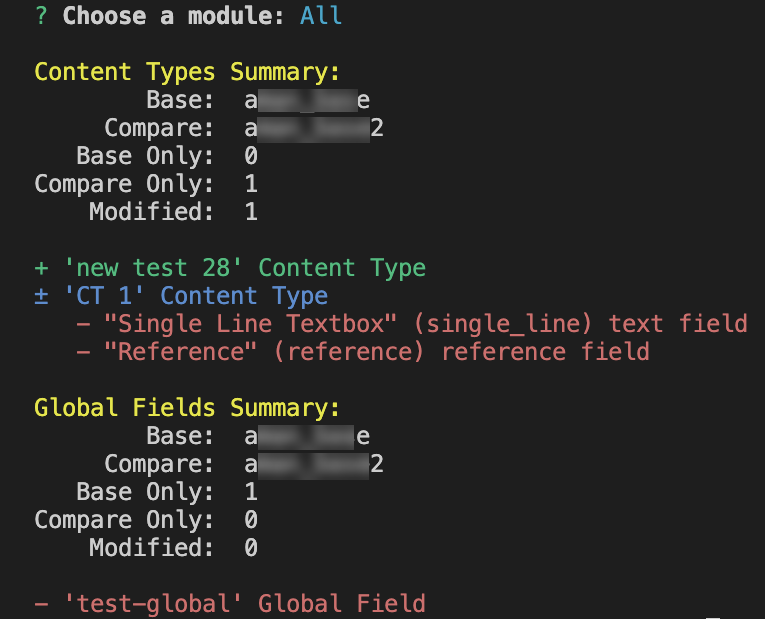
This displays the branch comparison summary, showing modules and the affected sub-modules. In our example, the content types are displayed along with their fields.
The comparison results are distinguished based on the following:
- A “+” symbol with green highlighted text: Indicates that this is present only in the compare branch.
- A “±” symbol with blue highlighted text: Indicates that this is present in both branches, but has different values between them.
- A “-” symbol with red highlighted text: Indicates that this is not present in the compare branch.
Usage
csdx cm:branches:diffor
csdx cm:branches:diff --stack-api-key <value> --base-branch <value> --compare-branch <value> --module <value>or
csdx cm:branches:diff --stack-api-key <value> --base-branch <value> --compare-branch <value> --module <value> --format <value>Options
- --base-branch=base-branch: Base branch (Target branch).
- --compare-branch=compare-branch: Compare branch (Source branch).
- -k, --stack-api-key=stack-api-key: Provide the Stack API key to show the difference between branches.
- --module=module: Module. <options: 'content-types', 'global-fields', 'all'>
- --format=format: [default: 'compact-text'] [Optional] Type of flags to show the difference between two branches. <options: 'compact-text', 'detailed-text'>
- --csv-path=<path>: [optional] Custom path for the CSV output file. If not provided, the system uses the current working directory.
Examples
- To compare the content types between two branches:
csdx cm:branches:diff --stack-api-key bltxxxxxxxx --base-branch main --compare-branch develop --module content-types - To compare the global fields between two branches with format:
csdx cm:branches:diff --stack-api-key bltxxxxxxxx --base-branch main --compare-branch develop --module global-fields --format detailed-text - To compare the global fields between two branches with format, providing a custom path for CSV file:
csdx cm:branches:diff --stack-api-key bltxxxxxxxx --base-branch main --compare-branch develop --module global-fields --format detailed-text --csv-path "/path/to/folder"Note: When you use --format "detailed-text", the command also generates a CSV file for easier analysis and reporting of branch differences. You can use the --csv-path flag to choose where the file is saved. If you select --format "compact-text", the --csv-path flag is ignored.
Steps to Merge Branches
Follow the steps below to merge two branches:
- Run the following command to merge two branches:
csdx cm:branches:merge - Enter the Stack API key of the stack where you want to merge the branches.
- Enter the name of the base branch.
- Enter the name of the compare branch. By default, the current base branch is used.
Alternatively, you can pass the Stack API key, base branch (target branch), and compare branch (source branch) in the command as given below:
csdx cm:branches:merge --stack-api-key <value> --base-branch <value> --compare-branch <value>Note: To choose a base branch other than the default, specify the --base-branch flag as given in the command above.
The branches' compare results will be displayed for individual modules as Content Types Summary and Global Fields Summary.
- Choose a merge strategy from the displayed list.
- Merge, Prefer Base: Adds all changes from the compare branch to the base branch. In case of any conflicts, the preference goes to the base branch.
- Merge, Prefer Compare: Adds all changes from the compare branch to the base branch. In case of any conflicts, the preference goes to the compare branch.
- Merge, Ask for Preference: Asks you to choose how you want to merge every difference individually at the content type or global field level.
- Overwrite with Compare: Replaces the base branch with the compare branch. Anything in the base branch that is not in the compare branch is removed.
The following table contains an example of field changes to a content type between the base branch and compare branch, and explains how the changes are merged based on the merge strategy you choose:
Base Branch Compare Branch Merge, Prefer Base Merge, Prefer Compare Overwrite with Compare Is conflict? Title (unchanged)
Title (unchanged)
Title (unchanged)
Title (unchanged)
Title (unchanged)
No
Categories (present)
(not present)
Categories (from Base)
Categories (from Base)
No
Feature B (renamed/reconfigured)
Feature C (renamed/reconfigured)
Feature B (from Base)
Feature C (from Compare)
Feature C (from Compare)
Yes
(not present)
SEO Description (present)
SEO Description (from Compare)
SEO Description (from Compare)
SEO Description (from Compare)
No
Topics
Topics (from Base)
Topics (from Base)
(removed from Base)
No
- If you choose Merge, Prefer Base or Merge, Prefer Compare from step 4, choose what you want to merge from the following list:
- New in Compare Only: Adds only new items from the compare branch to the base branch. All the items that are modified are ignored.
- Modified Only: Adds only modified items from the compare branch to the base branch. All the items that are new are ignored.
- Both: Adds both new and modified items from the compare branch to the base branch.
- Go Back: Takes you back to the previous step.
- Start Over: Takes you back to step 4.
The following table contains the content types in the base branch and compare branch, explaining how data is merged based on the merge strategy preference you choose:
Base Branch Compare Branch Merge New in Compare Only Merge Modified Only, Prefer Base Merge, Modified Only, Prefer Compare Title
Title
Title
Title
Title
Categories
Categories
Categories
Categories
Feature B
Feature C
Feature B
Feature B
Feature C
SEO Description
SEO Description
SEO Description
Topics
Topics
Topics
- If you choose Overwrite with Compare from step 4, or New in Compare Only, Modified Only, or Both from step 5, choose what you want to do next from the following list:
- Execute Merge: Executes the merge action and exports the merge result summary to the specified location.
- Export Merge Summary: Exports the merge result summary to the specified location but does not execute the merge action. This can be used to apply the merge later.
- Execute Merge and Generate Content Migration Scripts: Executes merge action, exports merge result summary to the specified location, and generates the entries migration script.
- Export Summary and Generate Content Migration Scripts: Exports merge result summary to the specified location and generates the entries migration script.
- Go Back: Takes you back to the previous step.
- Start Over: Takes you back to step 4.
- If you choose Execute Merge and Generate Content Migration Scripts or Export Summary and Generate Content Migration Scripts from step 6, choose what you want to do next from the following list:
- Both existing and new: Generates script for both new and modified entries.
- New only: Generates script for the new entries.
- Existing only: Generates script for the updated entries.
- Ask for preference: If you choose this option, the following table displays:
Choose what you want to do next from the following list: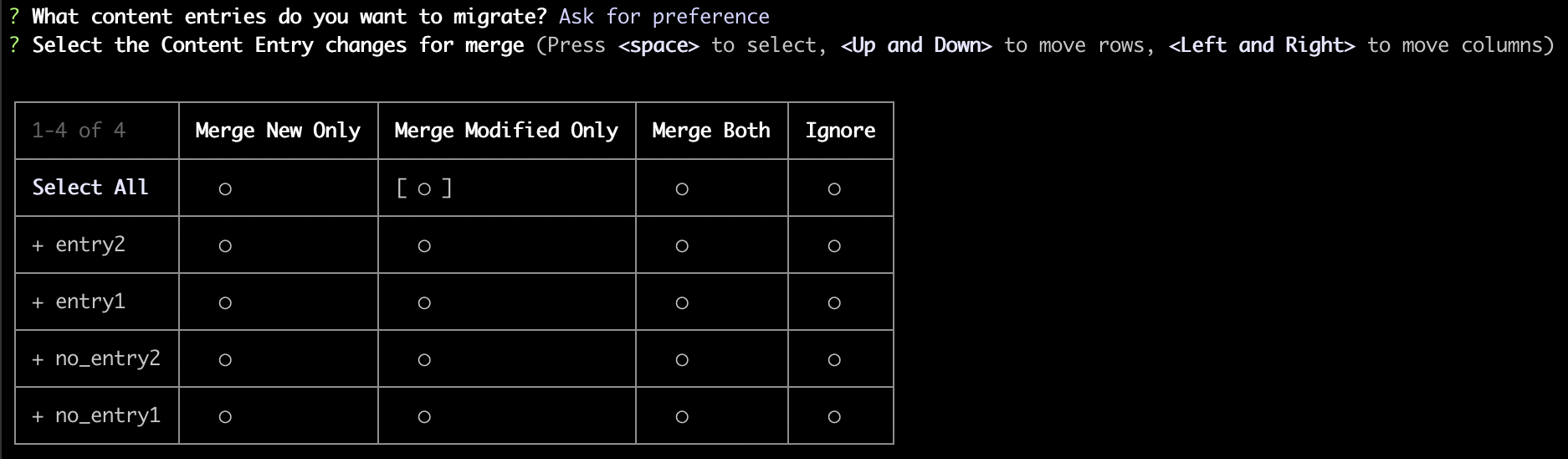
- Merge New Only: Generates script for the new entries.
- Merge Modified Only: Generates script for the updated entries.
- Merge Both: Generates script for both new and modified entries.
- Ignore: Ignores entries from a particular content-type.
- If you choose Merge, Ask for Preference from step 4, follow the steps below:
- Select the content type changes for merge from the provided tabular column. With this, you can choose to modify/add/remove only those content types from a selected branch during the merge operation.
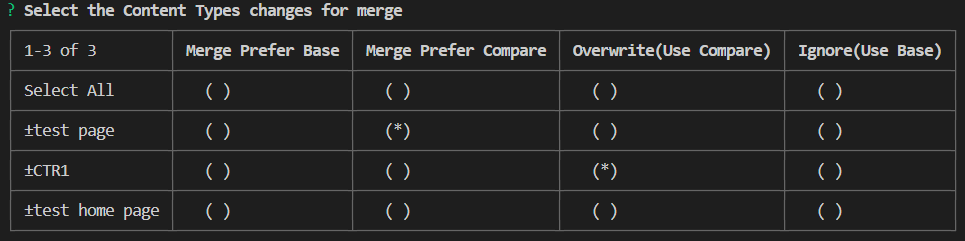
Note: To ignore the changes in the compare branch for a specific content type, select the Ignore(Use Base) option for that content type.
Tip: Use the arrow keys to move along the table cells and then hit the spacebar to make the selection.
- Select the global field changes for merge from the provided tabular column. With this, you can choose to modify/add/remove only those global fields from a selected branch during the merge operation.

Note: To ignore the changes in the compare branch for a specific global field, select the Ignore(Use Base) option for that global field.
- In the next step, choose what you want to merge from the following list:
- Execute Merge: Executes the merge action and exports the merge result summary to the specified location.
- Export Merge Summary: Exports the merge result summary to the specified location but does not execute the merge action.
- Execute Merge and Generate Content Migration Scripts: Executes merge action, exports merge result summary to the specified location, and generates the entries migration script.
- Export Summary and Generate Content Migration Scripts: Exports merge result summary to the specified location and generates the entries migration script.
- Go Back: Takes you back to the previous step.
- Start Over: Takes you back to step 4.
- If you choose Execute Merge and Generate Content Migration Scripts or Export Summary and Generate Content Migration Scripts from the above step, follow the steps in step 7.
- Select the content type changes for merge from the provided tabular column. With this, you can choose to modify/add/remove only those content types from a selected branch during the merge operation.
With this, the merge operation is completed, and the Entry Migration files generated are placed in the “YYYYMMDDHHMMSS_bltxxx” folder under merge_scripts folder in the current working directory.
Usage
csdx cm:branches:mergeor
csdx cm:branches:merge --stack-api-key <value> --base-branch <value> --compare-branch <value>Options
- -k, --stack-api-key=stack-api-key: Provide the Stack API key to show the difference between branches.
- --base-branch=base-branch: Base Branch (Target branch).
- --compare-branch=compare-branch: Compare branch (Source branch).
- --comment=comment: Pass a comment.
- --export-summary-path=export-summary-path: Export summary file path.
- --use-merge-summary=use-merge-summary: Path of merge summary file.
- --no-revert: If passed, will not create the new revert branch.
Examples
- To merge feature-branch with the base branch for a stack:
csdx cm:branches:merge --stack-api-key bltxxxxxxxx --compare-branch feature-branch - To merge branches and export the results summary to a file path:
csdx cm:branches:merge --export-summary-path "/file/path"
More articles in "Contentstack CLI Core Commands"
