

Status
The Status panel in Visual Editor gives you an overview of the current entry along with other entries linked or referenced within the web page.
To access the status of a web page using Visual Editor, log in to your Contentstack account and perform the following steps:
- Navigate to your stack and select Visual Experience.
- Click Editor in the bottom pill menu.
- In the right sidebar, click the Status icon. The panel appears, providing details of the selected page.
- Expand the relevant sections in the panel to view the following details:
- Basic Information: Displays details such as entry ID, content type ID, creator, creation date, last modified by, and last modified date.
- Referenced In: Lists all entries that reference the selected entry.
- Localization Status: Shows all languages where the entry is localized and highlights those where it is not.
- Publish Status: Displays the entry’s publish details, including environment, version, publish date and time, and the user who published it.
- Release Status: Lists all scheduled releases for the selected entry.
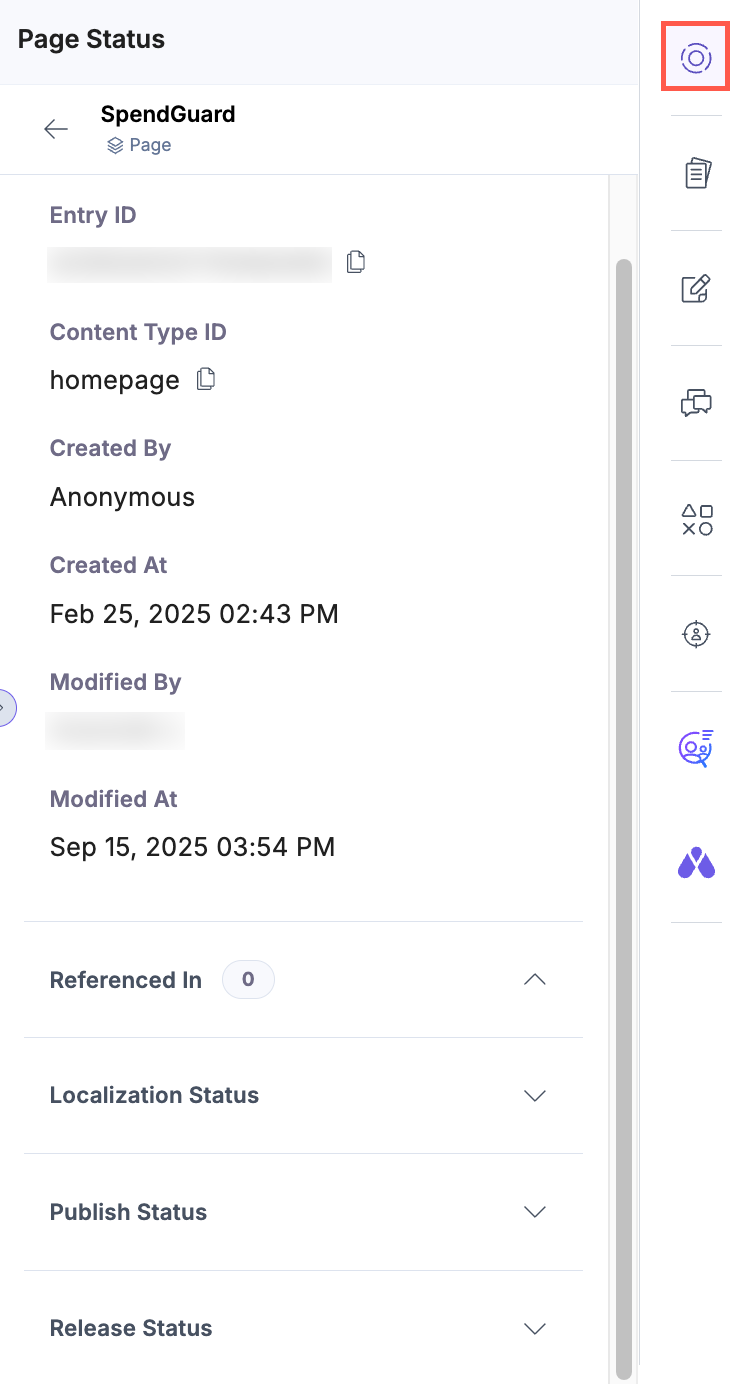
Use the Status panel to quickly monitor each entry’s content, localization, and publish status.
Was this article helpful?
More articles in "Visual Editor Tools"
