

Automate
The Visual Editor enables you to run automation workflows configured by your team directly from the page editing interface. By accessing the Automate App, you can trigger actions such as validations, approvals, or custom processes. Automating common tasks saves time and ensures consistency.
Note: The Automate app reflects workflows configured in your stack. If no automation is available, you can create new workflows to begin streamlining your content operations.
To access the Automate feature in Visual Editor, log in to your Contentstack account and perform the following steps:
- Navigate to your stack and select Visual Experience.
- Click Editor in the bottom pill menu.
- In the right panel, click the Automate icon.
- The sidebar shows available workflows or automation triggers for the current entry variant. Click the “Run” icon to trigger automation.
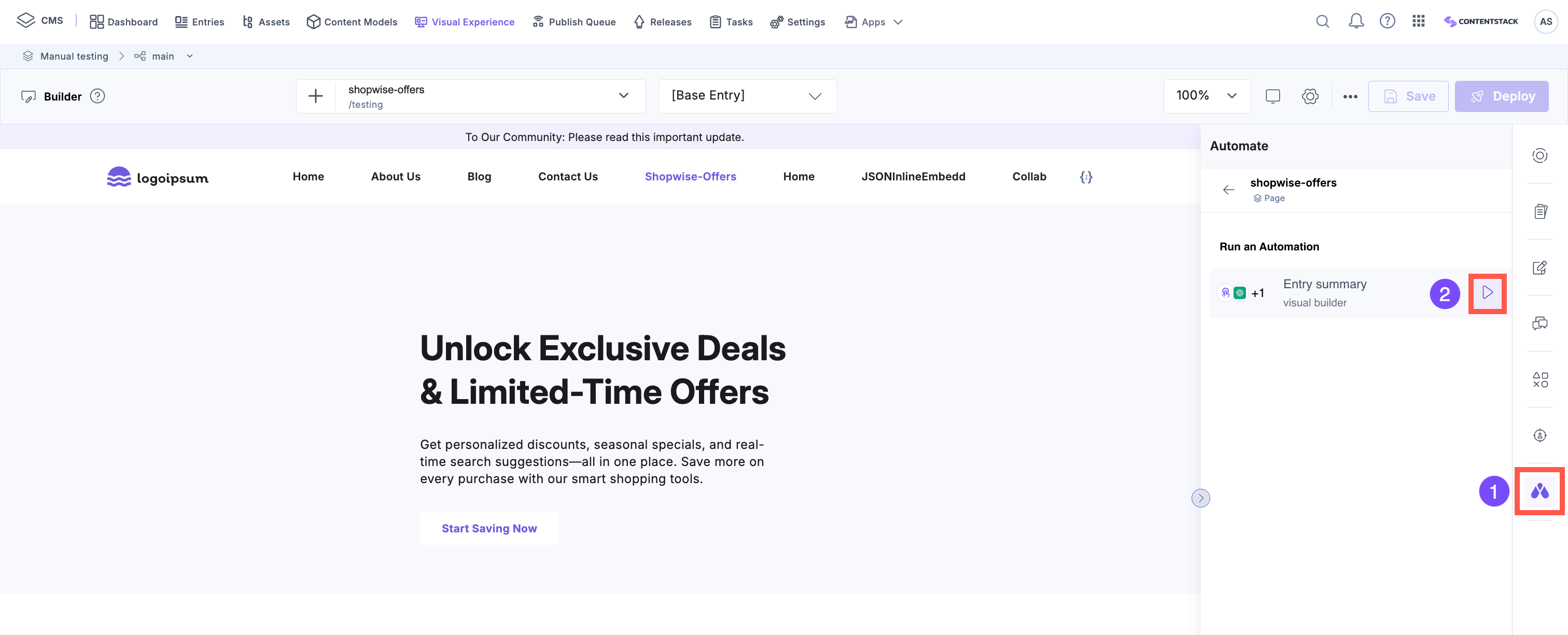
- In the modal that appears, click Yes to confirm your action.
- To trigger automation for a different entry, click the “Back” button to return to the entries list, then select the desired entry to load its automation interface. Alternatively, you can switch entries using the URL bar.
Note: The available automations may vary depending on the selected entry’s content type.
Using Automate, you can reduce manual work and keep your content publishing workflows consistent and efficient.
More articles in "Visual Editor Tools"
