

Name Entry Versions
Assigning custom names to versions can help you better organize and identify specific versions of your entries for improved content management.
By default, Contentstack assigns a version number to each entry (e.g., "Version 1," "Version 2," etc.) . To make versions easier to identify, you can assign custom names, such as"Production Ready" or "Do Not Edit."
Note: You can also name specific versions of a variant entry. For more information, refer to the Name Entry Variant Versions documentation.
To name an entry version, log in to your Contentstack account, and perform the following steps:
- Go to your stack and click the “Entries” icon.
- Navigate to the entry you want to modify.
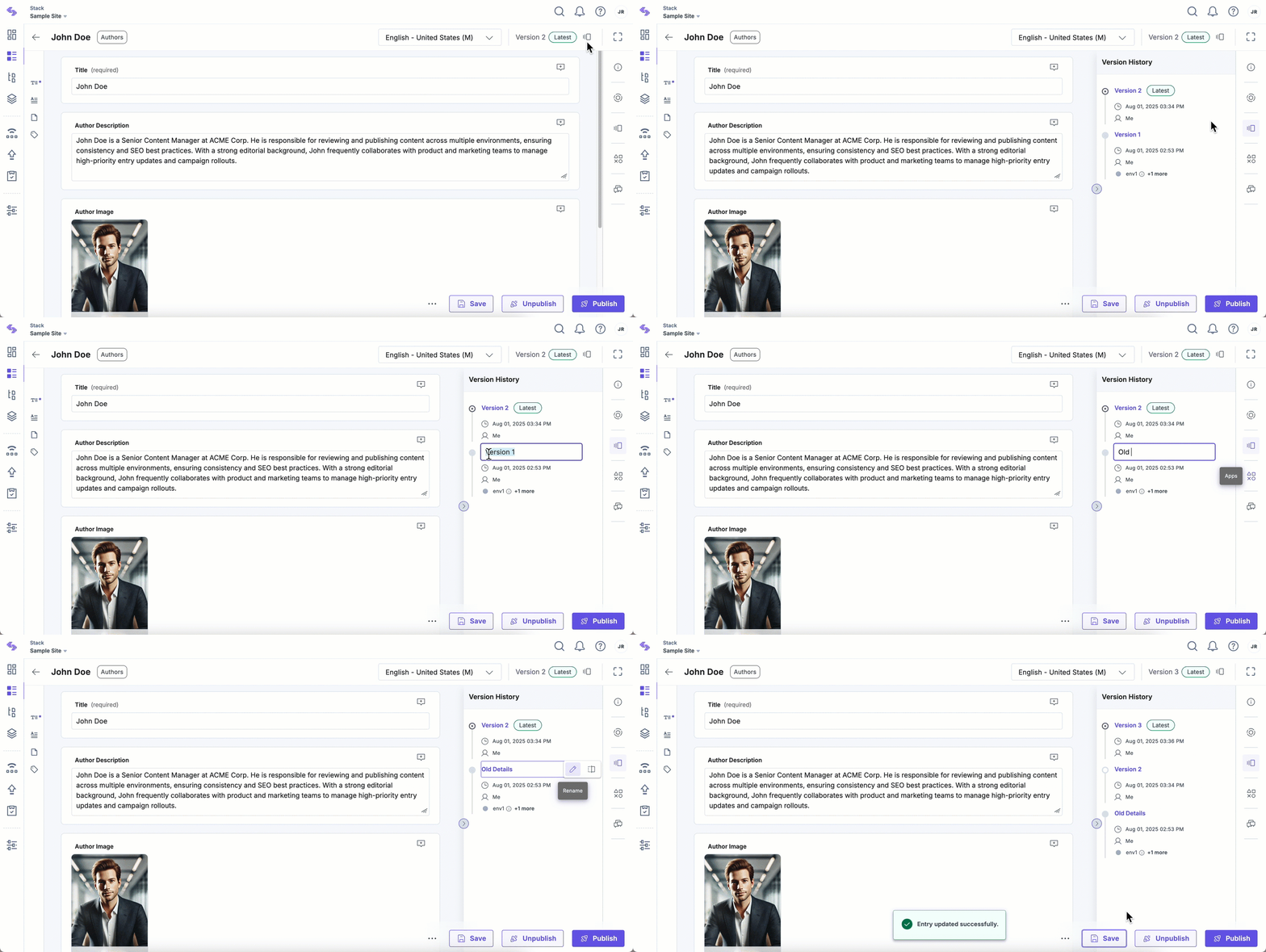
- Click the version icon in the top-right corner of the entry editor, or use the “Versions” icon in the right sidebar to open the Version History panel.
- Locate the version you want to name. Hover over it and click the “Rename” icon.
- Enter a custom name and confirm your changes by pressing “Enter” on your keyboard.
Note: Version names can include only alphanumeric characters, spaces, hyphens, or underscores. Special characters such as slashes or symbols are not supported.
Note: Custom version names have a maximum limit of 32 characters.
