

Compare Entry Versions
Contentstack enables you to compare any two versions of an entry side-by-side on the same screen. With a color-coded comparison view, you can easily identify differences between the selected entry versions.
You can also compare versions of the same entry in different languages. For instance, compare the version 4 in English with version 2 in German to spot differences across translations.
To compare versions of an entry, log in to your Contentstack account, and perform the following steps:
- Go to your stack and click the “Entries”.
- Navigate to the entry you want to compare.
- Click the version icon in the top-right corner of the page or the “Versions” icon in the right sidebar.
- Locate the entry you want to compare with the current selected version. Hover over it and click the “Compare” icon.
- The comparison view will display the two selected versions side-by-side. Changes will be highlighted using color coding, making it easy to identify differences.
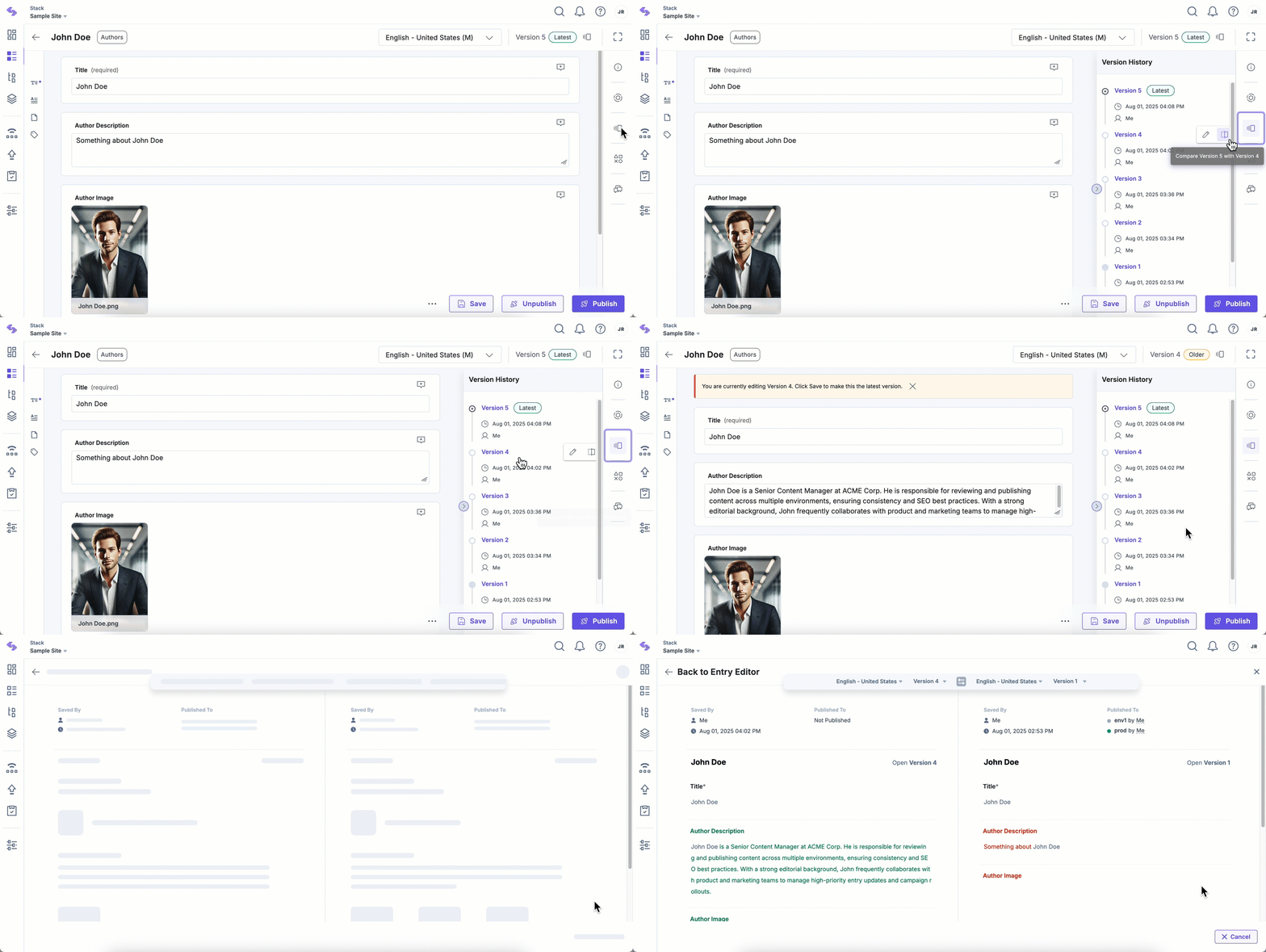
If needed, you can switch to a different version or select another language for comparison by using the dropdown menus in the comparison view.
The ability to compare entry versions side-by-side ensures transparency and simplifies version management in Contentstack. By utilizing the color-coded comparison view and multi-language support, you can effortlessly review and track changes, ensuring your content stays accurate and consistent across versions and languages.
More articles in "Manage Entry Versions"
