

Compare Drafts and Versions
Note: Drafts and Auto Save is currently part of an Early Access Program and may not be available to all users. Contact the Contentstack support team for more information.
Drafts and Auto Save automatically stores changes while you edit an entry. Over time, an entry may include:
- A saved version (major version)
- A draft containing unsaved changes
- Multiple minor auto-saved updates within the draft
Use the Compare feature to review differences between drafts and saved versions before you decide to save, publish, or discard changes.
Comparing changes helps you:
- Prevent accidental overwrites
- Review collaborative edits
- Validate updates before creating a new version
- Maintain an accurate version history
When to Use Compare
Use Compare in the following scenarios:
- You want to review draft changes before publishing
- Another user edited the entry, and you need to verify their updates
- You plan to discard a draft and want to confirm what will be removed
- You need to compare two saved versions for audit or review purposes
Comparing changes before confirming updates helps reduce unnecessary version creation and prevents unintended changes.
Note: To use the Compare feature, the entry must have at least one saved version and a draft with changes. The draft can then be compared with the most recent saved version.
Access Compare Mode
To compare a draft with a saved version:
- Open the required entry.
- Click the Versions icon in the right sidebar.
- In the version panel, locate:
- The current draft (for example, “V2 draft”), or
- Any previous saved version.
- Click Compare next to the version you want to review.
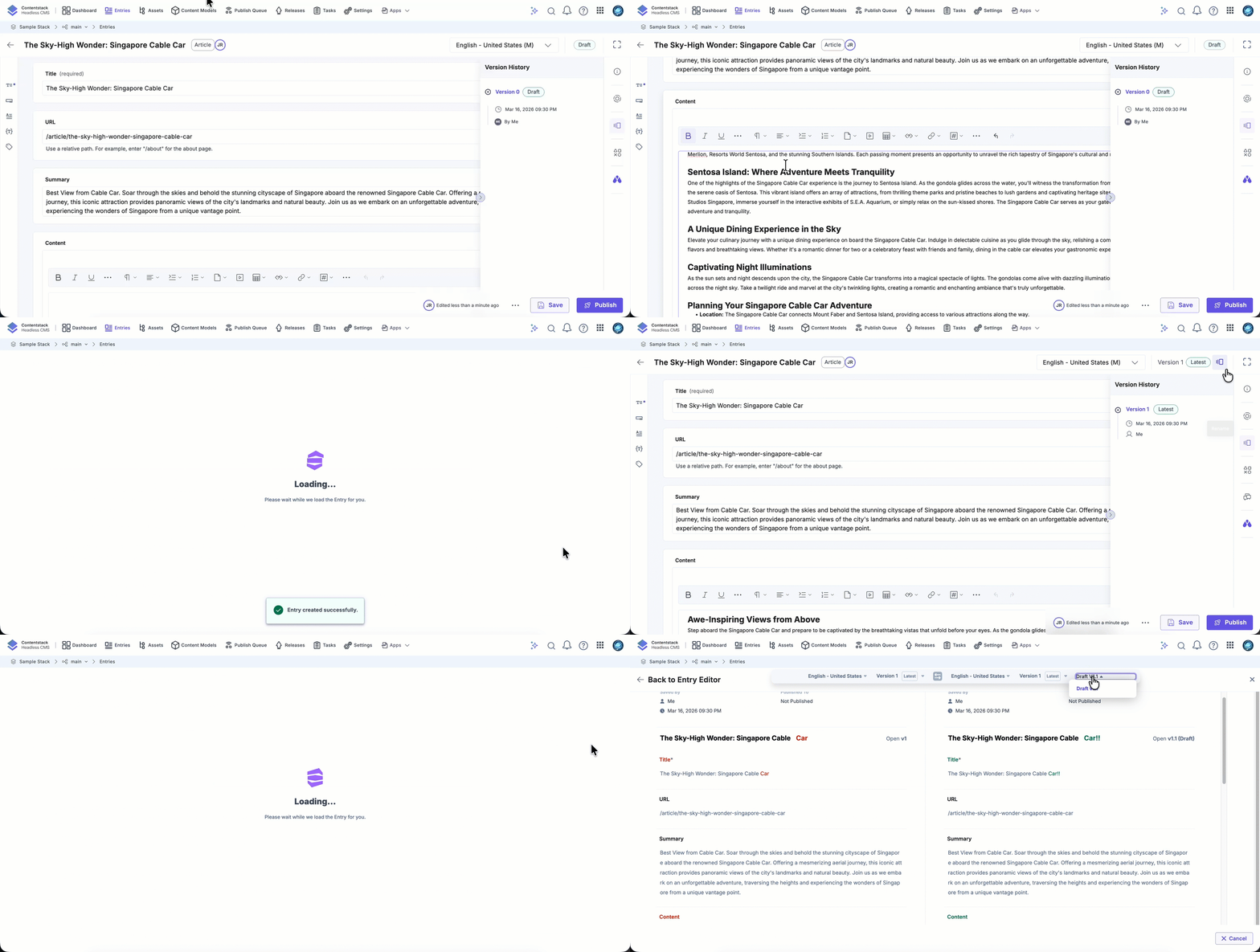
The system opens Compare mode and displays a side-by-side or inline difference view.
Note: Draft versions are retained only for the five most recent major versions of an entry. When newer major versions are created, draft updates associated with older major versions are automatically removed. As a result, only recent drafts appear in the version comparison panel.
Understanding the Compare View
The Compare screen highlights differences between the selected versions.
- Added content appears highlighted
- Deleted content is clearly marked
- Modified fields show inline differences
- Field-level changes are grouped under their respective fields
For container fields such as Group or Modular Blocks, the view reflects content updates and structural changes (for example, reordered or deleted blocks)
The compare view reflects:
- Text edits
- Field value updates
- Reference changes
- File updates
- Structural modifications
This allows you to review both content and layout changes.
Comparing a Draft and a Saved Version
When comparing a draft with the latest saved version:
- The saved version acts as the baseline
- The draft includes all unsaved changes
- Minor draft updates are grouped in the comparison view
Use this comparison to:
- Review collaborative changes before publishing
- Confirm that no unintended edits were introduced
- Validate content before creating a new major version
The Compare feature allows you to review draft and version differences before committing changes. By understanding how drafts and major versions interact, you can prevent accidental updates, manage collaboration safely, and maintain a structured version history.
More articles in "Drafts and Auto Save"
