Keeping content organized and secure with Teams & Taxonomy
.jpeg)
As content repositories grow larger and more complex, content management can become increasingly difficult without the right organizational structures in place. To help enterprises tackle these challenges, we have introduced two distinct powerful capabilities – Teams and Taxonomy. We’re excited to announce that both features are now generally available to all our customers! This is a significant addition to the Contentstack CMS, allowing our customers to scale content organization, team management, and role-based permissions, enabling users to easily manage large and complex data structures while maintaining content security and separation.
What is Teams?
Teams delivers simplified team management and content ownership. Organizations can create any number of teams with configurable visibility and privacy settings. Granular role-based permissions are set at the team level, streamlining access control across large groups. Stacks and Roles can be efficiently assigned in bulk at the team level. As needs shift, members can be added or removed fluidly. For content security, Teams acts as governance boundaries – all created content is owned by the content author's team. This simplifies cross-team collaboration while maintaining separation simultaneously.
Core features
For developers
- Create and Delete teams: As an organization owner/admin, you can create teams with privacy settings that suit your needs. Delete teams as necessary to maintain organizational structure.
- Stack and Role assignment: Assign specific stacks and roles to teams for streamlined content management. Remove stacks and roles when necessary.
- Team Management dashboard: Empower organization admins and owners with a comprehensive dashboard to manage teams, members, and permissions effortlessly at an enterprise scale.
For business users
- Organization-level team: Create dedicated teams where members can view, create, and publish content independently, fostering efficient teamwork.
- Team visibility privacy: Customize team visibility options to hide teams from everyone (Private) or make them open to all (Public).
- Manage team members: Seamlessly add or remove team members as your project requirements evolve.
What is Taxonomy?
Taxonomy enables advanced content classification using flexible metadata schemas. Content can be organized hierarchically, relationally, or in flat lists. This metadata-driven approach helps manage vast content volumes and complex relationships within the content graph. Practical applications include modeling site navigation structures, product categories, regional info, customer segments, and more.
Developers can define custom taxonomies, create nested terms, import/export structures as CSV, and tie taxonomy schemas directly to content types. On the editor side, content editors can intuitively navigate and search content using taxonomy facets. Taxonomy brings order and consistency to headless content in a way legacy CMS categories never could.
Core features
For developers
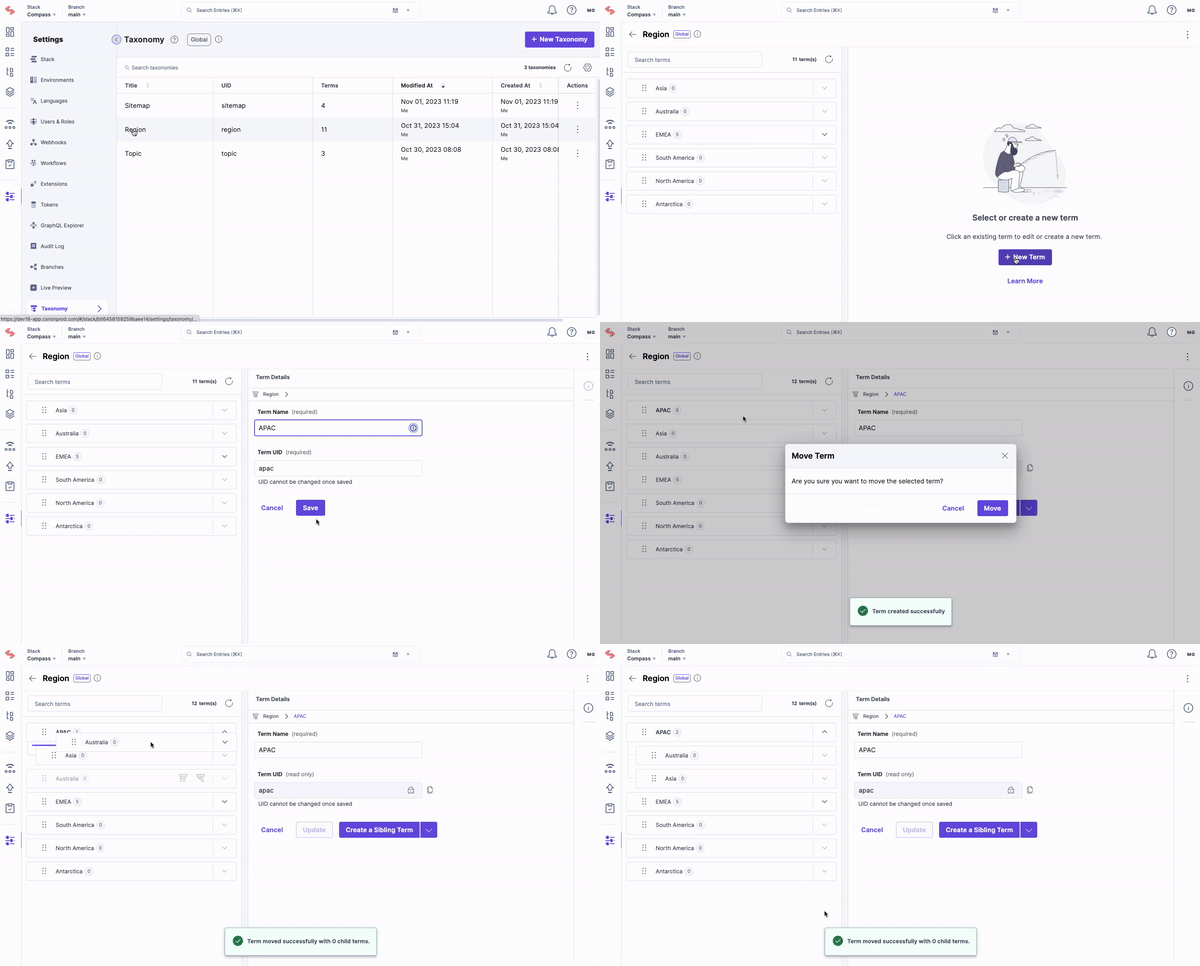
- Create: Create new taxonomies and terms. Developers can create sibling and child terms to establish a hierarchical structure for better content organization.
- Import & Export: Import one set of taxonomies and terms at a time, including nested terms, which helps save time and effort when managing a large number of taxonomies and terms.
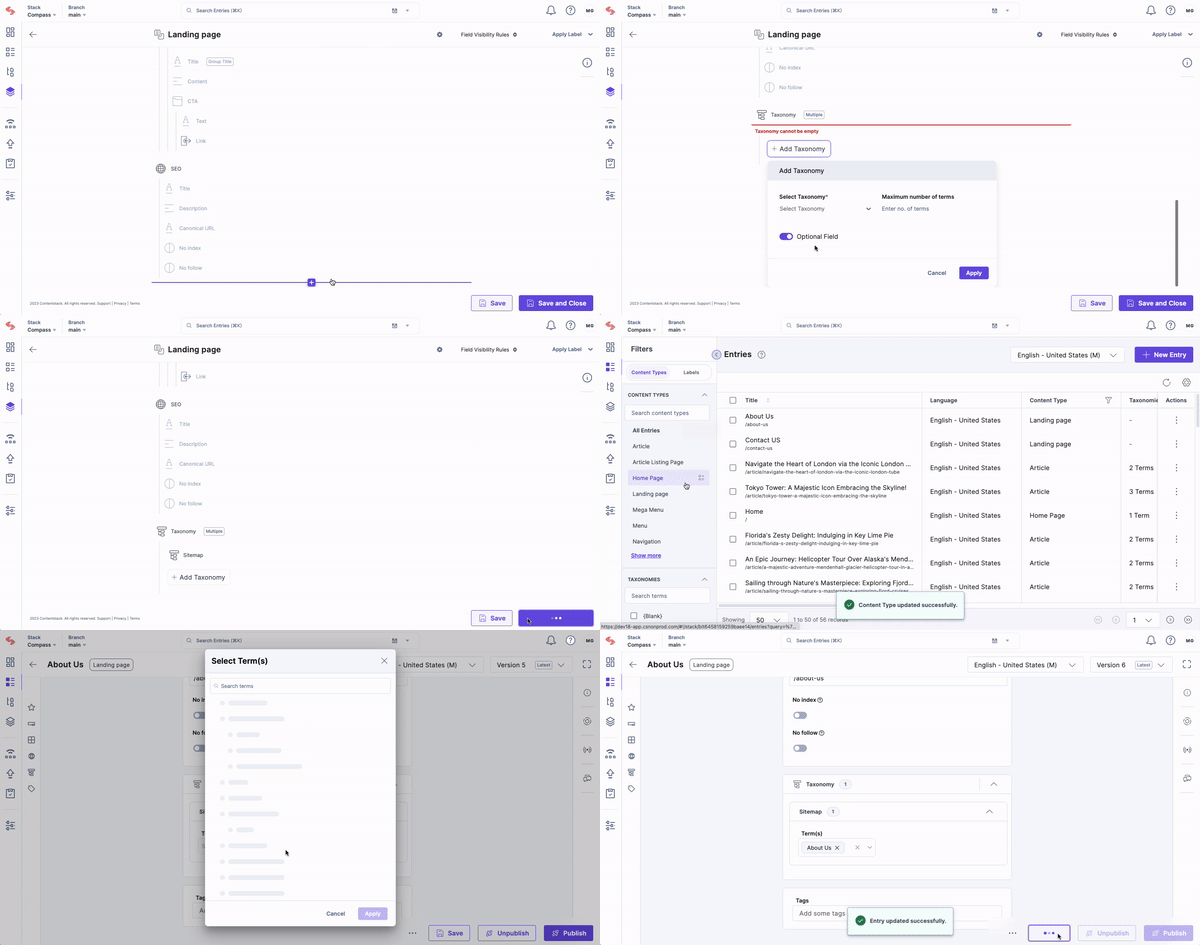
- Content modeling with taxonomies: Associate specific taxonomies with content types, allowing for better organization and management of content. Developers can add a new taxonomy field, restrict which taxonomies can be tagged, and limit an editor's tagging options to the selected taxonomies.
For business users
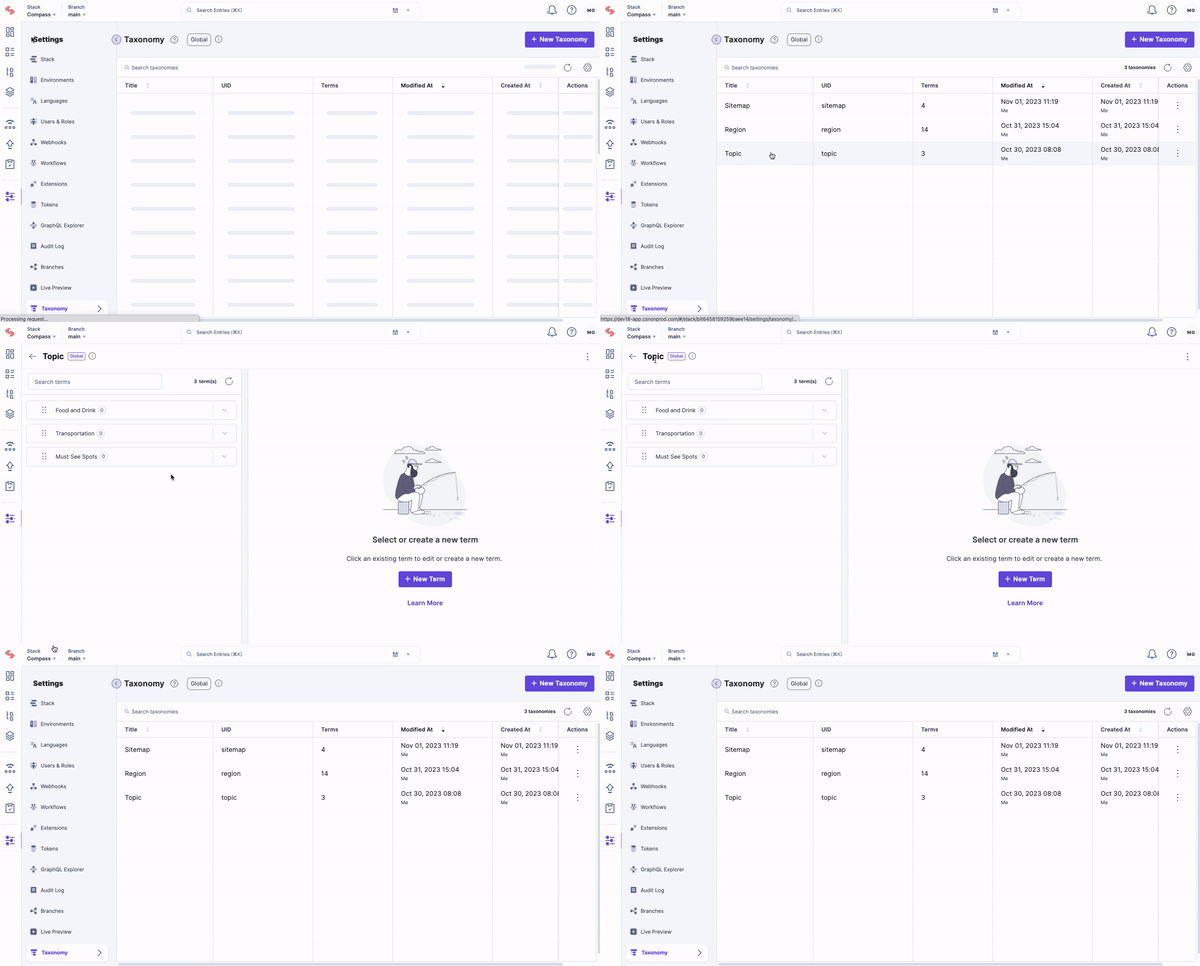
- List view: Content editors can view a list of all taxonomies on the Settings page, displaying relevant information such as Name, Description, Referenced Terms, Modified At, and Created At. This allows users to see an overview of their taxonomies and understand the relationship between taxonomy terms and categorized entries.
- Navigating entries with taxonomy structure: Content editors can navigate their content using a tree-like nested taxonomy structure. This will provide content editors with an intuitive way to browse, manage, and categorize their content based on the taxonomy.
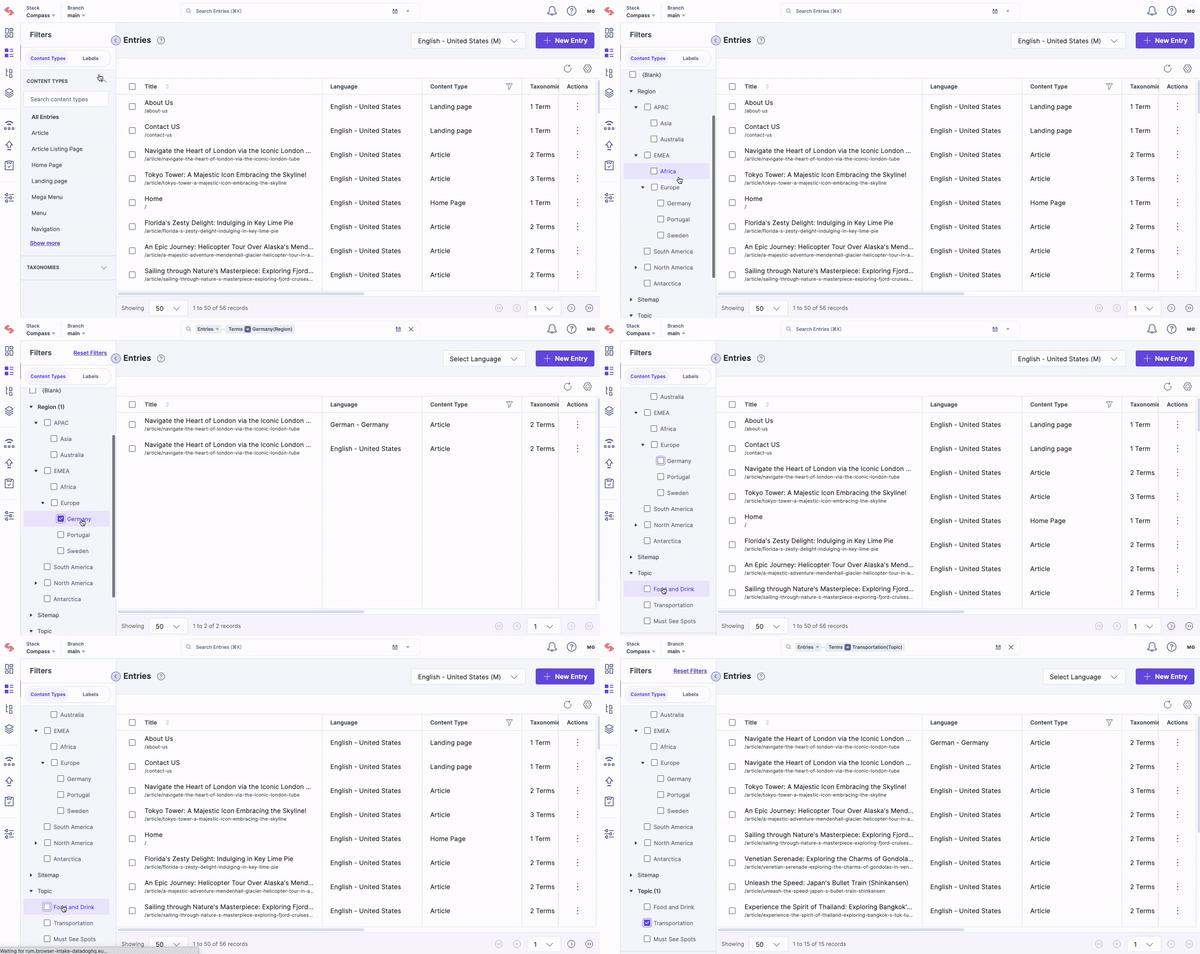
- Taxonomy-based search: Content editors have two primary methods at their disposal when searching for content. A basic search involves simply typing a keyword, such as ‘India’ into the search bar, which brings up all entries categorized with that term. For a more tailored approach, the advanced search option allows you to apply multiple conditions, refining your query and getting more specific results.
Key benefits
Simplified content security & ownership
Business leaders need a content ownership process that makes sense and is secure. Taxonomy helps stratify access to content within a content type by taxonomy term without duplicating a content type. Paired with Teams, this ensures the correct people on the team have access and permission to create and manage content most relevant to their respective project(s). No more content confusion and interruption as teams grow or change over time.
Ensure content separation and team privacy
Currently, enterprises may have the same website and digital properties for various business teams working on different products or brands. Without Teams and Taxonomy, this would result in multiple duplicates of roles and content models. Now, various business teams can work independently without interference, all with the peace of knowing our robust architecture ensures content separation and team privacy.
Manage large-scale content projects
Managing and organizing content taxonomies for distinct business purposes on an aging legacy system is conducive to organizational limitations around long-term scalability and efficiency. With Taxonomy, developers can manage and implement scalable content management processes for large-scale content projects across functions and systems with a direct line of sight.
Gain full purview of content taxonomy
Business teams need a way to effortlessly navigate to the content most relevant to their current priorities. Taxonomy helps provide navigation to content that spans multiple content types. It can mimic their site navigation structure or personalized ways of organizing content without understanding the context of which content type their content lives in. With Taxonomy, manage and lead content projects from a single vantage point, giving you the confidence and assurance to execute.
What Teams & Taxonomy can do for you
With the expanding complexity of content in today’s distributed digital environments, getting a handle on "content sprawl" is critical. Teams and Taxonomy deliver the advanced content control enterprises need while maintaining the flexibility that makes headless CMS useful, representing a significant leap forward in usability and scalability. Taxonomy focuses on content organization, while Teams focuses on access control and team management. However, both aim to simplify content management for enterprise use cases.
If you’re interested in learning more about how to scale content organization and team management at your company, please join us for our upcoming small group demo on Thursday, Apr 18, 2024 at 9 am PST / 12 pm EST / 6 pm CET! We'll present a live, interactive demonstration, followed by a Q&A session, ensuring you leave with a solid understanding of how to maximize Teams and Taxonomy for your projects.
Coming soon
Together, Teams and Taxonomy provides advanced yet easy-to-use mechanisms for organizing content and users. For example, an enterprise with multiple regional business units could model per-region taxonomies and assign local content teams access to just their local taxonomy. As content scales, finding and sharing the right assets across units stays efficient.
In the coming weeks, we'll roll out additional functionality for Taxonomy around Management Permissions. This addition will enable developers to create specific custom user roles and assign control over who can create, manage, and delete taxonomies in their organization. All to ensure that only authorized users can modify the taxonomy structure. Stay tuned!
About Contentstack
The Contentstack team comprises highly skilled professionals specializing in product marketing, customer acquisition and retention, and digital marketing strategy. With extensive experience holding senior positions in notable technology companies across various sectors, they bring diverse backgrounds and deep industry knowledge to deliver impactful solutions.
Contentstack stands out in the composable DXP and Headless CMS markets with an impressive track record of 87 G2 user awards, 6 analyst recognitions, and 3 industry accolades, showcasing its robust market presence and user satisfaction.
Check out our case studies to see why industry-leading companies trust Contentstack.
Experience the power of Contentstack's award-winning platform by scheduling a demo, starting a free trial, or joining a small group demo today.
Follow Contentstack on Linkedin

Recommended posts